A supplier portal that makes inbound freight predictable
Suppliers work in their own supplier portal, and every answer lands on your warehouse’s actual receiving plan. They acknowledge and answer purchase orders, send advance shipping notices with lots and handling units, request dock time, and see exactly what your warehouse counted so they can respond to a difference with evidence.
What changes for your operation
Inbound you can plan around
Advance shipping notices declare lots, expiry and handling units before arrival, so receiving knows what is coming and when.
One owner for every next step
Every item states whether the supplier, the buyer or the warehouse acts next, so nothing waits on an assumption.
Discrepancies answered with evidence
Suppliers see ordered, declared and received side by side and respond on the record, replacing email back-and-forth.
Dock time without double booking
Suppliers request a window and the yard confirms it, so a request is never mistaken for a booking.
What Supplier does
Purchase orders, ASNs, dock requests and receipt discrepancies
Supplier Action Center
Home groups a supplier’s work into needs attention, upcoming commitments, awaiting buyer or warehouse decision and recent activity, each with its next owner.
- Next owner: Supplier, Buyer or Warehouse on every item
- A separate supplier app on its own hostname
- Responsive on phone, tablet and laptop
Purchase order collaboration
Suppliers acknowledge receipt of an order, accept it, propose a change or reject it with a reason. The buyer approves or declines a proposed change, and the receiving plan follows the decision.
- Awaiting your response, Change proposed, Change agreed by buyer, Change declined by buyer
- Message the buyer from the order
- Nothing changes until the buyer decides
Advance shipping notices
Suppliers send an advance shipping notice from the purchase order, declaring lots, expiry dates and handling units, and can change or withdraw it until receiving starts.
- Expected, Being received, Received, Closed and Cancelled
- “Declaration locked” once receiving begins
- Declared values shown to the receiving clerk at the dock
Receipt discrepancies
Suppliers see what was ordered, what they declared and what the warehouse received, and respond to each difference with evidence. The warehouse owns the resolution.
- Short, Excess, Wrong item and Damaged
- Lot, expiry, serial and packaging captured at receipt
- Supplier response kept with the discrepancy
Documents
Suppliers file the documents that travel with a delivery against the shipping notice they belong to, where receiving and quality teams can find them.
- Delivery note, packing list and certificate
- Filed against the notice, not an inbox
- Access controlled and audited
Dock appointment requests
Suppliers request a dock time window for a delivery. The yard confirms it, and the portal shows the confirmed window or what an external yard system has observed.
- Requested window and confirmed yard window side by side
- A request is not a booking until the yard confirms
- Gate and dock events from the yard visit
Performance from recorded receipts
Suppliers see their own performance built from recorded receipts and discrepancies, not from a survey or a self-reported score.
- Shipment quantity variance
- Discrepancies by kind
- Request a business profile update
Conversations and Ask Kargentra
Threads are tied to the purchase order or shipping notice they concern. Ask Kargentra explains, prioritises and drafts from the record a supplier can see, and cannot act on its own.
- Requests and escalations on the record
- Screen-aware answers even with AI switched off
- Drafts a supplier reviews before sending
Supplier configuration and external sources
Your administrators publish versioned supplier templates. Purchase orders can originate in your ERP or procurement system with provenance, and external warehouse or yard observations are kept as evidence.
- Field visibility and requiredness per template
- Draft, preview, publish and retire
- Provenance and freshness shown for external data
The supplier sees exactly what your warehouse counted
When a delivery is received, the shipping notice shows what the supplier declared against what the warehouse received, with any discrepancy recorded by kind. The supplier answers in the portal with documents, and the warehouse resolves it. Both sides read the same facts, so the conversation is about the difference, not about whose spreadsheet is right.
- Purchase order ordered, notice declared and warehouse received in one view
- Short, excess, wrong item and damaged recorded separately
- Resolution owned by the warehouse, with the supplier’s response attached
- Lots, expiry and handling units carried from declaration to receipt

A requested window becomes a confirmed slot at the gate
Suppliers request dock time from the shipping notice. The yard team confirms a window against door capacity, and the supplier sees the confirmed time. When the truck arrives, check-in at the gate, the dock door and dwell are recorded on the yard visit, so late or early arrivals are facts rather than recollections.
- Requested and confirmed windows kept distinct
- Confirmation owned by the yard, not the supplier
- External yard observations shown with their source
- Arrival, dock and release times recorded on the visit
Performance built from receipts, not opinions
Suppliers see their own record: what was declared, what was received and where the differences were. Buyers and inventory controllers see the same facts, so a performance conversation starts from shared evidence and points at the specific receipts behind it.
- Sampled shipment quantity variance
- Discrepancy history by kind and by notice
- Visible to the supplier and the buyer alike
- Business profile updates requested, not edited directly

From purchase order to received stock
- 01
Order issued
A purchase order arrives from your buyer or your procurement system, with its source recorded.
- 02
Order answered
The supplier acknowledges and accepts it, proposes a change or rejects it with a reason. The buyer decides any change.
- 03
Notice sent
The supplier sends an advance shipping notice with lots, expiry and handling units, and files the delivery documents.
- 04
Dock time confirmed
The supplier requests a window and the yard confirms it against dock capacity.
- 05
Received
Receiving starts, the declaration locks, and the warehouse records what arrived against what was declared.
- 06
Difference answered
Any short, excess, wrong or damaged line is recorded and the supplier responds with evidence.
- 07
Performance recorded
Receipts and discrepancies feed the supplier’s performance view, visible to both sides.
Inside Supplier Portal
Captured from the running Kargentra application. Data shown is demonstration data.
- supplier.kargentra.com/notices
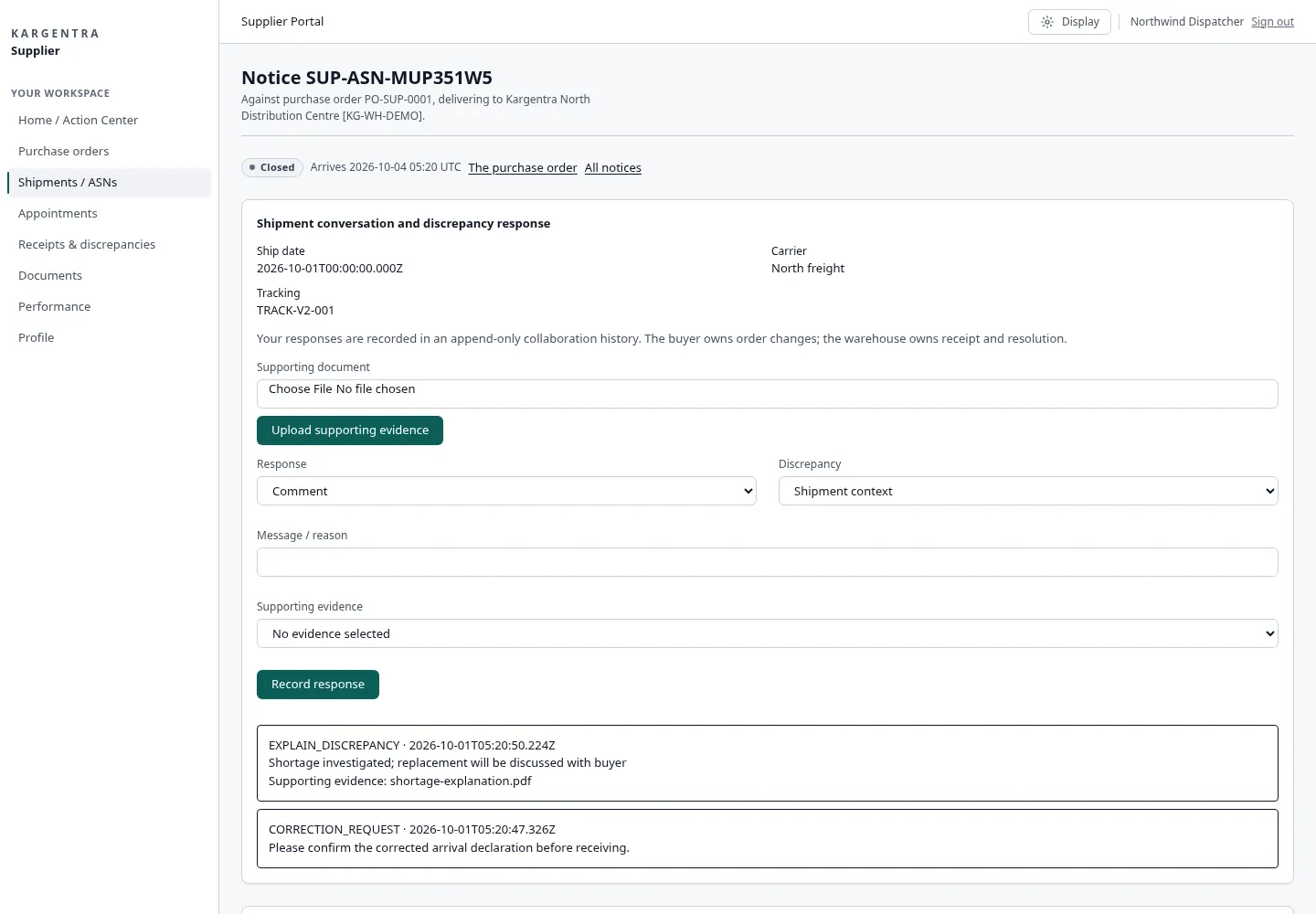
Supplier portal · shipment notice and receipt discrepancy - supplier.kargentra.com/performance
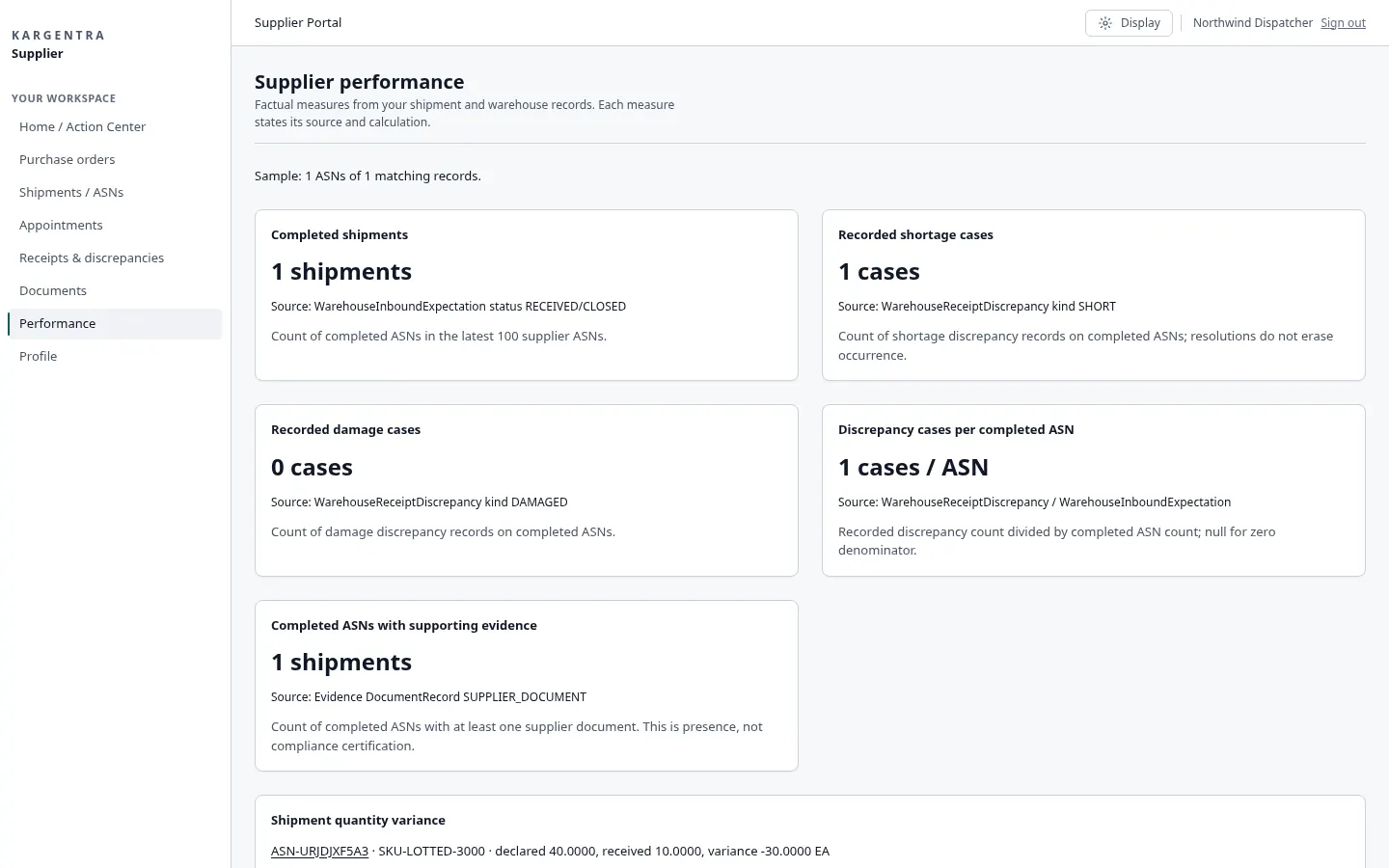
Supplier portal · performance from recorded receipts
Governed AI inside Supplier
Ask Kargentra reads the record you are looking at, cites every fact it uses and proposes the next step. Nothing changes until a person with the right permission approves it.
- Which orders need my response today?
- Why was this receipt short?
- Draft a reply to the buyer
Purchase order PO-1182 has a discrepancy: notice ASN-7731 declared 480 cases of lot L-2291, and the warehouse received 460. The receiving record shows one handling unit was not on the trailer at arrival. Two other orders are awaiting your response, and one change you proposed on PO-1190 was agreed by the buyer yesterday.
- PO-1182 · ordered 480
- ASN-7731 · declared 480 · lot L-2291
- Receipt · received 460 · Short
- PO-1190 · change agreed by buyer
Proposal · requires approval
Draft a discrepancy response with the signed delivery note attached, for the supplier to review and send.
Approver: Supplier user sends the response; the warehouse inventory controller resolves the discrepancy. Applied only through the governed action, and recorded in the audit trail.
Exceptions and edge cases Supplier handles
Real operations are mostly exceptions. These are handled as first-class states with an owner, evidence and a next step, not as notes in a spreadsheet.
- A shipping notice cannot be changed after receiving starts; the declaration is locked and shown as locked.
- A supplier’s proposed change to a purchase order waits for the buyer’s decision before the receiving plan changes.
- A dock request is shown as requested until the yard confirms it, so it is never treated as a booking.
- A short, excess, wrong-item or damaged receipt is recorded as its own discrepancy with the warehouse as owner.
- A notice withdrawn before arrival is cancelled on the record rather than deleted.
- A purchase order from an external procurement system shows its source and how fresh the data is.
- Observations from an external warehouse or yard system are kept as evidence, not as native receipts.
- A supplier sees only its own orders and notices, even when it serves several of your sites.
Who uses Supplier
Supplier user
Answers purchase orders, sends and amends shipping notices, requests dock time and responds to discrepancies with documents.
Buyer
Issues purchase orders, approves or declines supplier change proposals and messages suppliers on the order.
Receiving clerk
Receives against the declared notice, captures lots, expiry and handling units, and records discrepancies.
Dock scheduler
Confirms requested dock windows against door capacity and follows arrivals through the gate.
Inventory controller
Resolves discrepancies, reviews supplier performance and follows quality holds on received stock.
Supplier Portal at a glance
A scannable reference for evaluation teams and RFPs.
| Purchase orders |
|
|---|---|
| Shipping notices and documents |
|
| Receiving and discrepancies |
|
| Dock appointments |
|
| Access and configuration |
|
| Integrations |
|
Connected to the rest of Kargentra
Every module reads and writes the same record, so a hand-off is a state change rather than a re-keyed file.
- Warehouse ManagementSupplier Portal comes with Kargentra WMS: shipping notices land on the receiving plan, and receipts and discrepancies are recorded in warehouse receiving.Explore WMS
- Yard ManagementDock requests are confirmed by the yard, and gate check-in, door assignment and dwell are recorded on the visit.Explore YMS
- Collaboration CenterConversations, requests and escalations stay attached to the purchase order or shipping notice.Explore Collaboration
- Administration & ConfigurationVersioned supplier templates set which fields each supplier community sees and must complete.Explore Admin
- Ask KargentraAsk Kargentra explains a discrepancy or a waiting order from facts the supplier can see, and drafts a reply the supplier sends.Explore Ask Kargentra
Supplier: frequently asked questions
What is a supplier portal in logistics?
A supplier portal is where your suppliers answer purchase orders, tell you what they are shipping and when, and resolve differences with your warehouse without email. In Kargentra it comes with the warehouse management system, runs as a separate app on its own hostname and connects to your warehouse receiving and yard, so every supplier answer changes the plan your receiving team actually works from.
How do suppliers send advance shipping notices?
From the purchase order, the supplier sends an advance shipping notice declaring quantities, lots, expiry dates and handling units, and files the delivery note, packing list or certificates. The notice can be changed or withdrawn until the warehouse starts receiving, at which point the declaration locks so the receipt is compared against what was declared.
Can suppliers book dock appointments?
Suppliers request a dock time window in the portal, and your yard team confirms it against door capacity. The portal shows the requested and confirmed windows separately, so a request is never mistaken for a booking. When the truck arrives, gate check-in, the dock door and dwell are recorded on the yard visit.
What happens when the warehouse receives a different quantity?
The warehouse records each difference as a discrepancy: short, excess, wrong item or damaged, with lot and handling unit detail. The supplier sees what was ordered, declared and received side by side and responds with evidence in the portal. The warehouse owns the resolution, and the outcome feeds the supplier’s performance view.
Do suppliers need EDI or special software?
No. Suppliers use the portal in a browser with a named login, on a phone, tablet or laptop. Purchase orders can still originate in your ERP or procurement system through Connector Hub, with their source recorded, so suppliers work in one place while your own systems remain the source for the orders they send.
Further reading
- Guide · 9 min readOMS vs WMS vs TMS: what each system doesOrder, warehouse and transportation management compared: what each system owns, where they hand off and how to choose the right mix.
- Guide · 9 min readWhat is a logistics control tower?What a logistics control tower does, how it differs from a visibility platform, the data it needs and the KPIs that survive scrutiny.
- Guide · 9 min readAI in logistics operations: assist, propose, approveWhere AI helps logistics teams today, what data it needs, and the guardrails that keep advice from turning into unapproved action.
Take the Supplier datasheet with you
Capabilities, workflow, capability reference and the questions buyers ask, on two pages.
PDF · 2 pages · 297 KB
See Kargentra run your operation
A working session on your lanes, your sites and your hand-offs: order to invoice, on one record.