A warehouse management system with returns and reverse logistics built in
Kargentra WMS is a warehouse management system that runs receiving, quality, putaway, replenishment, picking, packing and staging from one scan-first queue on phone, tablet or desktop. Returns start on hold and are dispositioned with evidence, 3PL clients stay separate down to SKU and barcode, and transport learns exactly when a shipment is ready for handoff.
What changes for your operation
Received is not available
Expected, received, available and allocated stay separate, so stock cannot be promised before it is real.
One scan opens the work
Scan an inbound, item, pallet, bin or order and it opens in place, even when it is not on the current page.
Returns that protect stock
Every return arrives on hold and reaches Available only through a governed hold release with evidence.
Warehouse ready means ready
Ready for load and Blocked from transport handoff come from recorded packing and staging, not from a message.
What WMS does
Receive, store, pick, ship and take back with inventory you can trust
Warehouse Command
One queue of real warehouse work per facility, on phone, tablet and desktop, with operators acting in place.
- Needs action, Inbound, Putaway, Outbound, Exceptions, Ready for transport handoff
- Bounded pages that still count the full scoped total
- Your permissions in the top bar; supervisors get Needs a decision
Inbound and three-way match
Expected supply moves through receiving to putaway, with ordered, expected and received quantities matched line by line.
- Lot, expiry, serial, packaging and handling units captured at receipt
- Declare excess or wrong item at the point of receipt
- Supplier change proposals approved or declined on the purchase order
- Discrepancies resolvable even after the ASN closes
Quality inspection and holds
Inspection plans apply to received stock, and goods stay restricted until a governed pass and hold release.
- Needs inspection, Pass, Fail, Passed and awaiting release
- Sample quantity and inspection evidence recorded
- Available, Inspection required, Quarantine, Damaged, Rejected
Inventory traceability
Authoritative stock by item, owner, lot, location and disposition, with counts, transfers and labels.
- Lot and expiry with first-expiry-first-out allocation
- Cycle counts: counted against expected, variance, governed close
- ZPL II pallet labels with Code 128 barcodes
- Warehouse events published to an event outbox
Slotting and replenishment
Recommend storage slots and pick faces from verified capacity, and refill pick faces before picking runs short.
- Capacity verified, No verified slot available, Not eligible
- Governed slot moves that conserve stock
- A shortage blocks picking until the refill is physically moved
Outbound release and picking
Release outbound demand in waves or continuously, then run scan-confirmed pick sequences against current allocations.
- Discrete, batch, cluster, zone, wave and waveless picking
- Scan the source location, then scan the pick item
- A pick sequence is blocked when nothing is allocated
Pack, stage and hand off
Recommend cartons from verified dimensions, record actual packing and staging, and derive readiness for transport.
- Carton, euro pallet, US pallet and roll cage handling units
- Staging lanes and a final warehouse exit step
- Ready for load or Blocked from transport handoff, shown on the transport record
Returns and reverse logistics
Expected returns are received physically, start on hold, are inspected and dispositioned, and restock only through a governed release.
- Expected, Arrived, Awaiting a decision
- Restock, quarantine, damaged or rejected per line
- Cases from request through liability and remedy to Finance
- Customers request and follow returns in their own portal
3PL multi-client operations
Owner is a separate dimension on items, balances, demand and handling units, so two clients can share a SKU or barcode.
- Per-client policy with a preview before it applies
- Client workload in warehouse analytics
- Kit and bundle recipes with traceable output stock
- Service and storage events charged through the existing ledger
Scan-first receiving with a three-way match
A receiving clerk scans the inbound and works the supplier's notice line by line. Ordered, expected and received quantities are matched, lot and expiry are captured, and every difference is recorded as short, excess, wrong item or damaged. The supplier sees the same reconciliation in their portal, while the warehouse owns the resolution.
- Inbound expected, Receiving and discrepancy, and Putaway as separate stages
- Handling units, lots, serials and packaging captured at receipt
- Quality inspection applied before stock can become available
- One app on handheld, tablet and desktop, in the browser

Returns that start on hold and end in a decision
A return case runs from the customer's request through authorisation, the reverse movement and the warehouse return to liability, remedy and the Finance handoff. In the warehouse, every arrival starts on hold, is inspected against what was expected and is dispositioned per line with the evidence attached.
- Authorise or decline the request; assess and decide the claim
- Restock, quarantine, damaged or rejected for each line
- Restock requires a governed hold release, never a direct move to Available
- Responses drafted for review, while liability and money stay with people
Stock you can trust, down to the lot
Inventory 360 shows each balance by item, owner, lot, location and disposition, together with the holds that restrict it. On hand, available, allocated and held are separate numbers, so a quarantined pallet can never be promised to a customer by mistake.
- Lot, expiry and quarantine status on the handheld
- First-expiry-first-out allocation
- Cycle counts with governed variance correction
- A context view with authority, freshness and known omissions

From expected supply to Warehouse ready
- 01
Expect
A purchase order and the supplier's ASN create Inbound expected, with lots, expiry and handling units declared. Owner: receiving clerk.
- 02
Receive
Lines are scanned against ordered and expected quantities. Short, excess, wrong item or damage is recorded as a discrepancy, not absorbed.
- 03
Inspect and release
Stock that needs inspection stays restricted until a pass and a governed hold release. Owner: QA inspector or warehouse supervisor.
- 04
Put away
A slot is recommended from verified capacity and the move is confirmed by scan. Only now does received stock become available.
- 05
Allocate and release work
Outbound demand is allocated against available stock and released in waves or continuously. Owner: outbound supervisor.
- 06
Pick
Grouped, scan-confirmed pick sequences run against current allocations. A pick exception becomes a case with an owner.
- 07
Pack and stage
Cartons are recommended, packing and staging are recorded, and the shipment becomes Ready for load or Blocked from transport handoff.
- 08
Hand off to transport
Warehouse ready reaches the transport record as a readiness fact. It is not dispatch readiness: the dispatcher still releases.
Inside Warehouse Management
Captured from the running Kargentra application. Data shown is demonstration data.
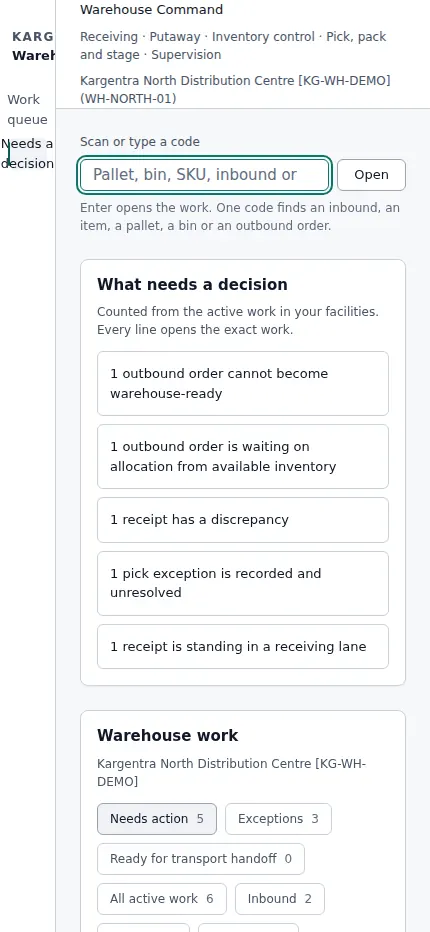
Warehouse supervisor · what needs a decision - supplier.kargentra.com/notices
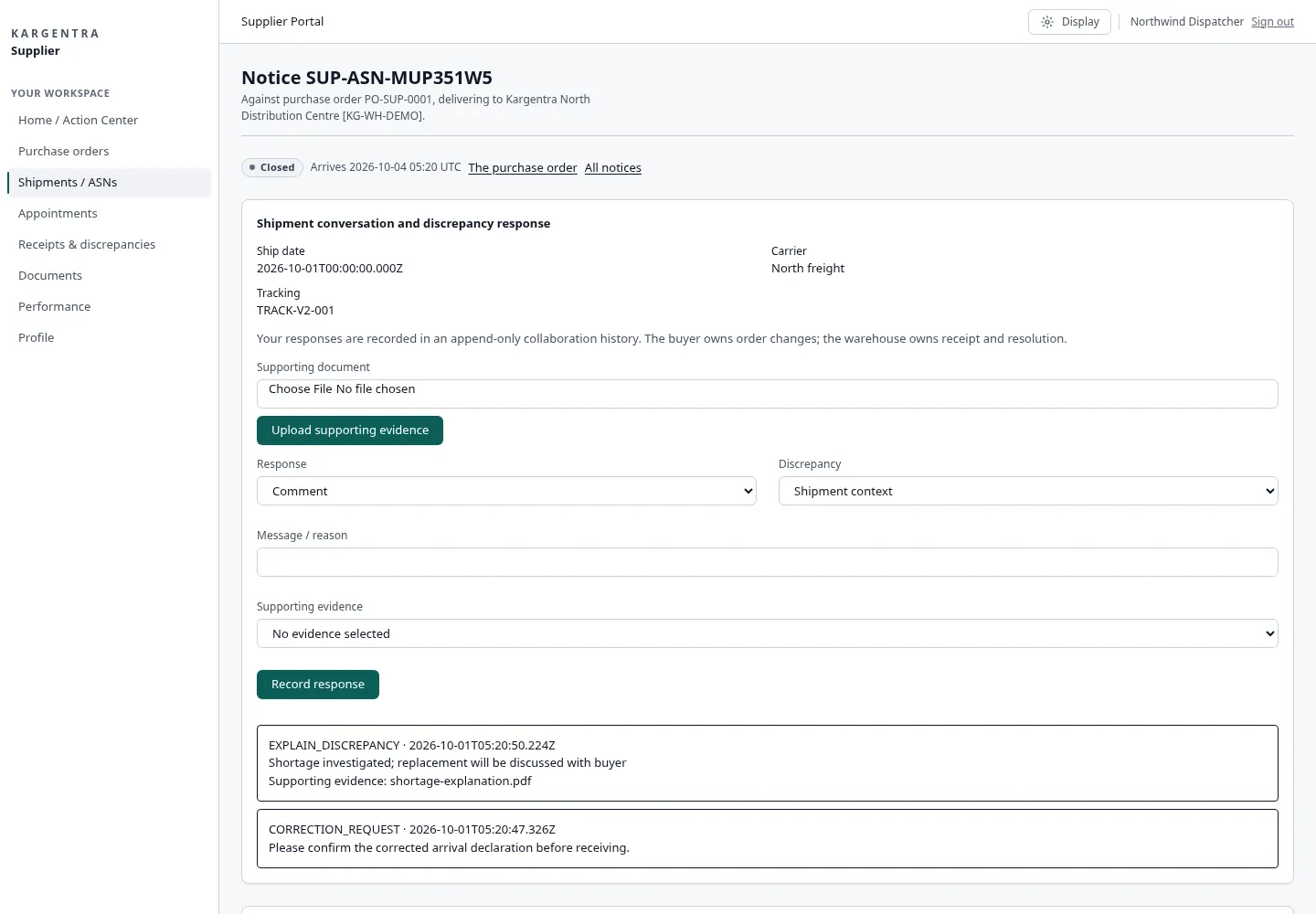
Supplier portal · shipment notice and receipt discrepancy


Governed AI inside WMS
Ask Kargentra reads the record you are looking at, cites every fact it uses and proposes the next step. Nothing changes until a person with the right permission approves it.
- Why is pallet LP-00418 not available?
- What is blocking OUT-7731 from handoff?
Pallet LP-00418 was received against ASN-20931, lot L2409-B, and is on a quality hold. The inspection plan sampled 12 units and one failed for crushed packaging. Until the hold is released, its 96 units count as on hand and held, not available, so they cannot be allocated to outbound order OUT-7731, which is short by 40 units.
- ASN-20931 · line 3 · received 96 of 100
- Quality inspection · sample 12 · 1 fail
- Disposition · Inspection required
- Inventory 360 · on hand 96 · available 0
Proposal · requires approval
Release 95 units to Available and move the failed unit to Damaged, with the inspection evidence attached.
Approver: Warehouse supervisor with the hold release permission. Applied only through the governed action, and recorded in the audit trail.
Exceptions and edge cases WMS handles
Real operations are mostly exceptions. These are handled as first-class states with an owner, evidence and a next step, not as notes in a spreadsheet.
- A supplier ships 96 of 100 cases: the shortage is recorded against the ASN line and the supplier sees it in their portal.
- The wrong item arrives on a correct-looking pallet: it is declared as wrong item at receipt, not absorbed into stock.
- Two 3PL clients use the same barcode: owner-scoped identity keeps their stock and their orders apart.
- A pick face runs dry mid-wave: picking blocks until the reserve refill and the physical move are confirmed.
- A lot fails inspection after putaway: it moves to quarantine and every allocation against it is visible for re-planning.
- A returned unit arrives with no matching authorisation: it is received on hold and waits for a decision.
- A carton does not fit its verified dimensions at packing: the shipment stays Blocked from transport handoff until resolved.
- An automation provider sends a duplicate or stale event: it is kept as evidence and never changes stock on its own.
Who uses WMS
Receiving clerk
Scans inbound notices, records lots, expiry and handling units, and declares every discrepancy at the point of receipt.
Warehouse operator
Works the scan-first queue for putaway, replenishment, picking, packing and staging on a handheld or tablet.
Warehouse supervisor
Decides holds, discrepancies and pick exceptions from Needs a decision, and releases stock only through governed actions.
Inventory controller
Runs cycle counts and transfers, manages slotting and replenishment, and keeps lot and expiry traceability clean.
Returns clerk
Receives returns on hold, inspects them against what was expected and dispositions each line with evidence.
3PL account manager
Sets client policy, runs kits and bundles, and follows service and storage events through to the charging ledger.
Warehouse Management at a glance
A scannable reference for evaluation teams and RFPs.
| Inbound |
|
|---|---|
| Inventory |
|
| Outbound |
|
| Returns |
|
| Work and 3PL |
|
| Platform |
|
| Integrations |
|
Connected to the rest of Kargentra
Every module reads and writes the same record, so a hand-off is a state change rather than a re-keyed file.
- Order ManagementConfirmed orders open warehouse fulfilment requests, and warehouse stock feeds promiseable quantity back to OMS.Explore OMS
- Supplier PortalSuppliers send ASNs, file documents and see PO ordered, ASN declared and WMS received side by side.Explore Supplier
- Yard ManagementDock appointments and gate arrivals line up inbound and outbound work with the dock door that serves it.Explore YMS
- Transportation ManagementStaged handling units become measured transport demand, and Warehouse ready is a readiness check before release.Explore TMS
- Freight Finance & BillingWarehouse service and storage events feed charging and storage period close on the commercial ledger.Explore Finance
- Customer PortalCustomers request returns and claims and follow each case through to its remedy.Explore Customer
WMS: frequently asked questions
What is a warehouse management system?
A warehouse management system controls the physical work and stock of a warehouse: receiving, quality, putaway, replenishment, picking, packing, staging and returns. Kargentra WMS does this from a scan-first queue on phone, tablet or desktop, and shares one record with orders and transport, so stock, warehouse readiness and shipments never have to be reconciled by hand.
What is the difference between received and available inventory?
Received means the goods are physically in the building and counted against the supplier's notice. Available means they have passed any inspection, are not on hold and can be allocated. Kargentra keeps expected, received, available and allocated as separate states, so stock under inspection or in quarantine can never be promised to a customer by mistake.
Does Kargentra WMS handle returns?
Yes. Expected returns are received physically, start on hold, and are inspected and dispositioned per line as restock, quarantine, damaged or rejected. Restock needs a governed hold release. Around the warehouse, a return case runs from the customer's request through authorisation, reverse movement, liability and remedy to a Finance handoff, and customers follow it in their own portal.
Does it support handheld scanners?
Kargentra WMS runs in the browser on handhelds, tablets and desktops, with one layout that adapts to the device. A single scan of an inbound, item, pallet, bin or outbound order opens that work in place, even when it is not on the current page. Operators see their own permissions in the top bar, and supervisors get a Needs a decision view.
Can a 3PL run several clients in one warehouse?
Yes. Owner is a separate dimension on items, balances, demand and handling units, so two clients can hold the same SKU or barcode without mixing stock. Each client can have its own policy, previewed before it takes effect, and warehouse service and storage events flow into charging and storage period close on the existing commercial ledger.
Can we run Kargentra WMS on its own?
Yes. WMS runs on its own, with order intake from an external ERP or OMS and handoff to an external shipping system, or connected to Kargentra OMS and TMS. One effective-availability decision governs the API, the preview and navigation. When an external system owns warehouse execution, Kargentra refuses native receipts, inventory adjustments and new outbound demand instead of accepting conflicting work.
Further reading
- Guide · 9 min readOMS vs WMS vs TMS: what each system doesOrder, warehouse and transportation management compared: what each system owns, where they hand off and how to choose the right mix.
- Guide · 9 min readAI in logistics operations: assist, propose, approveWhere AI helps logistics teams today, what data it needs, and the guardrails that keep advice from turning into unapproved action.
Take the WMS datasheet with you
Capabilities, workflow, capability reference and the questions buyers ask, on two pages.
PDF · 2 pages · 328 KB
See Kargentra run your operation
A working session on your lanes, your sites and your hand-offs: order to invoice, on one record.