A logistics customer portal where shippers order, track and resolve
Your customers get one responsive logistics customer portal built on the same records your team works from. They place orders and approve the delivery date you commit to, follow shipments through confirmed milestones, download proof of delivery and invoices, dispute a single line and raise claims, without a call or an email chase.
What changes for your operation
Numbers that match their lists
Each of the five Home KPIs opens the exact list behind it, so a customer never sees a count that the detail does not support.
Requests never become promises by accident
A customer’s requested date stays a request until you propose a date and the customer accepts it as the commitment.
Fewer “where is it” calls
Progress comes from confirmed milestones and accepted delivery evidence, so what the customer sees is what actually happened.
Billing questions settled line by line
Customers see each charge with its evidence and dispute one invoice line, instead of withholding a whole invoice.
What Customer does
Customers order, track, download proof and resolve, on your record
Command Center home
Home opens with five KPIs: needs your attention, orders in progress, active shipments, escalations and risk, and unread communications. Below them sit the next delivery, the orders pipeline, proof of delivery, returns and charges this period.
- Each KPI opens the list it counts
- “Since you were last here” and quick actions
- Command palette and an updates inbox
Orders and delivery promises
Customers create transport orders in a short wizard and answer the delivery dates you propose. The order shows requested, proposed and committed dates as separate facts.
- Accept this date, Reject this date, Ask us for something different
- Service, requested pickup and delivery, addresses and goods summary
- “Requested by you; not a promise” on unanswered requests
Changes, holds and shortages
Customers ask for a different date, a hold or a cancellation, and decide what happens to a line that is short. Your team approves or declines each answer with a note.
- Accept what is reserved and keep the rest open
- Wait for the rest and ship it all
- Reduce the order by agreement
Shipment tracking from confirmed milestones
Shipments move through Booked, In transit, Delivered, Needs attention and Cancelled based on confirmed events, never on a guess. Exact vehicle position appears only where you have enabled it for that customer account.
- Active, Needs attention, Delivered and All views
- Committed window kept separate from any estimate
- Position off by default, switched on per account
Deliveries and proof of delivery
Each delivery shows its progress, every attempt and downloadable documents. Proof of delivery reaches the customer only after your Operations team has accepted it.
- Delivery progress, attempts and documents on one page
- “Something not right with this delivery?” starts a claim with context
- Partial deliveries recorded per unit
Charges, invoices and line disputes
Customers see their own sell-side charges and issued invoices, download the PDF and dispute a single line, uploading evidence that is checked and scanned before it is stored.
- Lines, charges, credits, net before tax, tax and corrections
- “Corrects an earlier document” on credit notes and supplements
- Per-currency charges with their evidence and readiness
Quotes at an exact price
When you offer a quote, the customer accepts or declines the exact, versioned price in the portal. Customers see the sell price only, never your buy cost or margin.
- Accept this price or Decline this price
- Expired and superseded quotes stated clearly
- Acceptance recorded against the quote version
Returns and claims
Customers raise a return or claim on a delivery they own, so the evidence and context are attached from the start, and follow its status and evidence afterwards.
- Look up a delivery by reference
- Customer-safe claim status and evidence
- Linked to the delivery that caused it
Inbound to your warehouse
Customers with stock in your warehouse tell you what inbound to expect at the facilities they are granted, and follow it from expected to received.
- Expected or receiving, received or closed
- Facility access by explicit grant
- New requests refused where an external WMS owns receiving
A delivery date the customer approves, not one you hope they accept
When a customer asks when an order will arrive, the order answers with the committed promise and how it was reached: what they requested, what you proposed and what was agreed. If the proposal does not work, the customer asks for something different in the same place, and your team answers through a governed change rather than a reply to an email.
- Requested, proposed and committed shown as distinct states
- Change requests are applied only through your team’s governed commands
- Shortage decisions recorded per line, with ordered, agreed and still to come
- Another customer’s order is simply not found

Dispute one line, not the whole invoice
Customers open an issued invoice, see each line with the charge and evidence behind it, and dispute only the line they disagree with. The dispute follows the shared commercial lifecycle, and the agreed outcome arrives as a credit note or supplemental invoice that states which document it corrects.
- Download the invoice PDF at any time
- Dispute reference, charge, reason, invoiced amount and status in one list
- Evidence upload under its own permission, scanned before it is stored
- Issued invoices never change; corrections are new documents
The same portal on a phone, in light or dark
One navigation adapts to a bottom bar on a phone, a rail on a tablet and a sidebar on a laptop, so a logistics coordinator can answer a delivery-date question from the warehouse floor. Appearance follows the person, and your workspace theme and language carry through.
- Home, Orders, Shipments, Quotes, Returns and claims, Documents, Invoices, Disputes
- Effective-account selection for people who serve several accounts
- Shipment report download as CSV
- Ask Kargentra on every screen, advisory only

How a customer works with you through the portal
- 01
Order placed
The customer enters service, requested pickup and delivery, addresses and goods. The request is recorded as requested, not promised.
- 02
Date agreed
Your team proposes a date. The customer accepts it as the commitment, rejects it or asks for something different.
- 03
Shortage answered
If a line is short, the customer chooses to wait, reduce or take what is reserved, and your team approves the answer.
- 04
Shipment followed
Progress updates from confirmed milestones, with exact position only where you have enabled it for the account.
- 05
Delivery evidenced
Proof of delivery accepted by your Operations team appears on the delivery, ready to download.
- 06
Invoice issued
Issued invoices and charges appear with their evidence, and the customer downloads the PDF.
- 07
Resolved on the record
A disputed line, a return or a claim is raised from the record it concerns and followed to its outcome.
Inside Customer Portal
Captured from the running Kargentra application. Data shown is demonstration data.
- customer.kargentra.com/orders
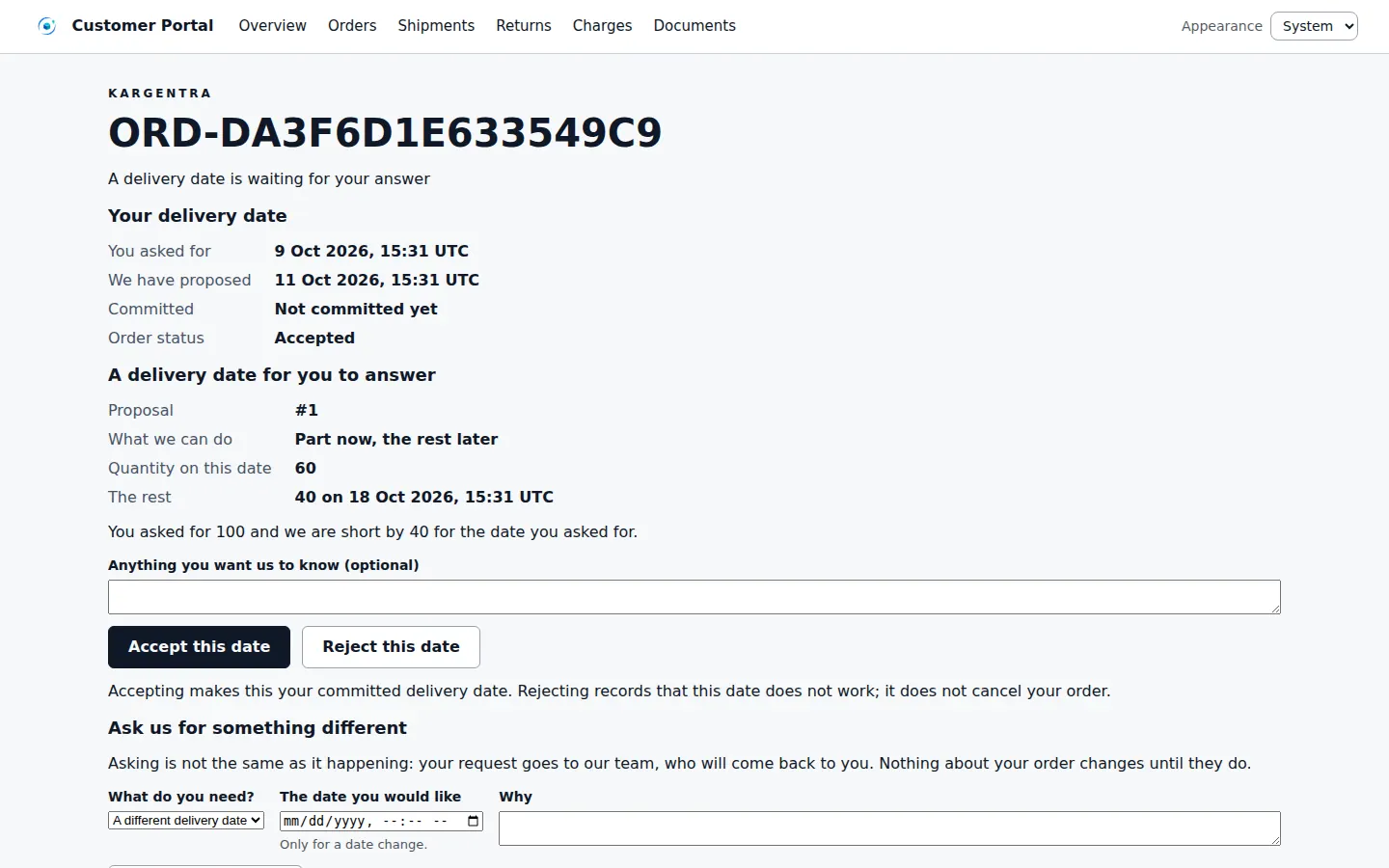
Customer portal · a delivery-date answer on an order 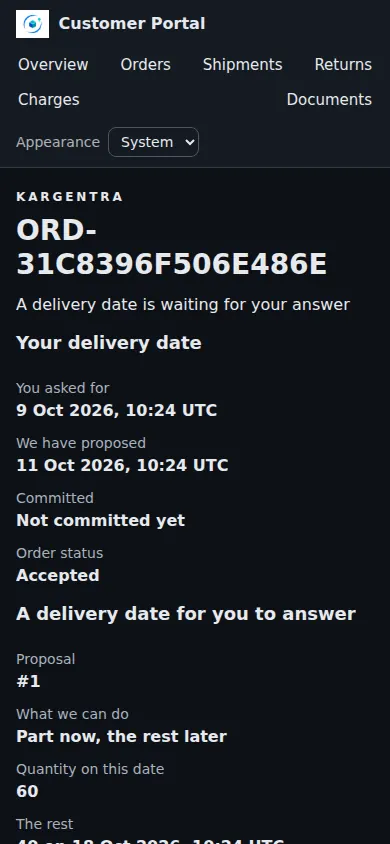
Customer portal · delivery date on a phone
Governed AI inside Customer
Ask Kargentra reads the record you are looking at, cites every fact it uses and proposes the next step. Nothing changes until a person with the right permission approves it.
- When will order 20931 arrive?
- Why is this shipment in Needs attention?
- Explain the charges on this invoice
Order 20931 has a committed delivery window of 14 October, 08:00 to 12:00, agreed on 6 October. Its shipment is in Needs attention because the carrier reported a vehicle fault on 9 October and a replacement vehicle is being assigned. No new delivery date has been proposed yet, so the committed window still stands.
- Order 20931 · committed promise
- Shipment SH-55120 · exception opened 9 Oct
- Promise history · accepted 6 Oct
Proposal · requires approval
Draft a change request asking to keep the committed window or be offered the next available date.
Approver: Customer buyer submits; your customer service lead approves any change. Applied only through the governed action, and recorded in the audit trail.
Exceptions and edge cases Customer handles
Real operations are mostly exceptions. These are handled as first-class states with an owner, evidence and a next step, not as notes in a spreadsheet.
- A requested delivery date stays labelled “Requested by you; not a promise” until a proposal is accepted.
- A short line waits for the customer’s choice and your team’s approval before the order changes.
- When exact position is not enabled, the portal says so and shows progress from confirmed milestones only.
- A link to another customer’s order or shipment returns not found, without confirming that it exists.
- Driver-submitted proof is not shown until your Operations team accepts it.
- Evidence upload fails closed if the file scanner is unavailable, rather than storing an unchecked file.
- Large unread or escalation counts are shown as “at least” when the list is truncated, never as an exact guess.
- Under an external WMS, a new inbound request is refused, so two systems never both accept the same receipt.
Who uses Customer
Customer logistics coordinator
Works the attention list, follows active shipments and deliveries, and downloads proof of delivery and documents.
Customer buyer or planner
Places orders, approves proposed delivery dates, asks for changes and answers line shortages.
Customer accounts payable
Reviews issued invoices and charges with their evidence, and disputes a single line with supporting documents.
Customer warehouse coordinator
Tells your warehouse what inbound to expect at granted facilities and follows it to received.
Your customer service team
Answers change requests and shortage decisions through governed commands, and replies in conversations on the record.
Customer Portal at a glance
A scannable reference for evaluation teams and RFPs.
| Home and navigation |
|
|---|---|
| Orders and promises |
|
| Tracking and deliveries |
|
| Billing |
|
| Access and experience |
|
| Integrations |
|
Connected to the rest of Kargentra
Every module reads and writes the same record, so a hand-off is a state change rather than a re-keyed file.
- Order ManagementCustomer orders, promises, change requests and shortage answers are the same order records your order desk works.Explore OMS
- Transportation ManagementShipment milestones and delivery attempts come from transport execution, with position shared only where enabled.Explore TMS
- Freight Finance & BillingIssued invoices, charges, credit notes and line disputes come straight from customer invoicing and the dispute lifecycle.Explore Finance
- Warehouse ManagementInbound expectations land on the warehouse’s receiving plan for the facilities the customer is granted.Explore WMS
- Collaboration CenterConversations about shipments, invoices and disputes stay attached to the record and visible to both sides.Explore Collaboration
- Ask KargentraCustomers ask questions about their own orders and shipments and get cited, advisory answers.Explore Ask Kargentra
Customer: frequently asked questions
What can customers do in the logistics customer portal?
Customers place transport orders, approve or reject the delivery dates you propose, ask for changes, holds or cancellations, and answer line shortages. They follow shipments through confirmed milestones, download proof of delivery and invoices, dispute a single invoice line, accept quotes at an exact price, raise returns and claims, and hold conversations on the record, all on phone, tablet or laptop.
Do customers see only their own shipments?
Yes. Every customer user signs in with a named account and sees only the orders, shipments, charges and invoices of the account they are acting for. A link to another customer’s record returns not found rather than confirming it exists. Customers never see your buy cost, margin or internal notes, and exact vehicle position is shown only where you enable it.
Can the portal carry our own brand?
Yes. The portal takes the governed workspace theme your administrator selects, including colours and typography within contrast guardrails, and your default language, including right-to-left scripts. Each person can choose light or dark appearance, and the same branded navigation adapts to phone, tablet and laptop screens without a separate app to install.
Does the portal show live vehicle position?
Only when you choose to. Exact position is off by default and switched on per customer account. Without it, the portal states that progress is shown from confirmed milestones only. Kargentra never animates a vehicle along an invented route or presents an estimate as the committed window, so customers can rely on what they see.
Can customers dispute an invoice in the portal?
Yes. A customer opens an issued invoice, chooses “Dispute this line”, gives a reason and uploads supporting evidence, which is scanned before it is stored. The dispute follows your commercial dispute lifecycle with its status visible to the customer, and the agreed outcome arrives as a credit note or supplemental invoice that references the original.
How do customers change or cancel an order?
From the order, the customer chooses “Ask us for something different” and requests a different delivery date, a hold or a cancellation. The request is recorded against the order and answered by your team through a governed command, so a customer request never changes the plan on its own. The customer sees the answer and the resulting commitment.
Further reading
- Guide · 9 min readElectronic proof of delivery (ePOD): a practical guideWhat electronic proof of delivery should capture, how offline capture works and why arrival, a delivery attempt and accepted POD are different.
- Guide · 9 min readOMS vs WMS vs TMS: what each system doesOrder, warehouse and transportation management compared: what each system owns, where they hand off and how to choose the right mix.
- Guide · 9 min readFreight audit and billing readiness, explainedThe freight audit process step by step, why delivery evidence decides billing readiness, common invoice errors and how disputes are resolved.
Take the Customer datasheet with you
Capabilities, workflow, capability reference and the questions buyers ask, on two pages.
PDF · 2 pages · 326 KB
See Kargentra run your operation
A working session on your lanes, your sites and your hand-offs: order to invoice, on one record.