Logistics integrations for your ERP, partners, carriers and maps
Kargentra runs logistics integrations with the systems you already use through one governed Connector Hub: EDI X12 204 load tenders, contract-first REST APIs, events and signed webhooks, ERP and external OMS coexistence, and a metered maps provider. Every exchange is recorded with a correlation id, failures name their fix, and a failed exchange is replayed without a duplicate effect.
What changes for your operation
Failures you can see and fix
Each exchange attempt is recorded as landed, partial, refused or failed, with a correlation id and a plain next action, instead of disappearing inside a script.
EDI partners on day one
Shippers keep sending the X12 204 load tenders their systems already produce, and every file traces to the transport order it created.
Build against a contract
Every API operation and event is defined in a versioned contract pack with frozen schemas and the permission it requires.
Safe to retry, safe to replay
Idempotency keys and duplicate detection mean a retried request or replayed file never creates a second order.
What Integrations does
Connector Hub, EDI X12 204, OpenAPI contracts, events and webhooks
Connector Hub
A governed catalogue of connector templates and a runtime that runs each tenant connection end to end: store the credential, test, discover, map with versioned approval, sync and inspect every exchange.
- Families include ERP, CRM, e-commerce, external WMS and TMS, carrier, parcel, ELD and telematics, yard gate, POD, finance and customs
- Auth profiles: API key header, bearer token, basic and query parameter
- Health reported as lag and consecutive failures
EDI X12 204 load tender intake
Inbound X12 004010 204 motor carrier load tenders from registered trading partners are validated deterministically, kept as immutable evidence and turned into transport orders through the governed create command.
- Trading partners move through Draft, Tested, Active and Paused
- Activation requires an approved mapping version
- Upload a file in the workbench or send it machine to machine
- Applied, Rejected, Failed but can retry, and Unmatched sender
REST APIs with OpenAPI contracts
Every operation is defined in a versioned OpenAPI contract with frozen schemas, fixtures and the permission it requires, validated on every change.
- Permission binding declared on every operation
- Problem Details error bodies with a correlation id
- Idempotent create, change and cancel where the lifecycle permits
Events and signed webhooks
Domain events are described as AsyncAPI contracts. Lifecycle webhooks are HMAC-signed, carry the partner’s own record identity and report their delivery health.
- Delivered in the last 24 hours, Pending, Retrying and Failed
- Governed replay with a fresh retry budget
- At-least-once delivery with duplicate suppression on receipt
ERP and external OMS coexistence
An ERP or external order system authenticates machine to machine and creates demand under its own durable identity. Reconciliation runs show matches and mismatches on both sides.
- Machine clients with their own credentials
- Safe retries on create, change, cancel and re-release
- Reconciliation: Expected, Matched and Mismatched
Field mapping with versioned approval
Mappings between your fields and Kargentra records are saved as drafts and approved as numbered versions. Ask Kargentra can propose a mapping, which writes nothing until a person approves it.
- “Approve version N” as an explicit, recorded step
- AI mapping assist is proposal only
- Earlier versions kept for comparison
Initial import and ongoing integration
The one-time load from spreadsheets or a legacy system runs as an activation project with profiling, validation and reconciliation. Live connections are configured and monitored separately.
- Each dataset marked Supported, Governed but not yet loadable or Not supported
- Reconciliation evidence before Ready for Pilot
- Per-connection steps from credential to first exchange
Maps provider with governed keys
A tenant-governed maps provider supplies road routing and stop-order proposals. Its API key is sealed and replaceable, every call is metered durably, and proposals change nothing until applied through a governed stop resequence.
- Key replaced without ever being displayed
- Calls with an uncertain outcome stay counted
- Route proposals read-only until approved
Failed-exchange replay and tracing
Every exchange attempt is inspectable, and a fixed file or failed delivery is replayed without a duplicate effect. Errors are classified so a permission refusal never looks like a partner outage.
- Correlation id on every request and response
- Failure classes with a plain remedy
- Endpoint safety checks on outbound URLs
A healthy connection you can prove, not assume
Each connection shows its exchange history: which records landed, which were partial or refused, and why. Health is measured as lag and consecutive failures rather than a green light, and the connection’s chain of credential, test, discovery, mapping and activation feeds onboarding readiness directly.
- Landed, Partial, Refused and Failed attempts with correlation ids
- Idempotency key recorded on every attempt
- Credential stored sealed and shown only by fingerprint
- Mapping version in force named on the connection

Orders from every channel, validated at the door
Demand arrives from people, portals, EDI load tenders, APIs and external order systems, and each order records the identity of the source that sent it. Validation is deterministic, so the same input always produces the same decision, and a rejected order says which rule failed and what to fix.
- Source identity recorded on every order
- EDI 204 tenders applied through the same governed create command
- Duplicate files and retried requests never create a second order
- Rejections name the segment, field or rule
Start from a governed template, not a blank script
The connector catalogue lists the connector types available to your tenant, each with its authentication profile, discovery and mapping steps. Integration engineers pick a template, bind it to a process stage and follow the same governed chain every time, so a new connection is configured rather than coded.
- Templates by family, from ERP to ELD and yard gate
- Bound to a process stage in the Process Composer
- The same chain of steps for every connection
- Credentials sealed per tenant and connection

From a template to a monitored, replayable connection
- 01
Template chosen
Pick a connector template from the catalogue and bind it to the process stage it serves.
- 02
Credential sealed
Store the credential once. It is encrypted, bound to your tenant and connection, and never shown again.
- 03
Tested and discovered
Run a connection test and a discovery run to see what the other system offers.
- 04
Mapping approved
Map fields to Kargentra records, save a draft and approve it as a numbered version.
- 05
Switched on
Activate the connection. Onboarding readiness clears only after a successful exchange.
- 06
Exchanges observed
Each attempt is recorded with its outcome, correlation id and idempotency key, and health is tracked as lag.
- 07
Failures replayed
Fix the cause and replay the file or delivery. Duplicate detection prevents a second effect.
Inside Integrations
Captured from the running Kargentra application. Data shown is demonstration data.
- app.kargentra.com/integrations
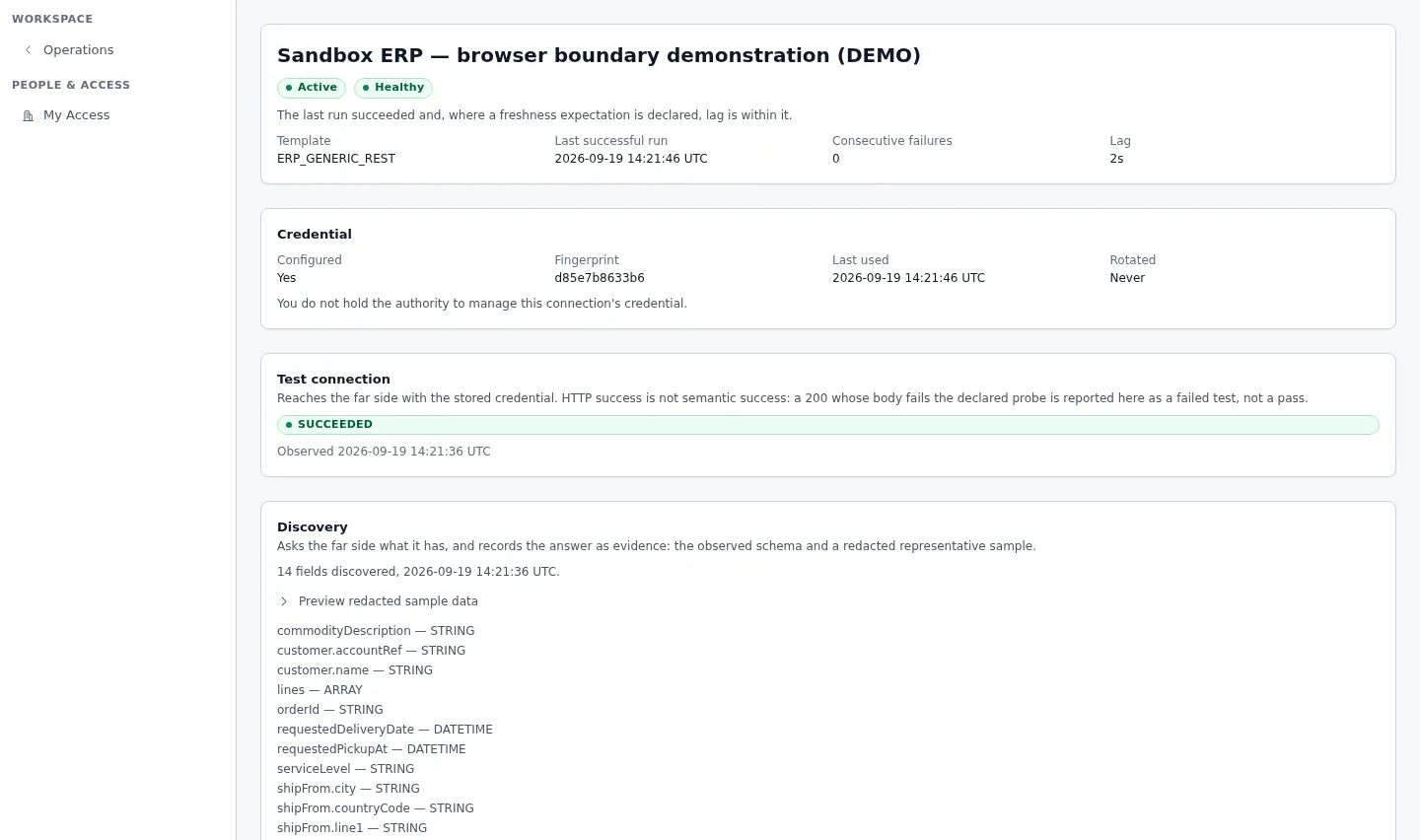
Connector Hub · a healthy ERP connection - app.kargentra.com/integrations/catalog
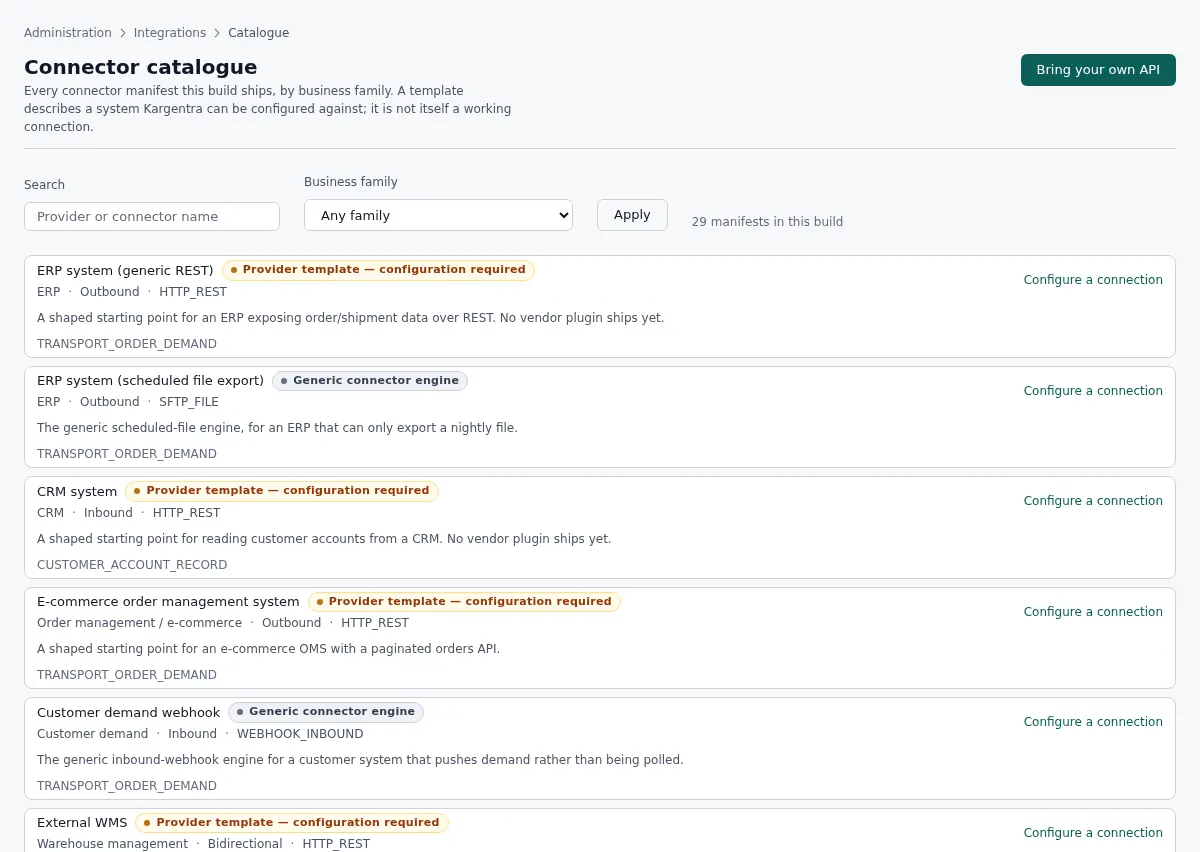
Connector Hub · connector catalogue
Governed AI inside Integrations
Ask Kargentra reads the record you are looking at, cites every fact it uses and proposes the next step. Nothing changes until a person with the right permission approves it.
- Why did this EDI file fail?
- Propose a mapping for the new ERP fields
- Which connections are lagging?
Interchange 000004417 from trading partner Brackenfield Foods was rejected at the second S5 segment: the stop sequence must be numeric and the file contains “A2”. The envelope, control numbers and B2 shipment identification are valid, and the partner’s previous files this week were applied. One connection, the ERP order feed, has been lagging for 40 minutes after three consecutive failures.
- Interchange 000004417 · segment S5
- Trading partner · Brackenfield Foods · Active
- Connection · ERP order feed · health
Proposal · requires approval
Draft mapping version 3 for the ERP order feed, mapping its delivery window fields to the order’s requested window.
Approver: Integration administrator approves the mapping version before it applies. Applied only through the governed action, and recorded in the audit trail.
Exceptions and edge cases Integrations handles
Real operations are mostly exceptions. These are handled as first-class states with an owner, evidence and a next step, not as notes in a spreadsheet.
- An exact duplicate EDI file is recognised and never applied twice.
- A 204 from an unregistered sender is held as Unmatched sender instead of creating an order.
- A 204 missing B2, B2A or N1, or with fewer than two S5 stops, is rejected with the segment named.
- An SE segment count that does not match the transaction is rejected as a control count mismatch.
- A webhook that exhausts its retries is replayed through a governed action with a fresh retry budget.
- A partner that retries a create with the same idempotency key gets the original result, not a second order.
- A maps call whose outcome is uncertain is still counted, so metering never under-reports.
- An outbound URL that fails the endpoint safety check is refused before anything is sent.
Who uses Integrations
Integration engineer
Configures connections from templates, approves mapping versions, watches exchange health and replays fixed failures.
IT architect
Decides which stages run in Kargentra or an external system, and builds against the published API and event contracts.
EDI administrator
Sets up trading partners, works the interchange workbench by failure class and replays corrected files.
Order operations
Opens the transport order created from an EDI tender and follows any interchange that was rejected.
Tenant administrator
Governs the maps provider, its key and metering, and sees connector steps in onboarding readiness.
Security officer
Reviews sealed credentials, rotation fingerprints and the audit trail of every connection change.
Integrations at a glance
A scannable reference for evaluation teams and RFPs.
| Connector Hub |
|
|---|---|
| EDI X12 204 segment mapping |
|
| EDI operations |
|
| APIs and events |
|
| Webhooks and coexistence |
|
| Maps and credentials |
|
| Integrations |
|
Connected to the rest of Kargentra
Every module reads and writes the same record, so a hand-off is a state change rather than a re-keyed file.
- Order ManagementAPI, external OMS and EDI 204 intake create orders with their source identity, and order status flows back by signed webhook.Explore OMS
- Transportation ManagementTransport planning can be marked as run by an external TMS, ELD duty facts feed route feasibility and the maps provider proposes stop order.Explore TMS
- Warehouse ManagementAn external WMS can own warehouse stages, and its reports are kept as observations rather than native receipts.Explore WMS
- Administration & ConfigurationThe Process Composer binds external stages to connections, and Data & Integrations runs the initial import.Explore Admin
- Driver AppThe driver app runs standalone with an external TMS, receiving work through Connector Hub and sending signed stop events back.Explore Driver
- Collaboration CenterExternal conversation delivery runs through Connector Hub, and inbound replies attach only with a trusted identity.Explore Collaboration
Integrations: frequently asked questions
Which EDI transactions does Kargentra support?
Kargentra receives X12 004010 204 motor carrier load tenders from registered trading partners, by file upload or machine-to-machine intake. Each file is validated, kept as immutable evidence and applied to a transport order, with replay for fixed files. Tender answers, status and other lifecycle updates are exchanged through the REST API, signed webhooks and the partner gateway.
Is there a REST API?
Yes. Every operation is defined in a versioned OpenAPI contract with frozen schemas and the permission it requires, and events are described as AsyncAPI contracts. Errors return a Problem Details body with a correlation id, so any failure can be traced. External systems authenticate as machine clients and can safely retry create, change and cancel calls.
How are webhooks secured?
Lifecycle webhooks are signed with HMAC so the receiver can verify they came from Kargentra and were not altered. Each delivery carries the receiving system’s own record identity. Delivery health shows what was delivered, pending, retrying or failed, and an exhausted delivery is replayed through a governed action. Delivery is at least once, so receivers should de-duplicate.
Can I connect my ERP?
Yes. Connector Hub includes ERP connector templates, and an ERP or external order system can create and change demand machine to machine under its own identity. Mappings are approved as versions, reconciliation runs compare both sides, and the Process Composer records which stages your ERP owns, so Kargentra never overwrites a stage it does not own.
What is the difference between initial import and ongoing integration?
Initial import is a project with an end: your existing data is profiled, mapped, validated and reconciled until it reaches Ready for Pilot. Ongoing integration is a live connection that exchanges records continuously, with its own credential, test, discovery, mapping approval and health. Kargentra keeps them separate and tells you plainly which datasets it can load.
What happens when an exchange fails?
The attempt is recorded as partial, refused or failed with a correlation id and a failure class that says what to fix, for example a mapping, partner or permission problem. Once the cause is fixed, the file or delivery is replayed. Idempotency keys and duplicate detection mean the replay never creates a second order or a second effect.
Further reading
- Guide · 10 min readWhat is a transportation management system (TMS)?What a TMS does, how it works from transport demand to freight audit and billing, who uses one and how to evaluate it without being sold a map.
- Guide · 9 min readOMS vs WMS vs TMS: what each system doesOrder, warehouse and transportation management compared: what each system owns, where they hand off and how to choose the right mix.
- Guide · 9 min readWhat is a logistics control tower?What a logistics control tower does, how it differs from a visibility platform, the data it needs and the KPIs that survive scrutiny.
Take the Integrations datasheet with you
Capabilities, workflow, capability reference and the questions buyers ask, on two pages.
PDF · 2 pages · 346 KB
See Kargentra run your operation
A working session on your lanes, your sites and your hand-offs: order to invoice, on one record.