An order management system that turns demand into promises you can keep
Kargentra OMS is an order management system that takes orders from your team, the customer portal, partner APIs, ERP connections and EDI 204, and checks every one with the same rule. It promises against real warehouse stock, keeps requested, proposed and committed dates apart, and routes fulfilment to native or external warehouse and transport legs.
What changes for your operation
Every order has one next step
Twelve queues, most urgent first. Each row shows the single action that moves the order on and the role that owns it.
Promises built on stock
Promiseable quantity nets on-hand, allocated, held and committed-elsewhere stock before anyone proposes a date to a customer.
Change without collateral damage
Holds, cancellations and customer changes show their downstream consequence first, and each needs a reason and a note.
One order, every leg visible
Warehouse and transport legs, native or external, with source freshness, from acceptance through to delivery evidence.
What OMS does
Capture, validate, promise and fulfil every order on one record
Order Command
One server-side rule places every order that is waiting on a person into exactly one of twelve queues, from On hold to Needs a promise.
- Queues such as Needs correction, Re-promise required and Committed date passed
- Filters and sort live in the URL, so a view can be bookmarked or shared
- Row actions: Release hold, Review the findings, Decide, Propose a promise
- A control you cannot use names the exact permission it needs
Multi-channel intake
Orders arrive through one canonical writer from five channels, and every order records exactly where it came from.
- Operator entry, customer portal, partner gateway, Connector Hub, enterprise integration
- Sending system, their order reference, their version and the last message
- A resent message is recorded as a repeat, never as a second order
Deterministic validation
Every submitted order ends Clear, Review required or Blocked, and acceptance is refused while a blocking finding stands.
- Findings such as possible duplicate, required detail missing and no cargo lines
- Severity chips: Blocks acceptance, Needs review, For information
- Each finding links to the screen where it is fixed
Availability-to-promise
Promiseable quantity is netted per line from warehouse stock, then the promise owner proposes a shape the customer can answer.
- In full, Part now with the remainder later, In full later, or Cannot be promised
- Requested, proposed and committed stored as separate facts
- One current commitment per order, enforced by the database
- Risk states: commitment at risk, re-promise required, committed date passed
Customer change requests
Date, hold and cancellation requests from the portal land on the order as requests, never as edits, and operations answers each one with a governed decision.
- Approve a new date by re-promising against the request
- Decline with a reason code and a mandatory note
- Requests flagged stale when the order has changed since they were asked
- Customer updates drafted for a person to copy and send
Hold, release and lawful cancel
A hold sits on top of the order. New steps are refused while work already under way continues safely.
- Reasons from Customer request to Compliance or documentation
- Separate hold and release permissions, each needing a reason and a note
- Consequence panel lists the shipments, warehouse demand and trips affected
- Cancel refused once shipment allocation exists
Fulfilment orchestration
Shows which part of each accepted order goes where, and through which owner, as warehouse and transport legs.
- Allocated versus remaining quantity on every line
- Native or external WMS legs marked Fresh, Stale or Sources disagree
- Form a shipment for the remainder, split or consolidate
- Next step owned by OMS, Warehouse or Integration
ERP and EDI coexistence
Run beside an ERP or an existing OMS that signs in machine-to-machine and keeps its own identity on every order.
- Create, change, cancel and re-release under the partner's identity
- Signed lifecycle webhooks with governed replay of failed deliveries
- EDI X12 204 load tenders become transport orders with full file evidence
- Reconciliation shows exactly where the two sides disagree
Configured intake and guided onboarding
Workspace order fields, stage ownership and a twelve-check onboarding take a new tenant from blank to its first order.
- Required fields enforced by the API, not only by the form
- The process route decides who owns intake and acceptance
- Each check says what is missing and where to fix it
Start the day on the orders that need a person
Order Command is the OMS home for order operations, customer service and the promise owner. The same deterministic rule drives the queue, the intake read and the acceptance guard, so what the queue shows is exactly what the system enforces. Urgency comes from each order's own facts, not from a ranking model.
- Twelve queues from On hold to Needs a promise, most urgent first
- Filter by queue, customer and source; sort by priority, age, pickup or customer
- One next step per row: Release hold, Review the findings, Decide or Propose a promise
- A setup banner links straight to onboarding while any check is still blocked

Promises a customer can answer, changes operations can govern
The promise owner proposes a shape the stock supports, and the customer accepts, rejects or asks for something different in their own portal. A new date is approved by re-promising against the request. A decline always carries a reason the customer can read and a note the team can audit.
- Customers see Requested, Proposed and Committed, labelled as different things
- Shortage answers: take what is reserved, wait and ship it all, or reduce by agreement
- Every decision lands in the order timeline with actor, reason and time
- Customer updates are drafted for a person to send; nothing leaves automatically
One order, split into warehouse and transport legs you can see
Once an order is accepted, the fulfilment workbench shows which part goes where and who owns the next step. Warehouse legs run natively or in an external WMS. A message from an external warehouse is treated as an observation, never as readiness, so a stale feed cannot pass for progress.
- Allocation per line: Not allocated, Partly allocated, Fully allocated
- Handoff chips from Not opened through to Handed off to transport
- Source freshness shown as Fresh, Stale or Sources disagree
- When several warehouses could fulfil, one facility is selected before stock is reserved

From the first message to delivered against the commitment
- 01
Capture as Draft
An operator, the customer portal, a partner API, an ERP connection or an EDI 204 file creates a Draft. The platform assigns number, status and version, and records the sender.
- 02
Validate
One rule returns Clear, Review required or Blocked. A blocking finding stops acceptance and links to its fix. Owner: order operations.
- 03
Submit and accept
Not yet submitted moves to Awaiting acceptance, then Accepted or Rejected with a governed reason. Configured approval steps can hold acceptance.
- 04
Requested, proposed, committed
The promise owner proposes a shape against promiseable stock. The customer answers, and one current commitment is recorded.
- 05
Allocate and open the warehouse leg
Lines move from Unallocated to Fully allocated, and the warehouse request opens, on confirm if tenant policy says so. Owner: fulfilment coordinator.
- 06
Form shipments
Accepted demand becomes one or more shipments for native transport planning, or the stage is marked as run by an external TMS. Order and shipment stay separate, linked records.
- 07
Govern holds and changes
Holds, change requests and cancellations are decided with a reason and a note, after the consequence view shows what they would touch.
- 08
Measure against the commitment
Delivered orders count as on time or late from delivery evidence time against the current commitment, never against an ETA.
Inside Order Management
Captured from the running Kargentra application. Data shown is demonstration data.
- app.kargentra.com/orders/fulfilment
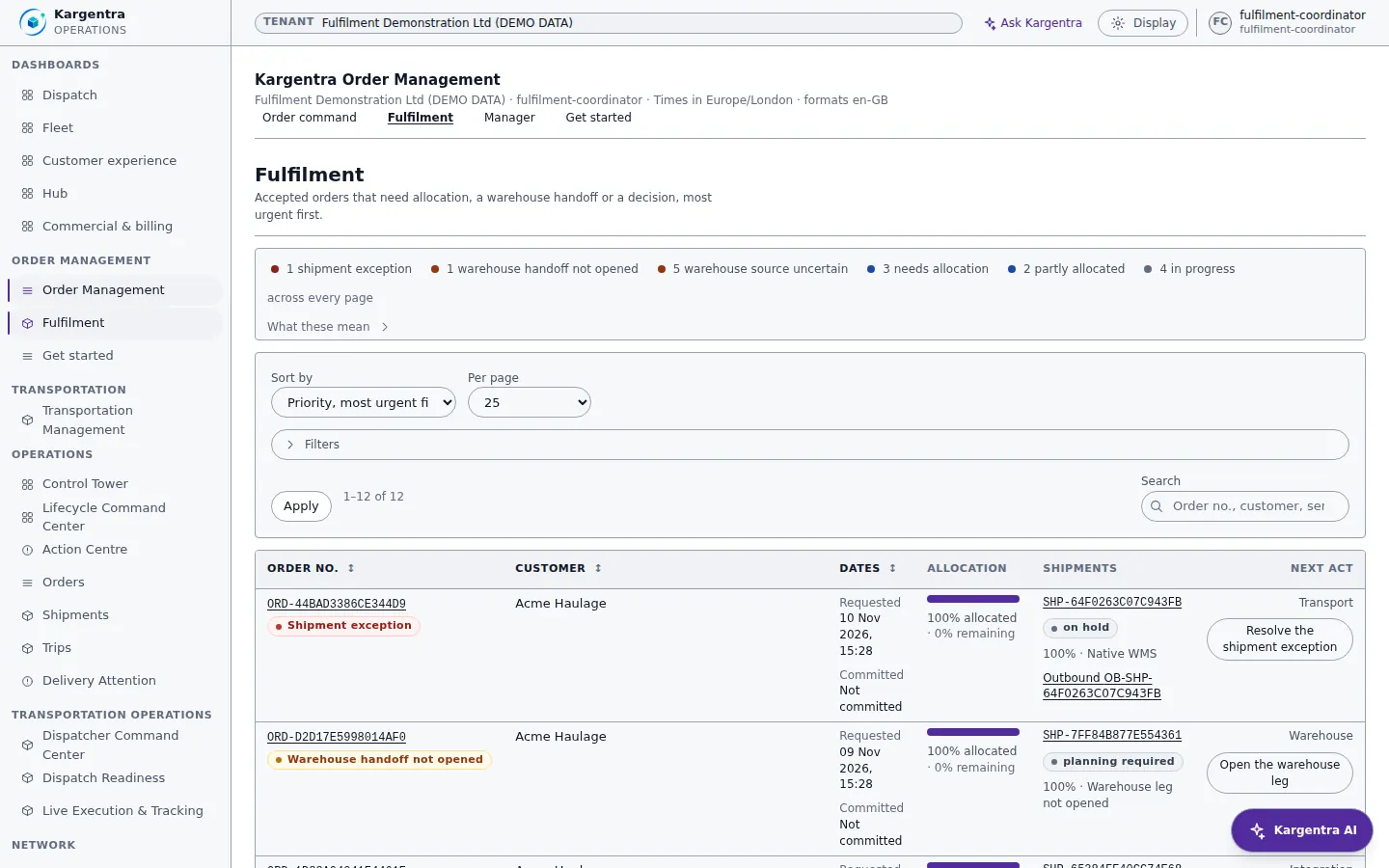
Fulfilment · OMS · what each order needs before it can ship - customer.kargentra.com/orders
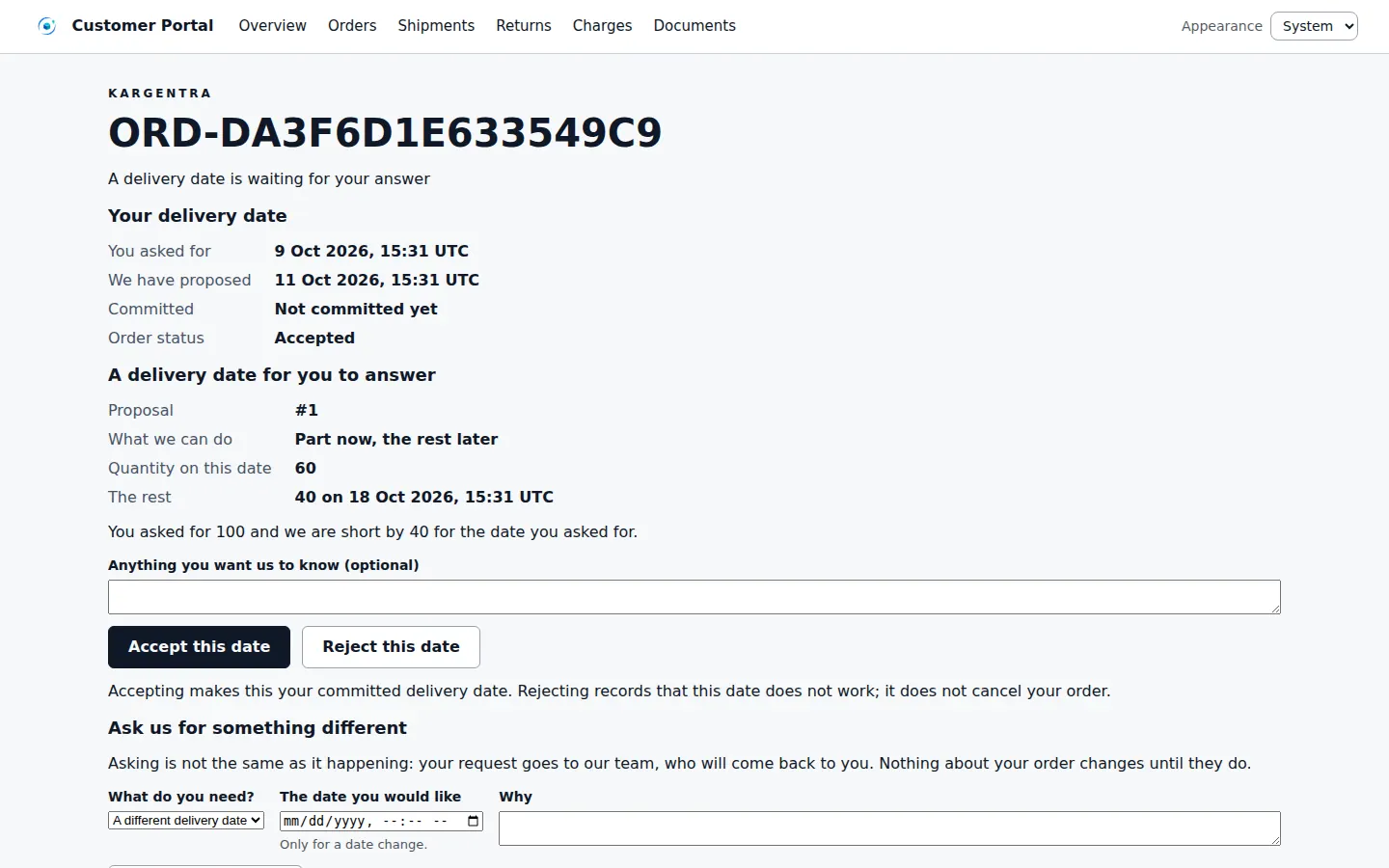
Customer portal · a delivery-date answer on an order


Governed AI inside OMS
Ask Kargentra reads the record you are looking at, cites every fact it uses and proposes the next step. Nothing changes until a person with the right permission approves it.
- Why is ORD-88214 waiting?
- Explain the shortfall
- What happens downstream if we hold it?
ORD-88214 is waiting on two things. Validation found a possible duplicate: ORD-88190 carries the same customer reference from the same ERP connection and arrived 40 minutes earlier. Line 2 (SKU HX-2040) is also short: 160 cases requested and 120 promiseable after stock allocated and held elsewhere, with a replenishment already open. Nothing has been committed to the customer yet.
- Validation · Possible duplicate · Needs review
- Where it came from · ERP connection · their ref PO-55120
- Availability preview · line 2 · 120 of 160 promiseable
- Delivery promise · Requested 14 Oct · not committed
Proposal · requires approval
Once the duplicate finding is cleared, propose Part now, remainder later: 120 cases on 14 October and 40 cases on 17 October.
Approver: Promise owner. Applied only through the governed action, and recorded in the audit trail.
Exceptions and edge cases OMS handles
Real operations are mostly exceptions. These are handled as first-class states with an owner, evidence and a next step, not as notes in a spreadsheet.
- An ERP resends an order after a timeout: it is recorded as a repeat of an earlier message, never as a second order.
- Stock covers only part of a line: the promise owner proposes Part now, remainder later, so the commitment matches what can ship.
- A change request arrives after the order has moved on: it is flagged stale instead of being applied blindly.
- A hold lands while a trip is already moving: new steps are refused, but the trip, delivery and POD continue.
- Cancellation is refused once shipment allocation exists, with the reason shown, so freight in motion is never orphaned.
- Two warehouses could fulfil the same order: one facility must be selected before any stock is reserved.
- An external warehouse feed goes quiet: the leg shows Stale or Sources disagree rather than drifting to ready.
- A committed date passes without delivery evidence: the order joins Committed date passed with a re-promise action.
Who uses OMS
Order operations
Works Order Command, clears validation findings, submits and accepts orders, and places or releases holds with a recorded reason.
Customer service
Answers change requests and shortage answers, sends the drafted customer update after review, and keeps the promise conversation on the order.
Promise owner
Proposes delivery shapes against promiseable stock, re-promises when risk appears and owns the order's one current commitment.
Fulfilment coordinator
Allocates demand, opens warehouse legs, selects the fulfilling facility and forms shipments for any remainder.
OMS supervisor
Reads Manager health across Intake, Promise, Change, Hold, Fulfilment and Integration, then drills into the exact list behind each count.
Integration administrator
Connects ERP, partner and EDI sources, watches exchange health and replays refused messages once the cause is fixed.
Order Management at a glance
A scannable reference for evaluation teams and RFPs.
| Intake |
|
|---|---|
| Validation and acceptance |
|
| Promise and change |
|
| Fulfilment |
|
| Control and governance |
|
| Insight and setup |
|
| Integrations |
|
Connected to the rest of Kargentra
Every module reads and writes the same record, so a hand-off is a state change rather than a re-keyed file.
- Transportation ManagementAccepted demand forms shipments that transportation management plans into loads and trips, and transport state flows back to fulfilment.Explore TMS
- Warehouse ManagementThe warehouse request opens on confirm, warehouse stock feeds promiseable quantity, and Warehouse reports ready flows back to the order.Explore WMS
- Customer PortalCustomers place orders, answer proposals, ask for changes and answer shortages, on their own account and nobody else's.Explore Customer
- Control Tower & Live TrackingOrders waiting on a person and commitments at risk appear in the Control Tower action centre with their owner.Explore Control Tower
- Administration & ConfigurationWorkspace order fields, the process route and the permission behind every action are configured once and enforced by the API.Explore Admin
- Ask KargentraThe order Context panel and Ask Kargentra explain blockers, shortfall and downstream effects, citing the record facts they use.Explore Ask Kargentra
OMS: frequently asked questions
What is an order management system?
An order management system captures customer demand, checks it, decides what can be promised and routes it to fulfilment. Kargentra OMS does this on the same operational record as warehouse, transport and billing, so an order's validation, promise, warehouse leg, trip and delivery evidence can be followed from one workbench instead of being reconciled across separate systems.
What is the difference between an order and a shipment?
An order is what the customer asked for: lines, quantities, dates and terms. A shipment is a physical movement formed from accepted demand. One order can become several shipments, and one shipment can carry lines from several orders. Kargentra keeps them as separate linked records, so splitting, consolidating or re-planning freight never rewrites what the customer ordered.
Can Kargentra OMS work with my ERP?
Yes. An ERP or existing OMS signs in machine-to-machine and can create, change, cancel and re-release orders under its own identity. It receives signed lifecycle webhooks, failed deliveries are replayed through a governed action, and reconciliation shows where the two sides disagree. Retries are safe, so a resent message never creates a second order.
How are promise dates and ETAs kept separate?
Requested, proposed and committed dates are stored as separate facts, and the database allows only one current commitment per order. An ETA belongs to transport execution and is never written over the commitment. Service outcomes compare delivery evidence time with the current commitment, so an on-time figure cannot quietly use the wrong date.
Can orders arrive by EDI 204?
Yes. Integration administrators register trading partners and approve a mapping version before activation. Inbound X12 004010 204 files, uploaded or sent machine-to-machine, are validated, kept as evidence with control numbers and a SHA-256 hash, and turned into transport orders through the governed create command. An exact duplicate file is never applied twice, and a corrected file can be replayed.
Does AI make order decisions in Kargentra OMS?
No. The order Context panel shows blockers, shortfall, freshness and the next step with its owner, and it works with AI switched off. When a tenant enables it, Ask Kargentra explains the order from records the user is allowed to read and cites them. Every acceptance, hold, promise and cancellation is made by a person with the right permission.
Further reading
- Guide · 9 min readOMS vs WMS vs TMS: what each system doesOrder, warehouse and transportation management compared: what each system owns, where they hand off and how to choose the right mix.
- Guide · 10 min readWhat is a transportation management system (TMS)?What a TMS does, how it works from transport demand to freight audit and billing, who uses one and how to evaluate it without being sold a map.
- Guide · 9 min readAI in logistics operations: assist, propose, approveWhere AI helps logistics teams today, what data it needs, and the guardrails that keep advice from turning into unapproved action.
Take the OMS datasheet with you
Capabilities, workflow, capability reference and the questions buyers ask, on two pages.
PDF · 2 pages · 337 KB
See Kargentra run your operation
A working session on your lanes, your sites and your hand-offs: order to invoice, on one record.