The proof of delivery app built for drivers and dead zones
The Kargentra driver app is a proof of delivery app that shows the one thing that needs an answer now: accept the assignment, acknowledge the release, check the load, work each stop and capture photo and signature proof. Every action queues on the phone when there is no signal, and the Sync Center shows exactly what dispatch has confirmed.
What changes for your operation
Works where the signal does not
Actions queue on the phone and reconcile in order when the connection returns, including work that changed while the driver was offline.
Proof that matches the pallet
The driver records what happened to each unit before capturing proof, so a partial delivery is never signed off as complete.
No trip starts unchecked
A trip cannot start until the dispatch release is acknowledged and the load has been checked against the manifest.
Problems reported in plain words
Drivers explain a problem in their own words, with help to word it, and the report enters governed exception handling with an owner.
What Driver does
Offline-first stops, loading checks and photo and signature POD
Driver cockpit
Home shows the one decision that needs the driver now, not a menu. The driver accepts an assignment or says they cannot take it, with a reason, and acknowledges any changed delivery window.
- “I cannot take this assignment” with a reason
- “Window changed” with “Got it — I have seen the new window”
- Tenant-themed light and dark appearance
Release and loading checks
Acknowledging the dispatch release enables Start trip, and the load check confirms the freight against the manifest by barcode or reference before the trip can begin.
- “This trip cannot start until you confirm the load”
- Barcode or reference check against the manifest
- Acknowledgement recorded against the release
Stop-by-stop execution
Each stop moves through start trip, arrived, start service and depart, with Call dispatch and Problem one tap away and the appointment window on the card.
- Navigate hands the stop to Google Maps
- Arrival is recorded separately from delivery and completion
- Position sharing with a plain-language disclosure to the driver
Photo and signature proof of delivery
At the door the driver captures photos and a signature and sends the proof for review. It is bound to the current delivery attempt, and Operations accepts it separately.
- “Send this proof for review”
- Proof bound to the attempt version it belongs to
- Only accepted evidence reaches the customer
Partial deliveries and failed attempts
The driver answers “What happened to each unit?” and “What happened at the door?”, so partial deliveries are recorded per unit and failed attempts carry a reason.
- Per-unit outcomes before proof is captured
- Reattempt and reschedule recovery
- Every attempt kept in the delivery history
Offline-first Sync Center
Every action is a queued command that reconciles deterministically. The Sync Center separates what is still on the phone from what the server has confirmed.
- All, Needs attention, Waiting and Confirmed views
- Send now, Try sending again, Remove from this phone
- “Changed since you answered — please answer again” on stale work
Plans that respect hours of service
Before work reaches the phone, the plan is checked against the driver’s duty records, including facts received from ELD and telematics connectors.
- A plan is not offered as executable when hours cannot be confirmed
- Stale or missing duty data stated plainly to the planner
- An hours shortfall raises an exception with an owner
Problem reporting and Ask Kargentra
Drivers report a problem with a reason and a note and follow what happened to it. Ask Kargentra summarises the work brief, suggests next steps and helps word a report; the on-screen instructions stay the authority.
- “Help me word this”, with Use this wording or Put my words back
- “What you told dispatch” and “What happened” on each report
- Work conversations with dispatch on each trip
Device trust and identity
Drivers sign in with a named identity, and each phone is enrolled to the company with a securely stored signing key that signs every request and can be revoked.
- “This phone is enrolled with your company”
- “Revoke this phone” for lost or replaced devices
- Queue and cache separated per company and enrolment
The next decision on the screen, not a menu to search
A driver glancing at the phone sees the trip, the next stop, its due time and anything that changed. When a delivery window moves, the card says so with the reason, and the driver confirms they have seen it. Each tap is a recorded event dispatch can see, so “I told them” becomes something both sides can check.
- Next stop with its appointment window and due time
- Changed windows shown with a reason and acknowledged
- Start trip, Navigate, I’ve arrived, Start service, Depart
- Call dispatch and Problem always one tap away

Assignment, release and load check before the wheels turn
Accepting an assignment is not the same as being released. Dispatch releases the trip when readiness checks pass, the driver acknowledges that release, and the load is checked against the manifest. Only then does Start trip become available, so a truck never leaves with the wrong freight or an unreleased plan.
- Assignment, readiness, release and execution are separate states
- Driver acknowledgement recorded against the release
- Barcode or reference check against the manifest
- Readiness rechecked after any change
A clear report from the roadside, with help to word it
When something goes wrong at a stop, the driver chooses a reason and writes a note in their own words. Ask Kargentra can help word it, and the driver chooses whether to use the suggestion or keep what they wrote. The report becomes a governed exception that dispatch owns, and the driver can see what happened next.
- Reason and note, kept exactly as the driver sent them
- Suggested wording the driver accepts or discards
- The report enters exception handling with an owner
- Deterministic help still works with AI switched off

From assignment to accepted proof of delivery
- 01
Assignment accepted
The driver accepts the assignment or says they cannot take it, with a reason that prompts reassignment.
- 02
Release acknowledged
Dispatch releases the trip when readiness passes, and the driver acknowledges the release.
- 03
Load checked
The freight is checked against the manifest by barcode or reference before Start trip becomes available.
- 04
Stops worked
Arrived, start service and depart are recorded per stop, with navigation handed to Google Maps.
- 05
Outcome recorded
The driver records what happened to each unit and at the door, including partial deliveries and failed attempts.
- 06
Proof captured
Photos and a signature are captured and sent for review, bound to the current delivery attempt.
- 07
Synced and accepted
Queued actions reach the server and are confirmed. Operations accepts the proof; evidence complete is still not Billing Ready.
Inside Driver App
Captured from the running Kargentra application. Data shown is demonstration data.
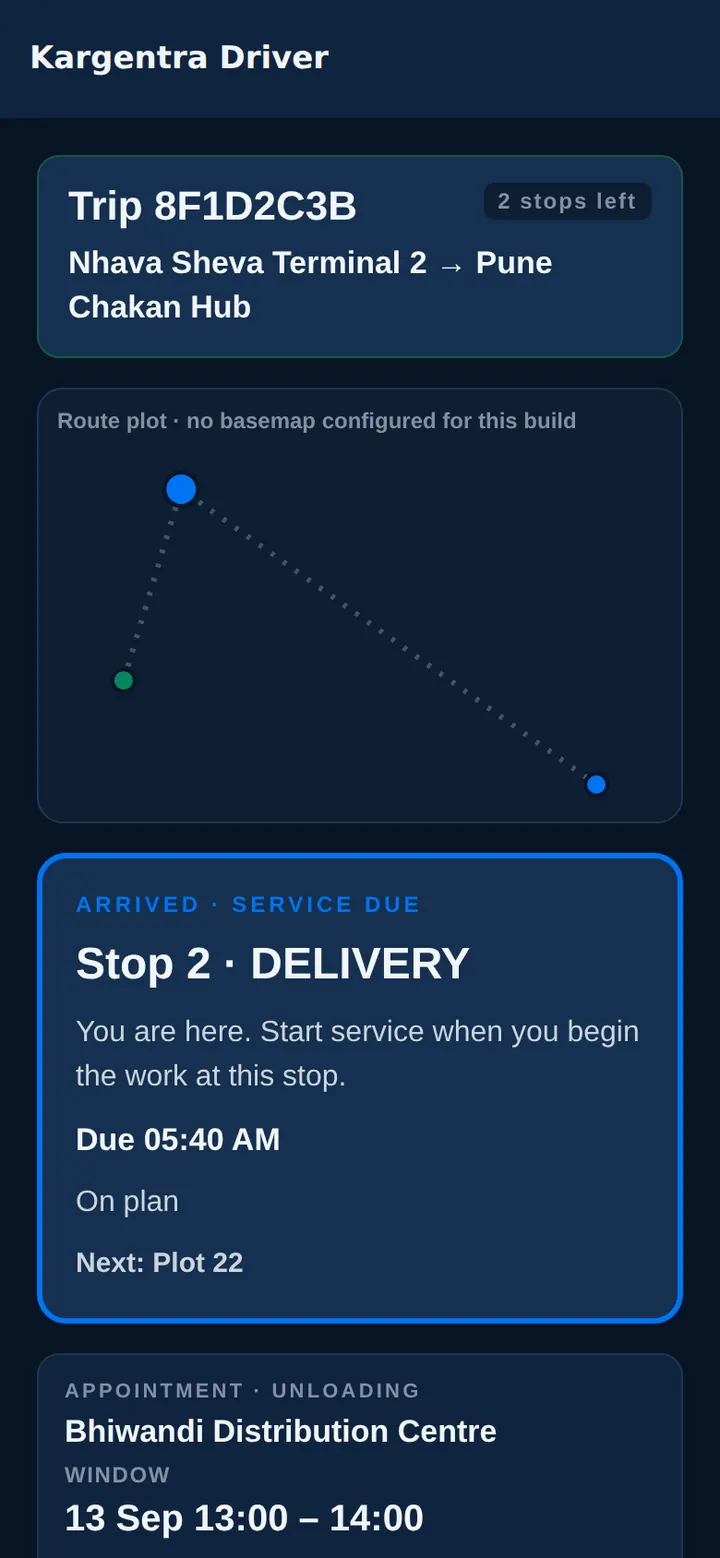
Driver app · arrived, service due, in dark mode 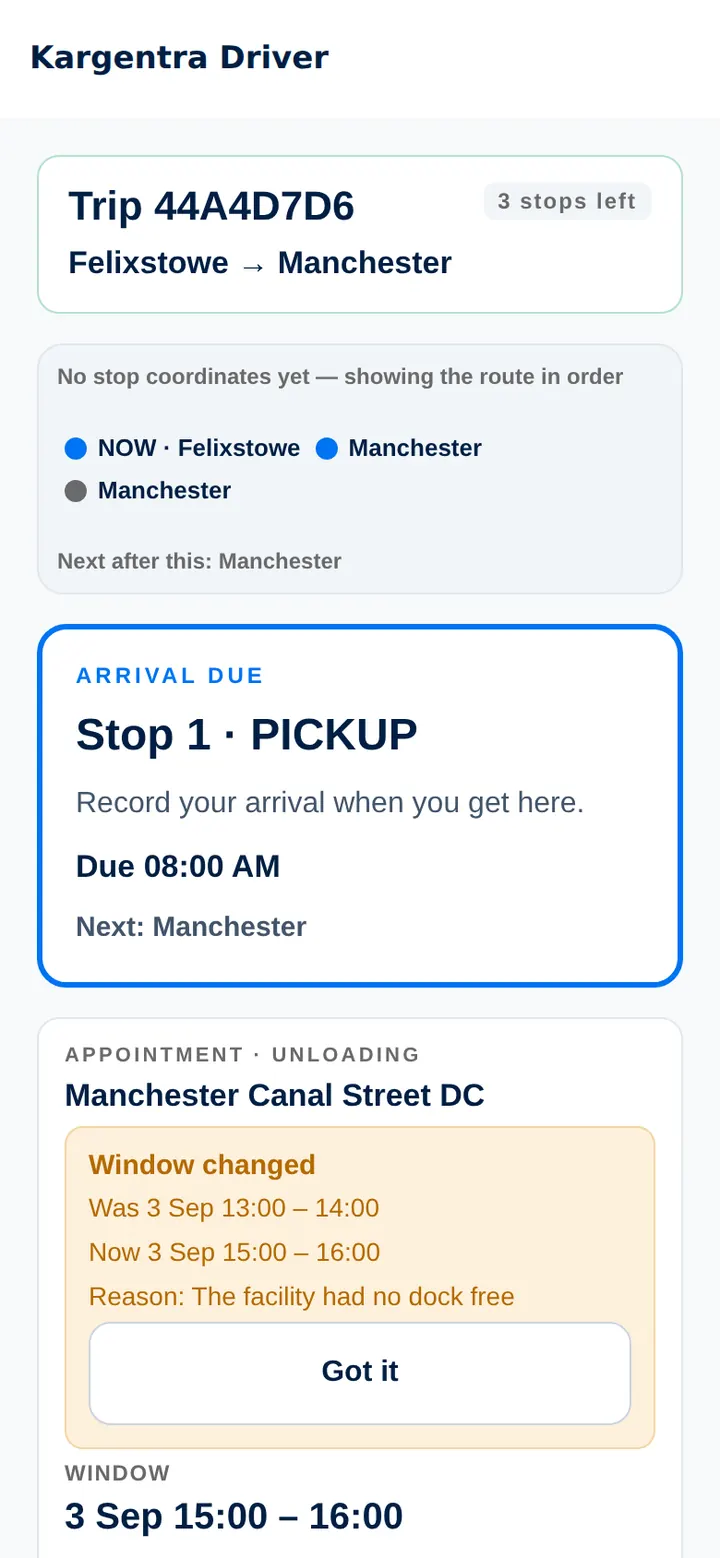
Driver app · next stop and a changed delivery window

Governed AI inside Driver
Ask Kargentra reads the record you are looking at, cites every fact it uses and proposes the next step. Nothing changes until a person with the right permission approves it.
- Summarise my work brief
- Help me word this problem
- What should I do next?
You have four stops today. Stop 2 at Harbour Road Depot now has a delivery window of 13:00 to 15:00, changed by dispatch because the site moved its unloading appointment. Your load check is complete. The next step on screen is Start trip; the instructions on screen remain the authority.
- Trip TR-3318 · four stops
- Stop 2 · window changed 07:42
- Load check · confirmed
- Dispatch release · acknowledged
Proposal · requires approval
Send a problem report to dispatch: “Gate closed on arrival, site contact not answering”, in the driver’s own words with suggested wording offered.
Approver: Driver sends the report; the dispatcher owns the recovery. Applied only through the governed action, and recorded in the audit trail.
Exceptions and edge cases Driver handles
Real operations are mostly exceptions. These are handled as first-class states with an owner, evidence and a next step, not as notes in a spreadsheet.
- Signal lost mid-stop: actions queue on the phone and reconcile in order when the connection returns.
- Work reassigned while the driver was offline is flagged “Changed since you answered — please answer again”.
- A partial delivery is recorded per unit, so proof can never claim a pallet that was not delivered.
- A failed delivery attempt keeps its reason and moves to reattempt or reschedule, with every attempt kept.
- A load that does not match the manifest stops the trip from starting until it is resolved.
- A lost phone is revoked, and its queued commands cannot be sent under another driver’s identity.
- A driver who cannot take an assignment says so with a reason, and the dispatcher reassigns with a recorded reason.
- A plan whose hours of service cannot be confirmed is not offered as executable.
Who uses Driver
Driver
Accepts work, acknowledges releases, checks the load, works each stop, records outcomes and captures proof, with or without signal.
Dispatcher
Releases trips, sees every driver action as it is confirmed, answers work conversations and owns reported problems.
Fleet manager
Assigns drivers and vehicles, handles reassignments with reasons and checks hours-of-service feasibility before dispatch.
Delivery operations
Reviews submitted proof, accepts or rejects it, and recovers failed attempts by reattempt or reschedule.
IT and security
Enrols phones to the company, revokes lost devices and relies on signed requests tied to a named driver.
Driver App at a glance
A scannable reference for evaluation teams and RFPs.
| Execution |
|
|---|---|
| Proof of delivery |
|
| Offline and sync |
|
| Safety and compliance |
|
| Identity and devices |
|
| Deployment modes |
|
| Integrations |
|
Connected to the rest of Kargentra
Every module reads and writes the same record, so a hand-off is a state change rather than a re-keyed file.
- Transportation ManagementTrips, stops, dispatch release and tracking come from TMS, and every driver event returns to the same trip record.Explore TMS
- Carrier Network & PortalDrivers nominated by carriers or assigned from your private fleet receive their work here after readiness checks.Explore Carrier
- Control Tower & Live TrackingDriver problem reports and failed attempts become exceptions with an owner in the Control Tower action centre.Explore Control Tower
- Customer PortalProof accepted by Operations appears on the customer’s delivery, ready to download.Explore Customer
- Freight Finance & BillingAccepted proof is the delivery evidence that billing readiness checks before an invoice can be raised.Explore Finance
- Ask KargentraDrivers get a work brief summary and wording help, read from the trip they are assigned to.Explore Ask Kargentra
Driver: frequently asked questions
What is an electronic proof of delivery app?
An electronic proof of delivery app replaces paper delivery notes with evidence captured on the driver’s phone. In Kargentra, the driver records what happened to each unit and at the door, then captures photos and a signature bound to that delivery attempt. Operations accepts the proof separately, and only accepted evidence reaches the customer and counts toward billing readiness.
Does the driver app work offline?
Yes. Every action is queued on the phone and reconciled in order when the connection returns. The Sync Center shows what is waiting, what needs attention and what the server has confirmed, with Send now and Try sending again. If dispatch changed the work while the driver was offline, the app asks the driver to answer again.
What evidence can a driver capture?
Drivers capture photos and a signature at delivery, record per-unit outcomes for partial deliveries, and give a reason for a failed attempt. Before the trip they confirm the load against the manifest by barcode or reference. Problem reports carry a reason and the driver’s own note. Everything is tied to the trip, stop and attempt it belongs to.
Does the app support hours of service?
Yes, before work reaches the phone. Duty-status changes from a configured ELD or telematics connection land in the same hours-of-service records the planner reads, with each provider driver mapped to a named Kargentra driver. A driver is offered a plan only once its hours are confirmed, and a shortfall during the trip opens an exception that dispatch owns, so the driver is not left to raise it alone.
Can we use the driver app with another TMS?
Yes. The driver app runs standalone alongside an external TMS. Work arrives through Connector Hub, and stop observations go back to your TMS as signed, deduplicated events with a delivery ledger. Driver resources are mastered separately, so your existing TMS stays the system of record for its trips while drivers get the same offline-first app.
Is turn-by-turn navigation built in?
Kargentra does not replace the phone’s navigation. Navigate hands the stop to Google Maps, so routing, traffic and voice guidance come from Google Maps rather than from Kargentra. Route proposals from the maps provider stay read-only for planners until a person approves a stop resequence.
Further reading
- Guide · 9 min readElectronic proof of delivery (ePOD): a practical guideWhat electronic proof of delivery should capture, how offline capture works and why arrival, a delivery attempt and accepted POD are different.
- Guide · 10 min readWhat is a transportation management system (TMS)?What a TMS does, how it works from transport demand to freight audit and billing, who uses one and how to evaluate it without being sold a map.
- Guide · 9 min readAI in logistics operations: assist, propose, approveWhere AI helps logistics teams today, what data it needs, and the guardrails that keep advice from turning into unapproved action.
Take the Driver datasheet with you
Capabilities, workflow, capability reference and the questions buyers ask, on two pages.
PDF · 2 pages · 508 KB
See Kargentra run your operation
A working session on your lanes, your sites and your hand-offs: order to invoice, on one record.