Logistics control tower software for live tracking and exception recovery
Kargentra Control Tower is logistics control tower software that puts every queue that needs a person on one screen, across orders, warehouse and transport. Live tracking is labelled by its true source and freshness, ETA is compared with the commitment instead of written over it, and every detected risk opens a case with an owner, a permitted recovery and proof that it cleared.
What changes for your operation
One screen, every queue
Order, warehouse and transport work that needs a person, most urgent first, each routed to its owning workspace.
ETA is not the promise
Planned, ETA, committed and actual times stay separate, so a late ETA raises risk instead of rewriting the commitment.
Alerts with an owner
Every detected risk opens one case with an owner and a next step, and a replay never creates a duplicate.
Figures you can audit
Every health figure shows numerator, denominator, scope and read time, and drills to the exact records.
What Control Tower does
Live tracking, ETA risk, alerts and exception recovery in one view
Operations Center
A scoped home across OMS, WMS and TMS: action centre, operational pulse, connected flow health, performance and risk, and capacity pressure.
- Time windows from today to year to date, or a custom window
- Organisation scope limited to what the viewer is authorised to see
- Source freshness on screen: current, stale or unavailable
Action centre
Every item that needs a person, with priority, owner and next action, opening the record in its owning workspace.
- Readiness of drivers, vehicles and carriers
- In-widget paging with a page-size picker
- Role dashboards for dispatch, fleet and the carrier network
Live execution
Every released movement grouped by what needs a person first, with observed facts kept apart from the plan.
- Exception open, Stopped progressing, Released not started, Moving now
- Delivered with evidence outstanding kept apart from Complete and evidenced
- Sort by need, most recently observed or worst exception first
Live tracking
Each executing trip's last position and recent trail, labelled with its true source, freshness and quality.
- Driver's device, vehicle telematics or an ELD connection
- Fresh, Stale last known, Poor quality or No position reported
- A position never changes a trip, shipment or stop status
- Tracking is its own permission and can be switched off per trip
ETA and delivery risk
Background passes compute ETA and delivery risk against the commitment and detect execution risks as they emerge.
- Delivery risk, silent tracking, hours shortfall, route deviation
- Missing POD and partial-delivery variance
- Idempotent: a replay never duplicates a case
Alerts and notifications
A detected risk opens a governed exception case and a notification for the person who owns it.
- Severity: Critical, High, Medium, Low
- Tenant-configurable POD-missing threshold
- Detection suggests; it never reassigns, re-routes or contacts anyone
Exception recovery
Work a case from cause and evidence through customer-promise impact to a permitted recovery, then verify it cleared.
- Open, Acknowledged, Recovery under way, Resolved
- Replace the driver, vehicle or carrier, or re-plan the route
- Outcomes recorded as Worked or Did not work, with reopen
Manager Health
One health lens across service, planning, carrier, fleet, execution, exceptions, commercial and integration.
- Each figure marked measured, bounded or unavailable
- Numerator, denominator, scope and read time on every figure
- Drill-through to a page whose count equals the figure
Movement supervision
One movement's dispatch decision, position evidence, a trip map when the tenant's maps provider is connected, delivery result and links to recovery and close.
- Recent position reports filterable by source and quality
- Road and stop-order estimates labelled as estimates, not the commitment
- Delivery result and POD beside the commercial close
Planned, ETA and actual, never blended into one time
Live tracking shows where a trip is and how far to trust it. Positions arrive from the driver's device, vehicle telematics or an ELD connection, each labelled with source, freshness and quality. ETA is computed against the commitment, and when a delay observed at a stop pushes it out the trip is flagged at risk and a case opens for the person who owns it.
- The source can switch from the driver app to telematics without losing the trail
- Fresh, stale or poor quality, stated on every position
- At risk is measured against the commitment, not against the plan
- A position is evidence: it never moves a stop or a trip to a new status
Every exception is a case with an owner and a next step
A detected risk becomes a governed case. The supervisor sees the cause, the source evidence, the customer-promise impact and any earlier attempts, chooses a permitted recovery and then verifies that the condition actually cleared. Recurrence and reopen are recorded, and every attempt stays in the history.
- Open, Acknowledged, Recovery under way, Resolved
- A named recovery owner, or Unassigned until someone takes it
- Hours-of-service conflicts resolved with a feasible replacement
- Notifying the customer needs its own send permission

Health figures with the records behind them
Manager Health gives the transportation manager one lens across service, planning, carrier, fleet, execution, exceptions, commercial and integration. Each tile states its numerator and denominator, scope and read time. Drill into any figure and the page you land on counts exactly the same records.
- Measured, bounded or unavailable, never a silent zero
- On-time and first-attempt delivery with prior-period variance
- Unknown populations stated, such as delivered without a commitment
- Open the execution board or the recovery queue straight from a tile
From the first signal to a verified recovery
- 01
Scope the view
Choose a time window and the organisations you are authorised to see. Each zone shows whether its sources are current.
- 02
Observe
Positions and stop events arrive from the driver app, telematics or an ELD connection, labelled with source, freshness and quality.
- 03
Compare
ETA is computed against the current commitment. Planned, ETA, committed and actual remain four separate times.
- 04
Detect
Background passes detect delivery risk, silent tracking, hours shortfall, route deviation, missing POD or delivery variance.
- 05
Open and notify
Each risk opens one exception case in Open and notifies its owner. A replay of the same signal never opens a second case.
- 06
Recover
The supervisor moves the case to Acknowledged, then Recovery under way, choosing a permitted recovery such as a replacement vehicle.
- 07
Verify and resolve
The outcome is recorded as Worked or Did not work. The case reaches Resolved only when the condition clears; recurrence reopens it.
- 08
Measure
Manager Health counts the result with numerator, denominator and drill-through to the exact records. Owner: transportation manager.
Inside Control Tower & Live Tracking
Captured from the running Kargentra application. Data shown is demonstration data.
- app.kargentra.com/control-tower
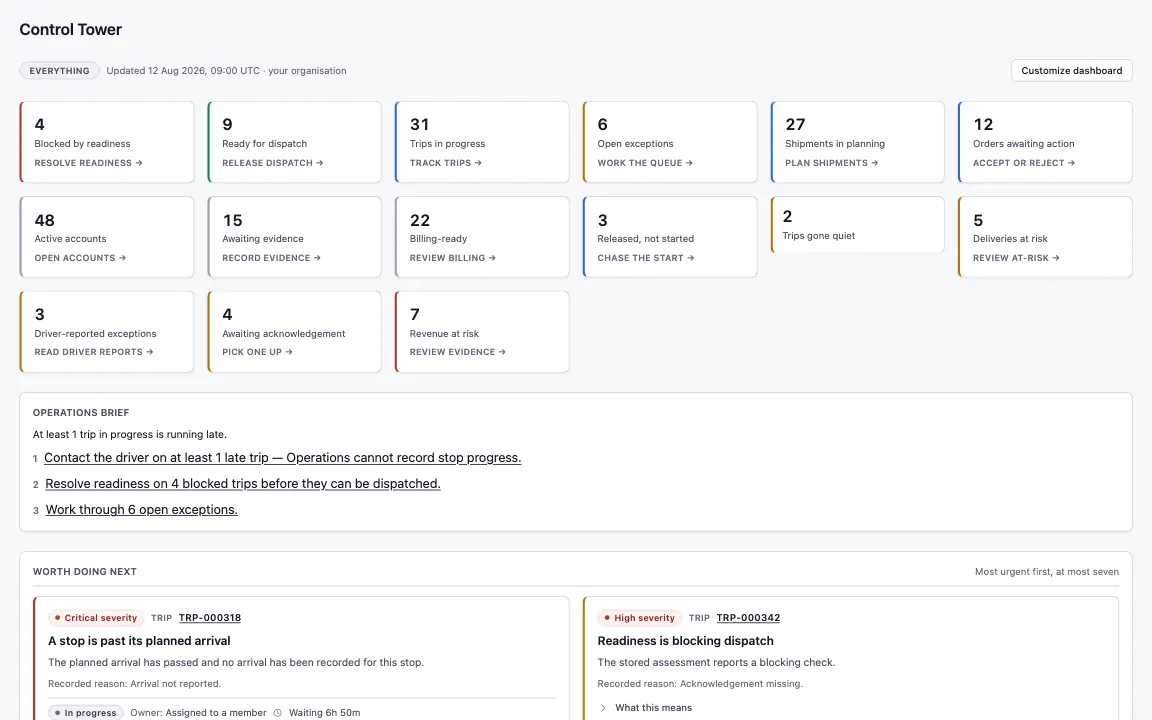
Control Tower · Operations · every queue that needs a person, most urgent first - app.kargentra.com/transportation/execution
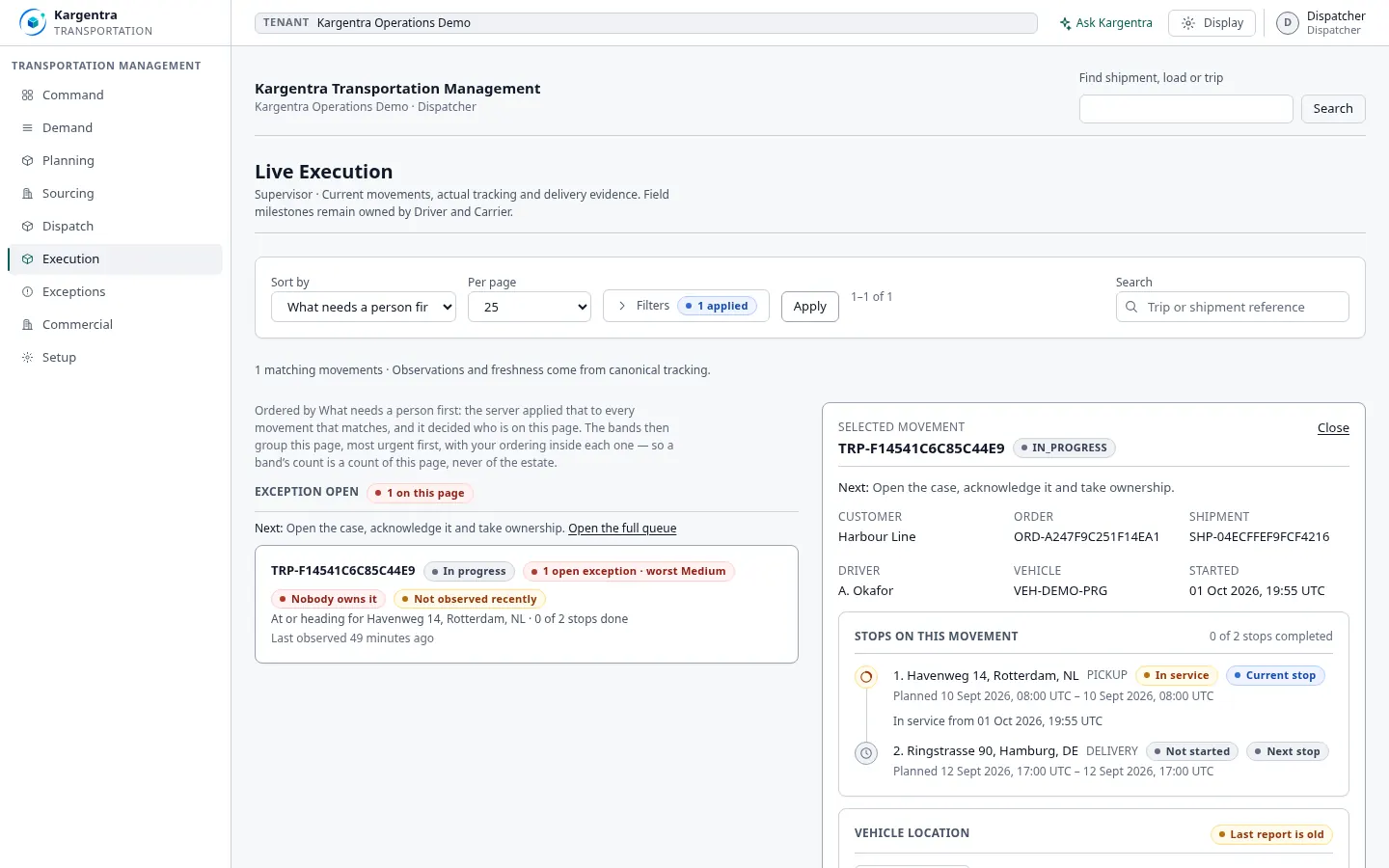
Live Execution · Dispatcher · planned windows kept distinct from what was observed


Governed AI inside Control Tower
Ask Kargentra reads the record you are looking at, cites every fact it uses and proposes the next step. Nothing changes until a person with the right permission approves it.
- Which trips may miss their committed delivery?
- Why did the ETA on TRIP-4410 move?
TRIP-4410 is at risk. The latest position, from vehicle telematics, is three minutes old, and the ETA at Antwerp is 16:40 against a committed delivery of 16:00. The ETA moved by 35 minutes when the trip left Breda 40 minutes behind plan. A delivery-risk case is open and assigned to the transport supervisor, and the customer's commitment has not changed.
- Tracking · vehicle telematics · fresh · 3 min
- ETA · Antwerp 16:40 · not the commitment
- Commitment · 16:00 · current
- Exception case · DELIVERY_RISK · Open
Proposal · requires approval
Resequence the remaining stops so Antwerp is served first, then re-check the ETA against the 16:00 commitment.
Approver: Transport supervisor. Applied only through the governed action, and recorded in the audit trail.
Exceptions and edge cases Control Tower handles
Real operations are mostly exceptions. These are handled as first-class states with an owner, evidence and a next step, not as notes in a spreadsheet.
- A trip stops reporting position: a silent-tracking case opens, and the trip status stays where the driver left it.
- Telematics and the driver's device disagree: both are shown with source and quality, and neither overwrites a milestone.
- A late departure from a stop pushes the ETA past the commitment: the trip is flagged at risk while the commitment stays unchanged.
- A driver runs short of duty hours mid-route: the hours case offers only feasible replacements.
- A vehicle leaves its route corridor: a route-deviation case opens with the position evidence attached.
- A delivery is recorded but its POD is still missing past the tenant's threshold: a POD-missing case opens for the owner.
- A recovery is tried but the condition persists: the outcome is recorded as Did not work and the case stays open.
- A source feed goes stale: the Operations Center says so instead of showing yesterday's numbers as today's.
Who uses Control Tower
Operations manager
Starts on the Operations Center, scopes by time window and organisation, and routes each item to its owning team.
Transport supervisor
Supervises live execution, takes exception cases, chooses permitted recoveries and verifies that they worked.
Dispatcher
Follows released movements, watches tracking freshness and acts when a movement stops progressing.
Fleet coordinator
Watches driver, vehicle and carrier readiness and replaces resources with hours-of-service feasibility.
Transportation manager
Reads Manager Health with numerator and denominator, and drills into the records behind each figure.
Customer service
Sees commitment risk beside the case and prepares the customer update for a person with send permission.
Control Tower & Live Tracking at a glance
A scannable reference for evaluation teams and RFPs.
| Operations Center |
|
|---|---|
| Live tracking |
|
| ETA and alerts |
|
| Exception recovery |
|
| Manager Health |
|
| Integrations |
|
Connected to the rest of Kargentra
Every module reads and writes the same record, so a hand-off is a state change rather than a re-keyed file.
- Transportation ManagementEvery movement supervised here was planned, sourced and released in TMS, and each recovery writes back to the same trip.Explore TMS
- Driver AppDriver devices report positions, arrival, delivery attempts and POD that live tracking and execution read.Explore Driver
- Order ManagementOrder holds and commitments at risk sit beside transport work in the action centre, and each opens the order where its owner acts.Explore OMS
- Warehouse ManagementWarehouse decisions and blocked transport handoffs surface beside transport exceptions.Explore WMS
- Ask KargentraAsk Kargentra explains a case or a movement with citations and proposes a recovery for the supervisor to approve.Explore Ask Kargentra
- Collaboration CenterEach exception carries its own conversation with carriers, drivers and customers, with internal notes kept internal.Explore Collaboration
Control Tower: frequently asked questions
What is a logistics control tower?
A logistics control tower is where an operation watches what is happening and acts on what is going wrong. In Kargentra it is not an overlay on someone else's data: it reads the same orders, warehouse work and movements the teams work on, so every alert opens the real record and every recovery is a governed change to that record.
How is ETA different from a committed delivery date?
The committed date is what you promised the customer. The ETA is the current estimate of when the vehicle will arrive. Kargentra stores planned, ETA, committed and actual as separate times. When the ETA slips past the commitment, the trip is flagged at risk and a case opens; the commitment changes only when a person re-promises.
Which tracking sources does Kargentra use?
Positions come from the driver's device in the Kargentra driver app, from vehicle telematics and from ELD or telematics connections configured in Connector Hub. Each report is labelled with its true source, its freshness and its quality. A position is evidence: it never changes a trip, shipment or stop status, which stay owned by the driver and carrier.
Who gets alerted when a shipment is late?
When delivery risk is detected, Kargentra opens an exception case and notifies the person who owns it, usually the transport supervisor for that movement. The case shows cause, evidence and customer-promise impact. Detection suggests and never reassigns, re-routes or contacts anyone by itself, and notifying the customer needs a separate send permission.
What happens when tracking or source data is missing?
It is shown as missing. Every Manager Health figure is marked measured, bounded or unavailable, with its numerator, denominator, scope and read time, and unknown populations are stated. The Operations Center shows source freshness, and a trip without recent positions reads as not observed recently or never observed, so a stale feed is never mistaken for a quiet day.
Can customers see live vehicle positions?
Exact vehicle position is deny-by-default for customers. The customer portal shows a customer-safe view of the same movement, with delivery dates and status, while exact coordinates stay inside operations. Within operations, tracking is a separate permission from trip access and can be switched off per trip by policy, so visibility follows a decision rather than a default.
Further reading
- Guide · 9 min readWhat is a logistics control tower?What a logistics control tower does, how it differs from a visibility platform, the data it needs and the KPIs that survive scrutiny.
- Guide · 9 min readElectronic proof of delivery (ePOD): a practical guideWhat electronic proof of delivery should capture, how offline capture works and why arrival, a delivery attempt and accepted POD are different.
- Guide · 9 min readAI in logistics operations: assist, propose, approveWhere AI helps logistics teams today, what data it needs, and the guardrails that keep advice from turning into unapproved action.
Take the Control Tower datasheet with you
Capabilities, workflow, capability reference and the questions buyers ask, on two pages.
PDF · 2 pages · 334 KB
See Kargentra run your operation
A working session on your lanes, your sites and your hand-offs: order to invoice, on one record.