Ask Kargentra, the logistics AI assistant that knows your operation
Ask Kargentra is the logistics AI assistant built into every signed-in Kargentra screen. It reads the record in front of you, answers with the facts it used and where they came from, and proposes the next permitted step. It never acts on its own: a person with the right permission approves through the same governed action, and the audit trail records both.
What changes for your operation
Answers you can check
Every fact in an answer carries its source and freshness, and unknowns are named rather than guessed.
Proposals, not surprises
Ask Kargentra suggests the next permitted step with a reason and an owner, and a person approves it.
Context without AI
The Context Layer works with AI switched off: facts, blockers and next steps are deterministic.
Governed per tenant
Each AI use case is switched on or off per tenant, and every invocation is recorded as evidence.
What Ask Kargentra does
Cited answers and proposals on every screen, approved by a person
Ask on every screen
One launcher on every signed-in operations, warehouse, supplier, carrier, driver and admin screen, aware of the screen and its record.
- Ask about this screen, explain this screen, summarise this record
- Screen descriptors kept complete by an automated coverage check
- Context disclosure: permitted record facts, or screen guidance only
Always-on Context Layer
A deterministic layer states what each screen is for, which record it binds and what is blocking it, with or without AI.
- Provenance and freshness on every fact
- Freshness unknown stated plainly when it is
- Recent changes read from canonical events
Cited answers
Answers are grounded only in records the asking user is already permitted to read, with each fact cited.
- Permission-checked grounding on every request
- Named unknowns instead of invented values
- A failing source becomes a stated refusal, not a wrong answer
Proposals a person approves
Suggested next steps come with a reason, an owner and a link to the permitted workflow, never as a hidden button.
- Advisory until a person approves
- Unsupported or unauthorised actions shown as refused
- Approval runs through the governed action and the audit trail
Module assistants
Purpose-built prompts in each module: orders, planning, dispatch, exceptions, warehouse, supplier, returns and driver help.
- Orders: summarise, why blocked, explain the shortfall, what happens downstream
- Planning: explain these options, checks before acceptance
- Warehouse and supplier: explain, prioritise and draft
Drafts for people to send
Customer updates, conversation replies and return responses are drafted for review, and a person decides whether to send them.
- Every draft marked as not sent
- Internal notes never quoted in summaries
- Price, liability, claims and credits handed to a person
Living Product Guide
Role-aware guidance answers what you can do with your access, shows your workflow and lists recent changes for your role.
- Capability toolkit: available, unavailable, historical
- Knowledge compiled from the product's own routes
- User feedback reviewed into canonical answers
Portal-safe intelligence
Customers and carriers can ask about their own records, grounded only on facts they are entitled to see.
- Customer answers use customer-safe facts only
- Carrier answers exclude other carriers' and shipper-internal data
- Answers explain records; they never change them
Tenant AI control
Tenants decide whether AI is on and which of eleven governed use cases may run, within a platform-level envelope.
- Per use case: off, insight only, or draft and confirm
- Event-triggered briefs, such as delivery risk when a trip starts
- Recorded invocation evidence for every use
Beside Dispatch Readiness, explaining exactly what blocks release
On the Dispatch Board, Ask Kargentra reads the movement's readiness checks and explains each blocker with the record facts behind it: an expired insurance document, a driver without confirmed hours, a warehouse hand-over not yet staged. It proposes the next step, and the dispatcher decides what happens.
- Cited facts: documents, assignment, facility service, open exceptions
- Suggested next steps with a reason, an owner and a permitted link
- The release itself stays a governed, version-checked action
- With AI switched off, the same facts still appear in the Context Layer

Ask Kargentra explains; the supervisor replaces the vehicle
When a critical breakdown opens a case, Ask Kargentra summarises the cause and evidence, shows the customer-promise impact and proposes a feasible replacement. The supervisor runs the governed replacement, then verifies that the condition cleared. Ask Kargentra holds no write authority at any point.
- A severity-sorted queue with cause and evidence
- Replacement proposals checked for hours-of-service feasibility
- The outcome recorded as Worked or Did not work by a person
- External communication needs its own send permission
Guided help for drivers at the stop
Drivers get a short work brief for the run and step-by-step guidance when something goes wrong at a stop, scoped to their assigned work. The guidance helps them report the problem accurately, while arrival, delivery attempts and POD remain explicit driver actions.
- Driver work brief and exception guidance as governed use cases
- Scoped to the driver's assigned trips and stops
- Problem reports land on the trip for the supervisor
- The same assistant on phones, in light or dark mode

How a question becomes an approved action
- 01
Govern
A tenant administrator decides which use cases are on, within the platform envelope. With AI off, the Context Layer still answers.
- 02
Ask in context
A user asks from the screen they are on. The Context Layer supplies the screen's purpose and the record it binds.
- 03
Check permission
Grounding reads only what this user may already read, in this tenant and within their record scope.
- 04
Answer with citations
The answer states each fact with its source and freshness, and names whatever is unknown.
- 05
Propose
A useful next step is proposed with a reason, an owner and a link to the permitted workflow. Its state: proposed, not applied.
- 06
Approve or decline
A person with the right permission opens the governed action and decides. Nothing changes until they do.
- 07
Record
The invocation and the human decision are recorded, so the audit trail shows what was suggested and who acted.
- 08
Improve
Users flag answers as outdated, wrong route or missing step, and reviewed feedback becomes a canonical answer.
Inside Ask Kargentra
Captured from the running Kargentra application. Data shown is demonstration data.
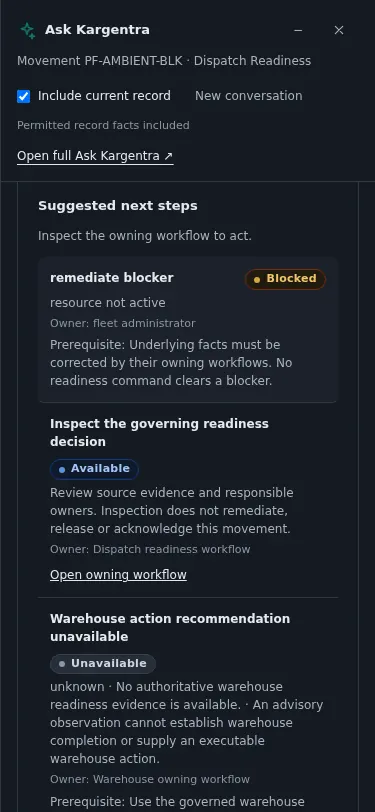
Ask Kargentra on mobile - app.kargentra.com/control-tower
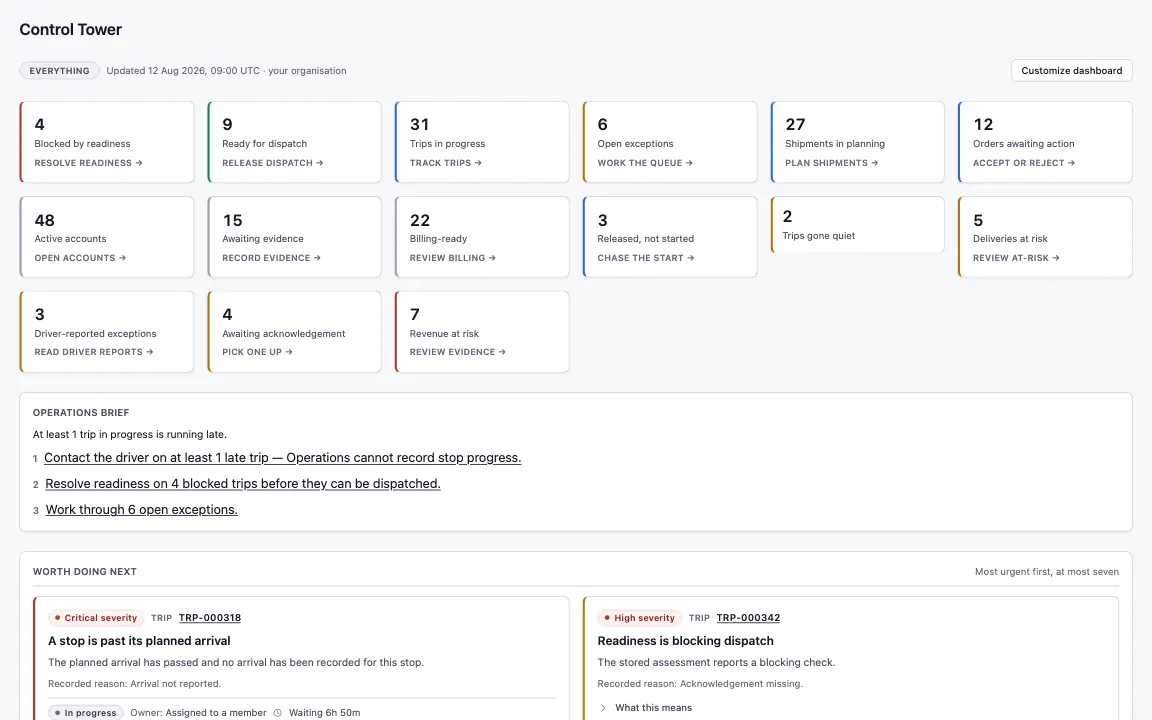
Control Tower · Operations · every queue that needs a person, most urgent first


One governed answer, step by step
Ask Kargentra reads the record you are looking at, cites every fact it uses and proposes the next step. Nothing changes until a person with the right permission approves it.
- What can I do here?
- Summarise this record
- Why is TRIP-4410 blocked?
TRIP-4410 is Blocked on two checks. The carrier's insurance certificate on file expired on 30 September, and the warehouse hand-over is not complete: 4 of 6 handling units for SHP-30781 are staged and 2 are still at Pack. The driver, tractor and trailer assignment is eligible, and there are no open exceptions on the movement.
- Readiness · carrier insurance · expired 30 Sep
- Warehouse · SHP-30781 · 4 of 6 units staged
- Assignment · driver, tractor, trailer · eligible
- Exceptions · none open
Proposal · requires approval
Request an updated insurance certificate in the carrier conversation, then re-evaluate readiness once the last two units are staged.
Approver: Dispatcher. Applied only through the governed action, and recorded in the audit trail.
Exceptions and edge cases Ask Kargentra handles
Real operations are mostly exceptions. These are handled as first-class states with an owner, evidence and a next step, not as notes in a spreadsheet.
- A user asks about a record outside their scope: the answer is refused, and nothing about that record is disclosed.
- One grounding source fails: that source is reported as refused and the rest of the answer stands on its own facts.
- AI is switched off for the tenant: the Context Layer still shows the complete facts and says that it does.
- A user asks Ask Kargentra to release a trip: the action is shown as refused, with a link to the dispatcher's workflow.
- A conversation touches price, liability or a claim: the topic is handed to a person instead of being drafted.
- A fact's freshness cannot be established: the answer says Freshness unknown rather than presenting it as current.
- A customer asks about another customer's order: portal grounding has no access to it, so no answer can include it.
- Product guidance drifts after a release: the guide is recompiled from the product's routes, and users can flag it.
Who uses Ask Kargentra
Operations coordinator
Summarises records, asks why something is blocked and follows suggested next steps to the permitted workflow.
Transport planner
Asks for the evidence behind plan options and the checks to run before accepting a plan.
Dispatcher
Gets readiness blockers explained with citations before deciding what to fix and when to release.
Customer service rep
Uses drafted replies and customer updates as a starting point, then reviews and sends them personally.
Tenant administrator
Switches AI use cases on or off for the tenant and reviews the recorded invocation evidence.
New user
Asks what they can do with their access and follows the workflow laid out for their role.
Ask Kargentra at a glance
A scannable reference for evaluation teams and RFPs.
| Where it works |
|
|---|---|
| Grounding and citation |
|
| What it does |
|
| What it never does |
|
| Governance |
|
| Integrations |
|
Connected to the rest of Kargentra
Every module reads and writes the same record, so a hand-off is a state change rather than a re-keyed file.
- Order ManagementOrder prompts summarise, explain blockers and shortfall, and show what happens downstream of a hold.Explore OMS
- Transportation ManagementPlanning, dispatch and exception assistants explain options and readiness with cited facts.Explore TMS
- Control Tower & Live TrackingDelivery-risk briefs and exception explanations sit beside the cases supervisors own.Explore Control Tower
- Collaboration CenterConversation summaries, open asks and reply drafts, with internal notes never quoted.Explore Collaboration
- Administration & ConfigurationTenant AI control decides which use cases run, within the platform envelope, with evidence recorded.Explore Admin
- Driver AppDriver work briefs and exception guidance help drivers report problems accurately at the stop.Explore Driver
Ask Kargentra: frequently asked questions
What can Ask Kargentra answer?
Ask Kargentra answers questions about the screen and record in front of you: what it is, why it is blocked, what changed recently, what the options mean and what to do next. It also answers what you can do with your access and how your workflow runs. Every answer is built from records you are already permitted to read, and cites them.
Does Ask Kargentra take actions on its own?
No. Ask Kargentra explains, cites and proposes. It has no write access, and actions such as release, award, acceptance, cancellation or sending a message are shown as refused if asked for. A proposal links to the permitted workflow, where a person with the right permission decides, and both the suggestion and the decision are recorded.
Where does Ask Kargentra get its answers?
From the Kargentra operational record, through the Context Layer. Each screen declares what it is for and which record it binds, and record providers supply facts with their provenance and freshness. Grounding is checked against the asking user's permissions and record scope, so an answer never includes something that user could not open themselves.
Can AI features be turned off per tenant?
Yes. Tenant administrators decide whether AI is on and which of eleven governed use cases may run, from operations briefs and delivery risk to drafting and connector mapping, within a platform-level envelope. When AI is off, the Context Layer still shows the complete deterministic facts, and every AI invocation that does run is recorded as evidence.
Is customer or carrier data exposed to other parties?
No. Customer portal answers are grounded only on customer-safe facts for that customer's own account, and carrier portal answers never include other carriers' data or shipper-internal information. Internal notes are never quoted in summaries. Each party gets an answer built from the same record, filtered by what they are entitled to see.
Which AI model does Ask Kargentra use?
Answers start from a deterministic engine that assembles cited facts, so the core works without any external model. A tenant can configure a model provider credential to add natural-language synthesis for supported use cases, and if that credential cannot be resolved the request fails closed rather than falling back silently. The same permission and citation rules apply either way.
Further reading
- Guide · 9 min readAI in logistics operations: assist, propose, approveWhere AI helps logistics teams today, what data it needs, and the guardrails that keep advice from turning into unapproved action.
- Guide · 9 min readWhat is a logistics control tower?What a logistics control tower does, how it differs from a visibility platform, the data it needs and the KPIs that survive scrutiny.
Take the Ask Kargentra datasheet with you
Capabilities, workflow, capability reference and the questions buyers ask, on two pages.
PDF · 2 pages · 344 KB
See Kargentra run your operation
A working session on your lanes, your sites and your hand-offs: order to invoice, on one record.