A yard management system that keeps trailers moving from gate to dock
Kargentra’s yard management system runs every facility visit from the appointment through gate check-in, the dock queue, door assignment and service to release. Driver, tractor and trailer are matched expected against observed at the gate, and dwell is measured against free time, so detention rests on recorded evidence rather than argument.
What changes for your operation
No surprise arrivals
Requested and confirmed windows are separate, and at-risk arrivals are queued for rescheduling before they reach the gate.
Identity checked at the gate
Driver, tractor and trailer are compared expected against observed, and a mismatch holds the visit with a reason.
Doors used, not argued over
Each visit waits in a dock queue and is assigned a compatible door, so the board shows who is where and why.
Detention with evidence
Dwell runs from check-in to release against the tenant's free time, so a detention claim rests on recorded times.
What YMS does
Dock appointments, gate, doors, dwell and detention on one record
Dock appointment scheduling
Inbound unload and outbound load appointments are booked per facility, with requested and confirmed windows kept apart.
- Suppliers and carriers request a window; the yard confirms it
- Requested, not confirmed is a visible state of its own
- Warehouse work waiting for an appointment is listed
Rescheduling from risk signals
Appointments whose trips carry delivery risk are queued for rescheduling, with late visits ahead of those at risk.
- Needs-rescheduling queue ordered by urgency
- Changes go through the governed appointment revision
- Rescheduled visits keep their full history
Gate check-in
Record the vehicle at the gate and match driver, tractor and trailer against the appointment.
- Expected against observed for every identity
- Arrived, needs match until the identities agree
- An unplanned arrival opens one appointment, never two
Dock queue and door assignment
Put a checked-in vehicle in the dock queue and assign a compatible dock door when one is free.
- Waiting for dock, At dock and In service views
- Door compatibility with the visit's work type
- Every assignment recorded with time and actor
Service at the dock
Start service, record service complete and keep the facility facts on the visit where every team can read them.
- Service started and completed times
- Linked warehouse receipt or outbound load
- Service complete is not dispatch readiness
Release holds and release
A release hold keeps a visit on site until its reason is cleared; then the vehicle is released to transport.
- Holds applied and cleared with reasons
- Blocked, discrepancy shown on the board
- Ready to leave and Released today views
Dwell and detention
Dwell is measured from check-in to release and compared with the tenant's free time and detention rate.
- Within free time, Detention accruing, Detention accrued
- Amount in the tenant's configured currency
- Filed as an accessorial by a person, never automatically
Partner and driver visibility
Suppliers see requested against confirmed windows in their portal, and drivers see the unloading window for their stop.
- Supplier dock appointment requests with the ASN
- Driver app shows the appointment window and service due
- External yard observations kept as evidence
Yard conversations and context
Dock appointment coordination happens in a conversation on the visit, and Ask Kargentra explains a blocked visit with citations.
- Dock appointment coordination as a conversation purpose
- Collaboration policies for yard events
- Context that states freshness and known omissions
Appointments requested by partners, confirmed by the yard
A supplier sends its advance shipping notice and requests a dock window from the portal. The yard confirms the window, and the warehouse sees the delivery as Inbound expected. Until the yard confirms, the request reads requested, not confirmed, so nobody plans labour around a slot that does not exist yet.
- Requested and confirmed windows shown side by side
- Inbound unload and outbound load appointment types
- Warehouse work waiting for an appointment visible to the dock scheduler
- Late and at-risk appointments queued for rescheduling
One visit, from the gate to the dock to release
The yard visit workspace follows a vehicle from gate arrival through identity match, the dock queue and door assignment to service and release. Each step records who did it and when, and a release hold keeps a vehicle on site until its reason is cleared.
- Driver, tractor and trailer at the gate, expected against observed
- Put the vehicle in the dock queue, then assign a compatible dock
- Start service at the dock and record service complete
- Release to transport once no release hold is in force

Service complete is not ready to dispatch
Yard facts and dispatch facts stay separate. Service at the dock and the warehouse hand-over feed the dispatcher's readiness checks, but the dispatcher still evaluates and releases the movement. Leaving the yard is not dispatch release, and neither is a driver's acknowledgement.
- Warehouse hand-over appears as a readiness check, not as a release
- Readiness re-evaluated against current facts before release
- Released, awaiting driver acknowledgement as a distinct state
- Dwell breaches surface on the shipment journey
A facility visit, from appointment to release
- 01
Request a window
A supplier, carrier or the warehouse requests a window. It reads requested, not confirmed until the dock scheduler confirms it.
- 02
Confirm
The dock scheduler confirms the appointment as an inbound unload or an outbound load. Owner: dock scheduler.
- 03
Check in at the gate
The gate operator records the vehicle. Driver, tractor and trailer are matched; a mismatch leaves the visit at Arrived, needs match.
- 04
Queue and assign a door
The visit moves to Waiting for dock, then At dock once a compatible door is assigned. Dwell has been running since check-in.
- 05
Serve at the dock
In service until service is recorded complete, linked to the warehouse receipt or outbound load.
- 06
Clear holds and release
Release holds are cleared with reasons, then Ready to leave becomes Released to transport. Owner: yard coordinator.
- 07
Settle the time
Dwell against free time reads Within free time, Detention accruing or Detention accrued; a person files detention with evidence.
Inside Yard Management
Captured from the running Kargentra application. Data shown is demonstration data.
- app.kargentra.com/shipments
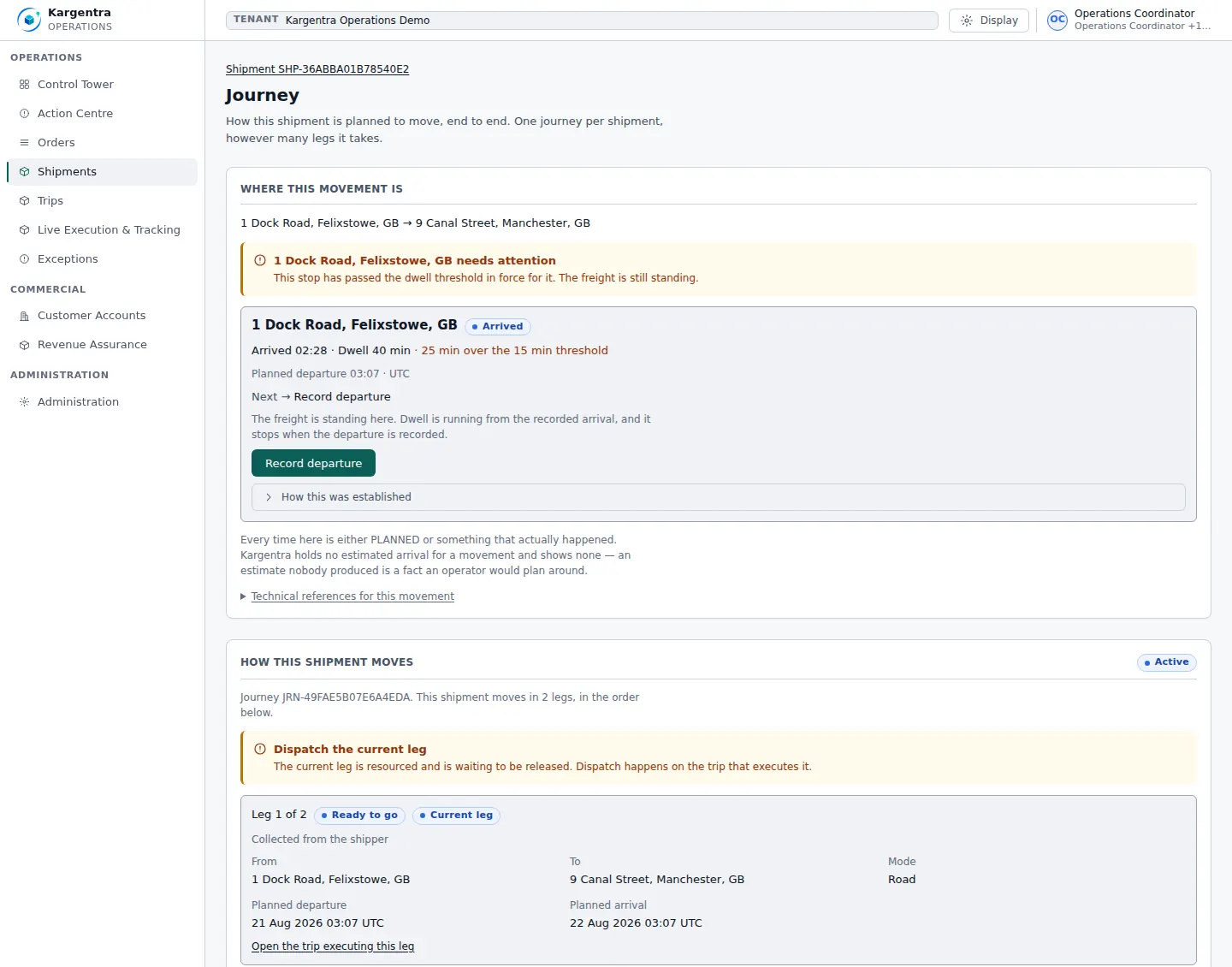
Shipment journey · a dwell breach surfaced on the record 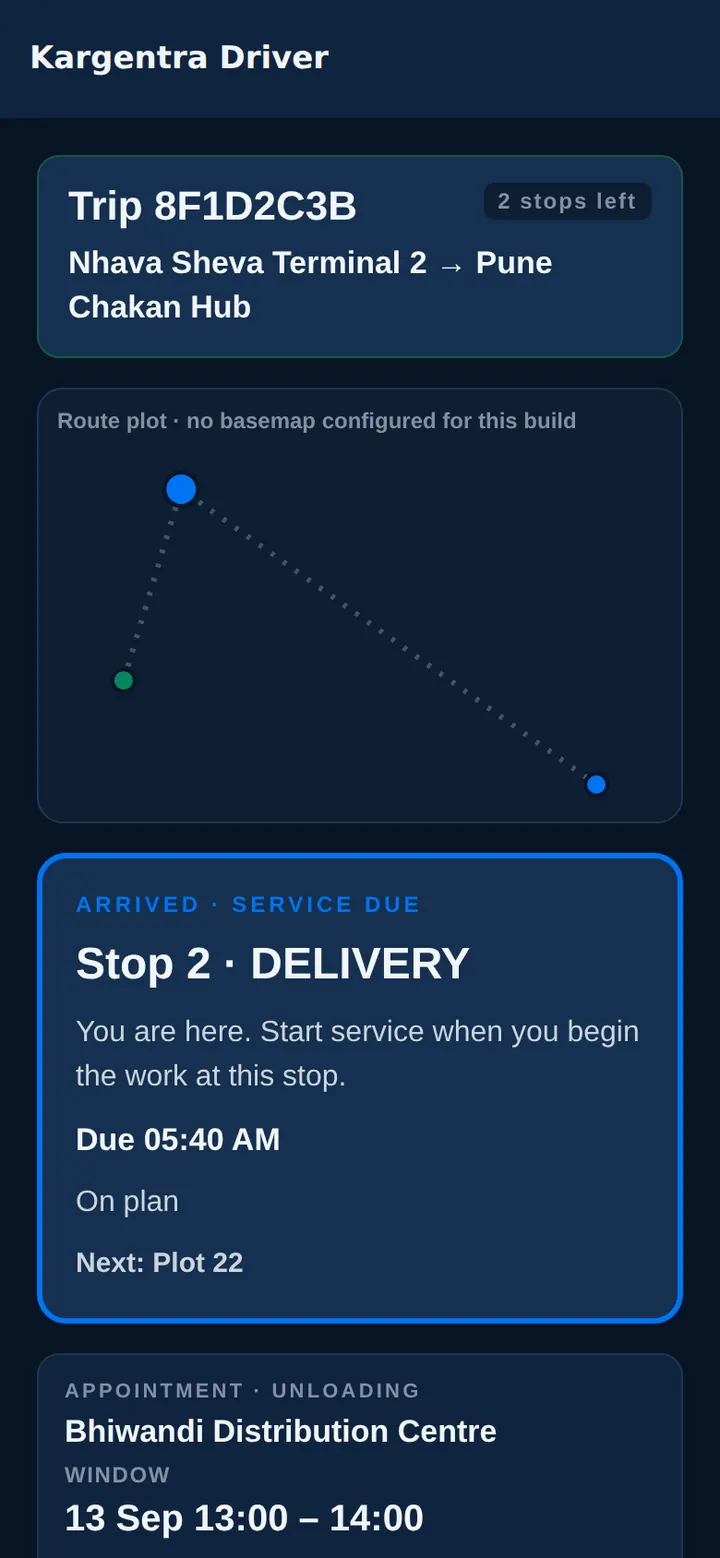
Driver app · arrived, service due, in dark mode


Governed AI inside YMS
Ask Kargentra reads the record you are looking at, cites every fact it uses and proposes the next step. Nothing changes until a person with the right permission approves it.
- Why is the trailer at Door 5 not released?
- Which appointments today need rescheduling?
Visit YV-3318 finished service at Door 5 at 14:05, but a release hold is in force: the trailer observed at the gate, TRL-5521, is not the trailer on the appointment, TRL-5512. Dwell is 2 h 40 min against 2 h of free time, so detention is accruing on this visit. Separately, two inbound appointments after 16:00 are flagged at risk by delivery-risk signals on their trips.
- Gate check · trailer · expected TRL-5512 · observed TRL-5521
- Release hold · in force · identity mismatch
- Dwell · 2 h 40 min · free time 2 h
- Needs rescheduling · 2 at risk after 16:00
Proposal · requires approval
Correct the trailer on the appointment to TRL-5521, clear the release hold with that reason and release the visit to transport.
Approver: Yard coordinator. Applied only through the governed action, and recorded in the audit trail.
Exceptions and edge cases YMS handles
Real operations are mostly exceptions. These are handled as first-class states with an owner, evidence and a next step, not as notes in a spreadsheet.
- The trailer at the gate is not the trailer on the appointment: the visit stays at Arrived, needs match until it is resolved.
- A truck arrives without an appointment: the unplanned arrival opens one appointment, and a retry never opens a second.
- The inbound trip is running late: its appointment joins the needs-rescheduling queue before the window is missed.
- Every compatible door is occupied: the vehicle waits in the dock queue with its dwell clock already running.
- Service completes while a release hold is in force: the vehicle cannot leave until the hold is cleared with a reason.
- A visit runs past free time: detention moves from accruing to accrued, priced in the tenant's currency.
- A supplier asks for a window the yard cannot honour: the request stays requested, not confirmed, and the supplier can see it.
- An external yard system reports an observation: it is stored as evidence, never as the visit's own state.
Who uses YMS
Gate operator
Records vehicles at the gate, matches driver, tractor and trailer to the appointment, and opens unplanned arrivals.
Dock scheduler
Confirms requested windows, balances inbound and outbound appointments and works the needs-rescheduling queue.
Yard coordinator
Assigns compatible doors, applies and clears release holds, and releases vehicles to transport.
Warehouse supervisor
Sees which inbound and outbound work is waiting for an appointment or a door, and when service completes.
Commercial manager
Reviews dwell against free time and files evidence-backed detention as an accessorial.
Dispatcher
Reads yard and warehouse facts as readiness checks before releasing the movement.
Yard Management at a glance
A scannable reference for evaluation teams and RFPs.
| Appointments |
|
|---|---|
| Gate |
|
| Dock |
|
| Release |
|
| Dwell and detention |
|
| Integrations |
|
Connected to the rest of Kargentra
Every module reads and writes the same record, so a hand-off is a state change rather than a re-keyed file.
- Warehouse ManagementService at the dock links to the warehouse receipt or load, and warehouse work awaiting an appointment is visible to the yard.Explore WMS
- Supplier PortalSuppliers request dock windows with their ASN and see the confirmed window or the yard's observations.Explore Supplier
- Transportation ManagementDelivery-risk signals queue appointments for rescheduling, and yard release feeds the dispatcher's readiness checks.Explore TMS
- Driver AppDrivers see their appointment window and service status at the stop, on the same visit record.Explore Driver
- Freight Finance & BillingEvidence-backed detention is filed as an accessorial on the movement's commercial record.Explore Finance
- Control Tower & Live TrackingDwell breaches and blocked visits surface with an owner alongside the rest of the operation.Explore Control Tower
YMS: frequently asked questions
What is a yard management system?
A yard management system controls what happens between the gate and the dock: appointments, check-in, which vehicle waits where, which door it gets, how long it stays and when it may leave. Kargentra Yard Management does this on the same record as the warehouse and transport, so a gate arrival, a dock door and a release are facts every team reads the same way.
How does dock appointment scheduling work?
Suppliers, carriers or the warehouse request a window for an inbound unload or an outbound load. The request stays requested, not confirmed, until the dock scheduler confirms it, and both windows are kept side by side. When delivery-risk signals show a trip will be late, its appointment joins a rescheduling queue, ordered late before at risk.
How does gate check-in work?
The gate operator records the vehicle and matches the driver, tractor and trailer against the appointment, each as expected against observed. When everything agrees, the vehicle joins the dock queue. A mismatch keeps the visit at Arrived, needs match, and a truck without an appointment is opened as an unplanned arrival exactly once, however many times it is retried.
How are dwell time and detention calculated?
Dwell runs from check-in to release and is compared with the free time and detention rate the tenant configures. The visit reads Within free time, Detention accruing or Detention accrued, with the amount in the tenant's currency. Detention never becomes a charge on its own: a person files it as an accessorial, with the recorded times as evidence.
How does the yard connect to the warehouse and TMS?
Service at the dock links to the warehouse receipt or load, and warehouse work waiting for an appointment is visible to the yard. Transport delivery-risk signals queue appointments for rescheduling. Yard release feeds the dispatcher's readiness checks, but a vehicle leaving the yard is never treated as dispatch release, which stays with the dispatcher.
Can we keep an existing yard or gate system?
Yes, as a source of evidence. Observations from an external yard or gate system arrive through Connector Hub and are kept with their source and time, and suppliers can see them beside their requested window. They never overwrite the visit's own state, so a stale or duplicated external feed cannot move a vehicle to the dock or release it from the yard.
Further reading
- Guide · 9 min readOMS vs WMS vs TMS: what each system doesOrder, warehouse and transportation management compared: what each system owns, where they hand off and how to choose the right mix.
- Guide · 9 min readWhat is a logistics control tower?What a logistics control tower does, how it differs from a visibility platform, the data it needs and the KPIs that survive scrutiny.
- Guide · 9 min readFreight audit and billing readiness, explainedThe freight audit process step by step, why delivery evidence decides billing readiness, common invoice errors and how disputes are resolved.
Take the YMS datasheet with you
Capabilities, workflow, capability reference and the questions buyers ask, on two pages.
PDF · 2 pages · 360 KB
See Kargentra run your operation
A working session on your lanes, your sites and your hand-offs: order to invoice, on one record.