The logistics operating system. One record, from order to invoice.
Kargentra is logistics management software for shippers, 3PLs, carriers, distributors and brokers. Orders, transport, warehouse and yard, partner portals, a driver app and freight finance run on one operational record, and governed AI explains and proposes while your people approve.
Screens on this site are captured from the running Kargentra application or rebuilt from its real screens. All data shown is demonstration data.

Five facts the product makes true
Counted from the platform itself, not from a survey.
8role-built applications
Operations, warehouse handheld, tenant and platform administration, and the carrier, customer, supplier and driver apps.
1operational record
Order, shipment, load, trip, evidence and invoice stay linked, so a hand-off is a state change rather than a re-keyed file.
9order-to-delivery stages
From order intake to billing readiness, each owned by Kargentra, a connected system or a person.
3deployment shapes
TMS-only, WMS-only or the full connected operating system, from one tenant.
4transport modes
Road, rail, ocean and air legs planned as one multi-leg journey.
Follow one consignment from order to invoice
Most software calls everything a shipment and everything in progress. Kargentra names each state precisely and records who moved it. Here is one consignment on a single record: the order forms a shipment, the shipment is planned onto a load, a trip carries the load, and the delivery evidence passes the billing checks before an invoice is issued.
- Order
- ORD-88214
- Shipment
- SHP-30418
- Load
- LOAD-2291
- Trip
- TRIP-4410
- 01 · Order · OMSOrder acceptedCommitted 14 Oct
- 02 · Shipment · OMSShipment formed18 pallets, 2 stops
- 03 · Load · TMSLoad plannedStop order proposed
- 04 · Load · TMSTenderedRouting guide, 1st carrier
- 05 · Load · Carrier portalBookedCarrier capacity confirmed
- 06 · Trip · TMSReleasedReadiness checks passed
- 07 · Trip · Driver appIn transitPlanned 14:30 · ETA 14:20
- 08 · Trip · Driver appDeliveredActual 14:24
- 09 · Delivery · Driver appPOD capturedSignature + 2 photos
- 10 · Delivery · TMSEvidence completeAccepted by operations
- 11 · Finance · Freight FinanceBilling readyRate and accessorials checked
- 12 · Finance · Freight FinanceInvoicedINV-24-0412 issued
- Precise by design
Requested is not committed
The requested date, the proposed date, the committed date, the live ETA and the actual arrival are stored as separate facts, so an on-time figure cannot quietly use the wrong one.
- Precise by design
Accepted is not booked
A carrier that accepts a tender accepts its amount; the booking then confirms capacity and resources. Released is not picked up, and arrival is not proof of delivery.
- Precise by design
Evidence complete is not billing ready
Signature and photos complete the evidence. Billing readiness also checks the rate, the accessorials and the agreement before Finance can issue an invoice.
Six systems keep six versions of the truth
In most operations the order lives in the ERP, the plan in a spreadsheet, the tender in an inbox, stock in the warehouse system, the position in a tracking portal and the invoice in accounting. Each is right about something and wrong about the rest, and people reconcile the gaps by phone.
Hand-offs become state changes
A tender acceptance from the carrier portal, a POD from the driver app and an ASN from a supplier all update the same record, with the actor and the time recorded.
Every figure says how it was counted
Manager health metrics show their numerator, denominator, scope and read time. A value the system cannot know is shown as unknown, never as zero.
Exceptions arrive with their context
When a delivery is at risk, the case opens on the record with its order, load, trip, carrier and documents already attached, and an owner named.
Thirteen products. One operating system.
Start with one module or run them all. Each is a complete product for its role, and each reads and writes the same operational record, so nothing is exported, re-keyed or reconciled between them.
- TMS
Transportation Management
Plan and optimise loads, source and tender carriers, release with readiness checks, supervise execution and close each delivery to finance.
Explore TMS - OMS
Order Management
Capture orders from every channel, validate them with one rule, promise against real availability and route fulfilment to native or external legs.
Explore OMS - WMS
Warehouse Management
Scan-first receiving, putaway, picking, packing and staging on phone, tablet or desktop, with 3PL client ownership on every unit.
Explore WMS - YMS
Yard Management
Appointments, gate check-in, dock doors, dwell and release, with expected and observed driver, tractor and trailer matched at the gate.
Explore Yard Management - Visibility
Control Tower & Live Tracking
Every queue that needs a person, most urgent first, with each position labelled by its source and ETA risk kept apart from the plan.
Explore Control Tower - Governed AI
Ask Kargentra
Ask a question on any screen. Answers cite the record they came from, and proposals wait for a person with the right permission to approve them.
Explore Ask Kargentra - Collaboration
Collaboration Center
Conversations anchored to the order, load or invoice, with internal notes kept internal and partners scoped to what is shared with them.
Explore Collaboration Center - Finance
Freight Finance & Billing
Billing readiness, freight audit, invoices, disputes, credit notes and supplemental invoices, all built from facts already on the record.
Explore Freight Finance - Admin
Administration & Configuration
Decide who owns each stage, publish operating profiles after an effective preview, and govern roles, permissions and onboarding.
Explore Administration - Network
Carrier Portal
Carriers quote, accept tenders, nominate driver and equipment, and file delivery evidence on the same record.
Explore Carrier Portal - Network
Customer Portal
Customers place orders, see the committed delivery date, track shipments, and review or dispute invoices.
Explore Customer Portal - Network
Supplier Portal
Suppliers confirm purchase orders, declare ASNs, request dock appointments and answer receipt discrepancies.
Explore Supplier Portal - Network
Driver App
Offline-first stops, delivery attempts and proof of delivery with signature and photos, synced when signal returns.
Explore Driver App - Connect
Integrations
Connector Hub, EDI X12 204, REST APIs, signed webhooks, event streams and ERP connectors, with health, failures and replay in one place.
Explore integrations - Foundation
Trust & Security
Tenant isolation by row-level security, scoped and revocable sharing, sealed credentials and hash-chained audit evidence.
Explore Trust & Security
The journey of one order, screen by screen
Follow the hand-offs that usually happen across separate systems. Each screen is captured from the running Kargentra application with demonstration data, apart from the finance close, which is rebuilt from its real screen.


- 01Order Management · Order command
An order arrives and is accepted
ORD-88214 comes in through the customer portal, an ERP connector or an EDI X12 204 tender. One deterministic rule validates it, the same rule that guards acceptance, so what the queue shows is what the system enforces. The customer’s date is stored as requested, not as a promise.
app.kargentra.com/orders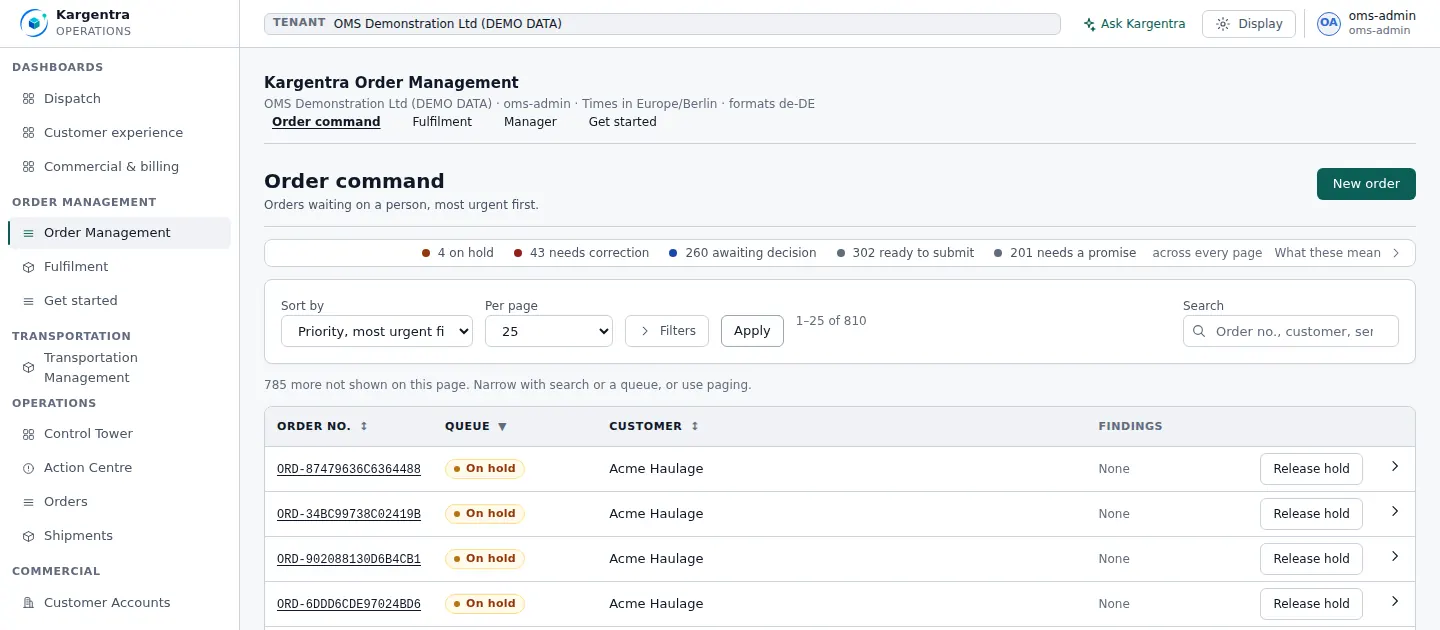
- 02Order Management · Fulfilment workbench
Fulfilment splits into warehouse and transport legs
The order is promised against real warehouse availability and split into legs. Each leg shows whether Kargentra or an external system owns it, and when two sources disagree the screen says so instead of assuming the order is ready.
app.kargentra.com/orders/fulfilment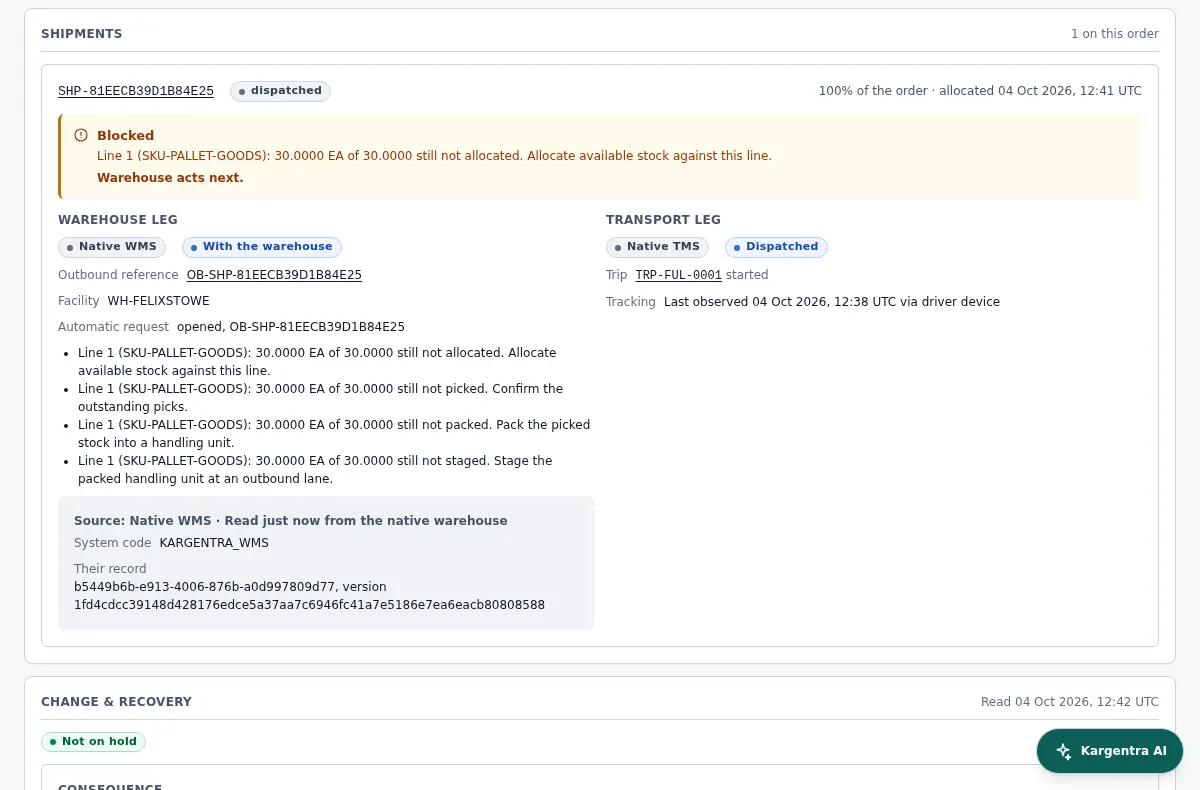
- 03Warehouse Management · Supervisor
The warehouse picks, packs and stages
Floor teams work scan-first on a phone or handheld. Short picks, quarantines and discrepancies reach the supervisor as decisions with a reason attached, and Warehouse Ready is recorded as its own state, separate from Dispatch Ready.
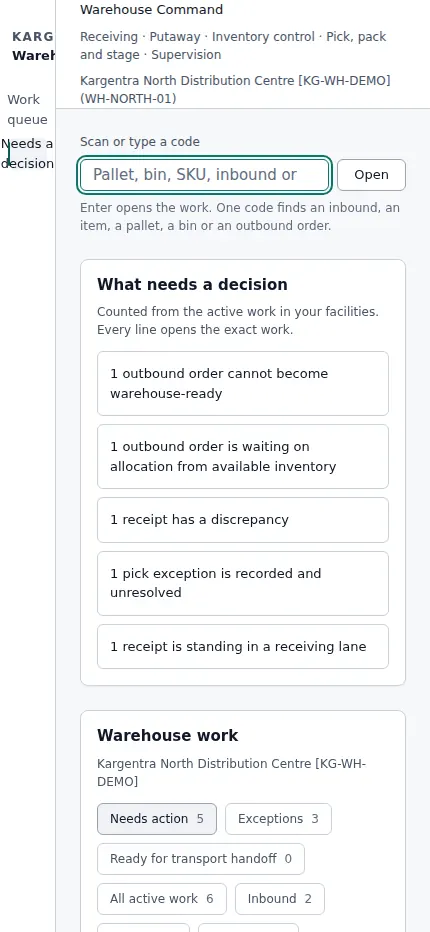
- 04Transportation Management · Planning
Transport is planned and optimised
Shipments with complete planning facts enter the optimisation pool, and the rest are listed with what is missing. The optimiser proposes a stop order, the planner approves it, and every option that was refused shows the reason it was refused.
app.kargentra.com/transportation/planning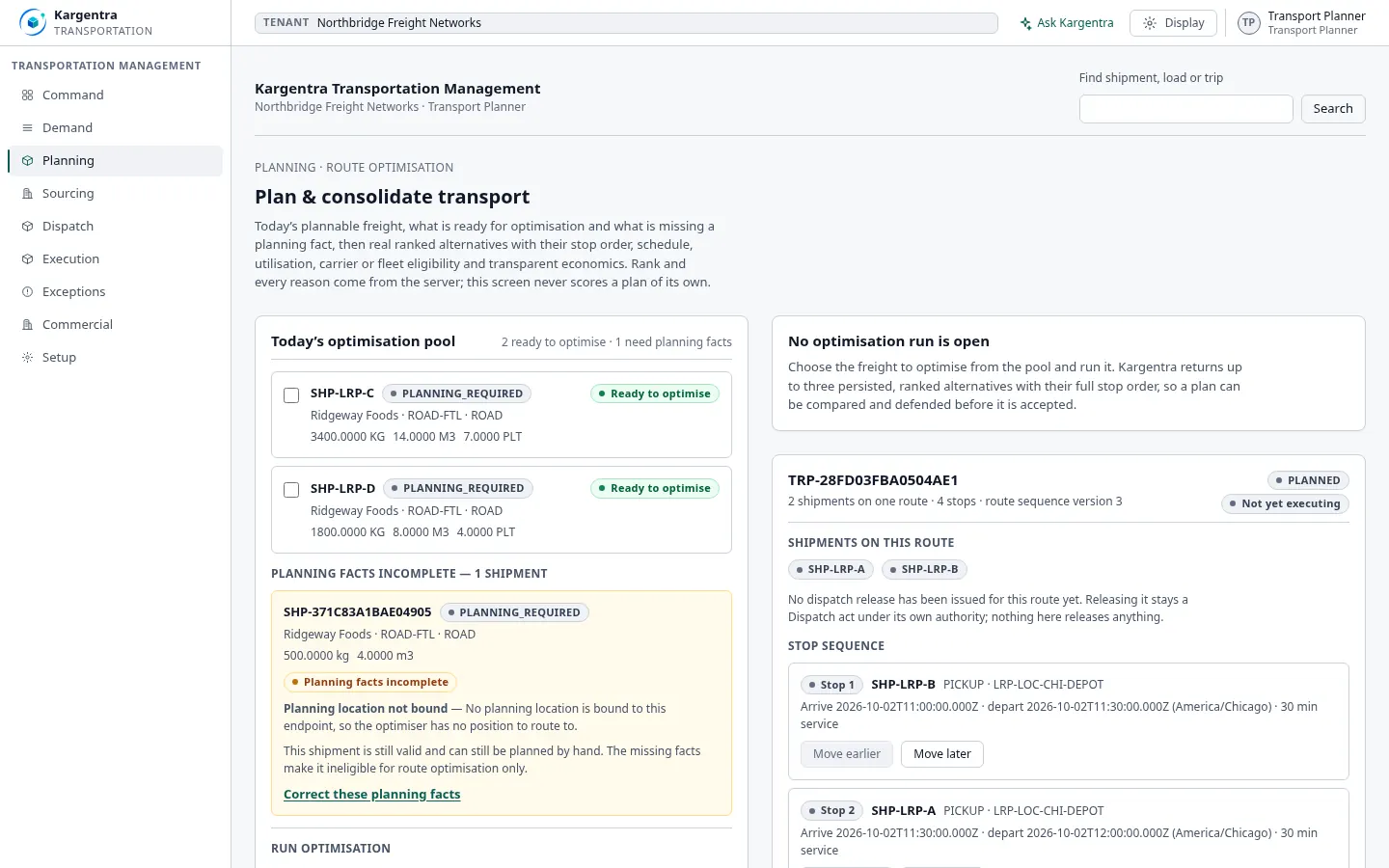
- 05Carrier Portal · Tender
A carrier is tendered and booked
LOAD-2291 goes out under the lane’s routing guide. The carrier answers in its own portal with everything it needs on one page, and accepting the tender accepts the amount. A carrier that declines or lets a tender lapse is never offered the same load again.
carrier.kargentra.com/tenders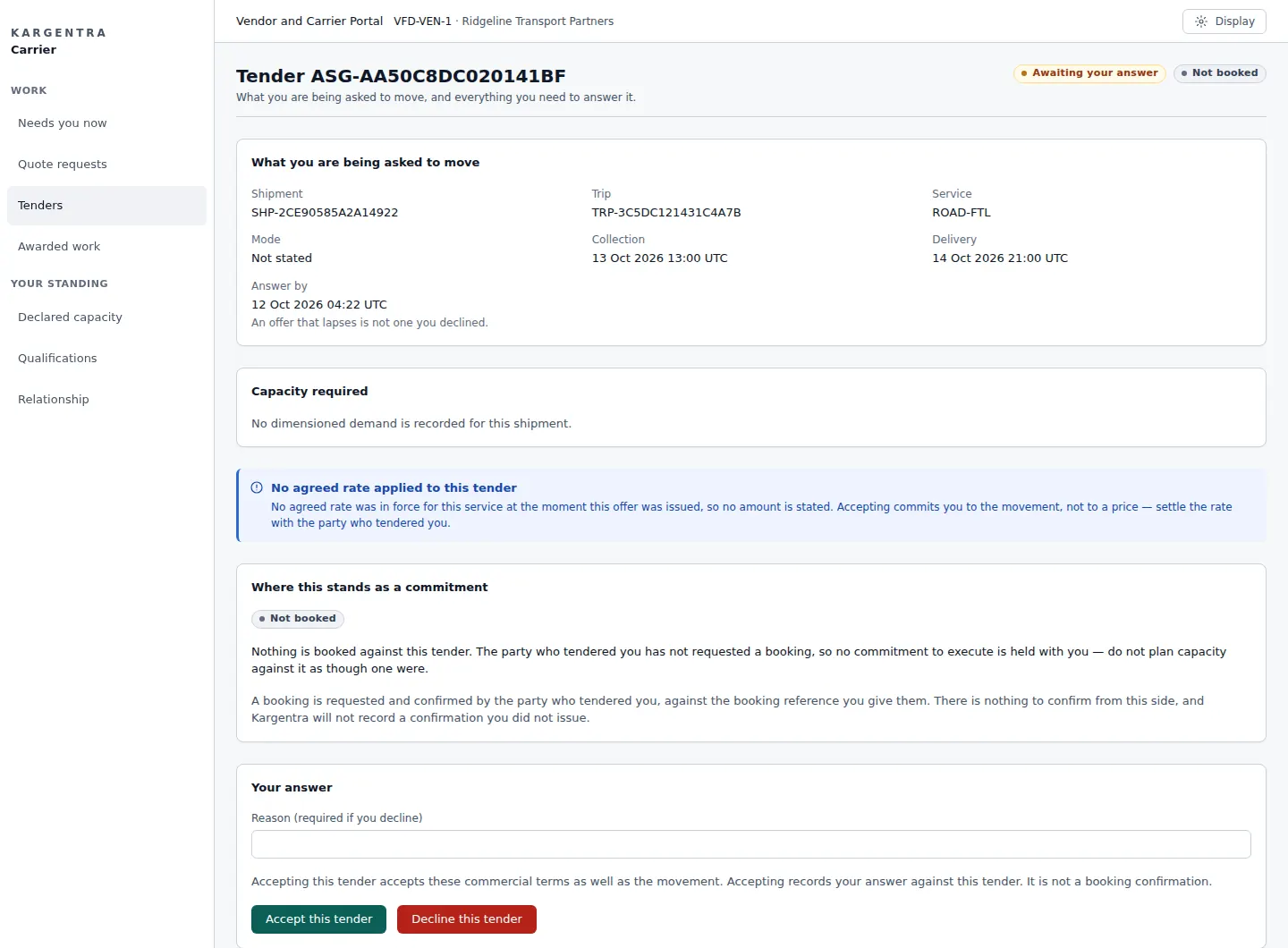
- 06Transportation Management · Fleet readiness
Resources are confirmed and the trip released
Driver, tractor and trailer combinations are shown as Eligible, Blocked or Cannot confirm, each with a reason code. Hours of service that are unknown are never treated as feasible, and release is recorded apart from driver acknowledgement and pickup.
app.kargentra.com/fleet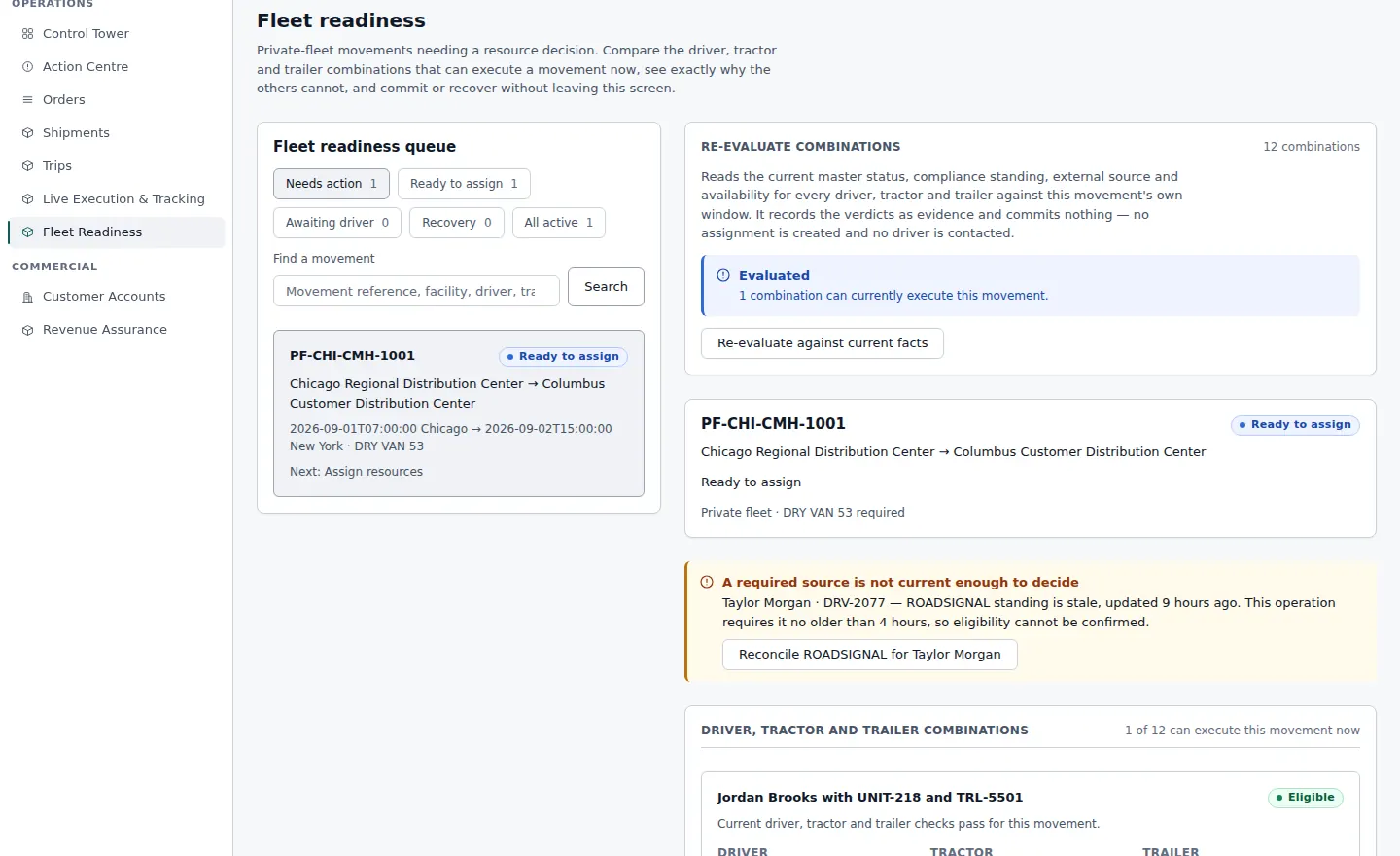
- 07Driver App · Active run
Delivered, with proof captured offline
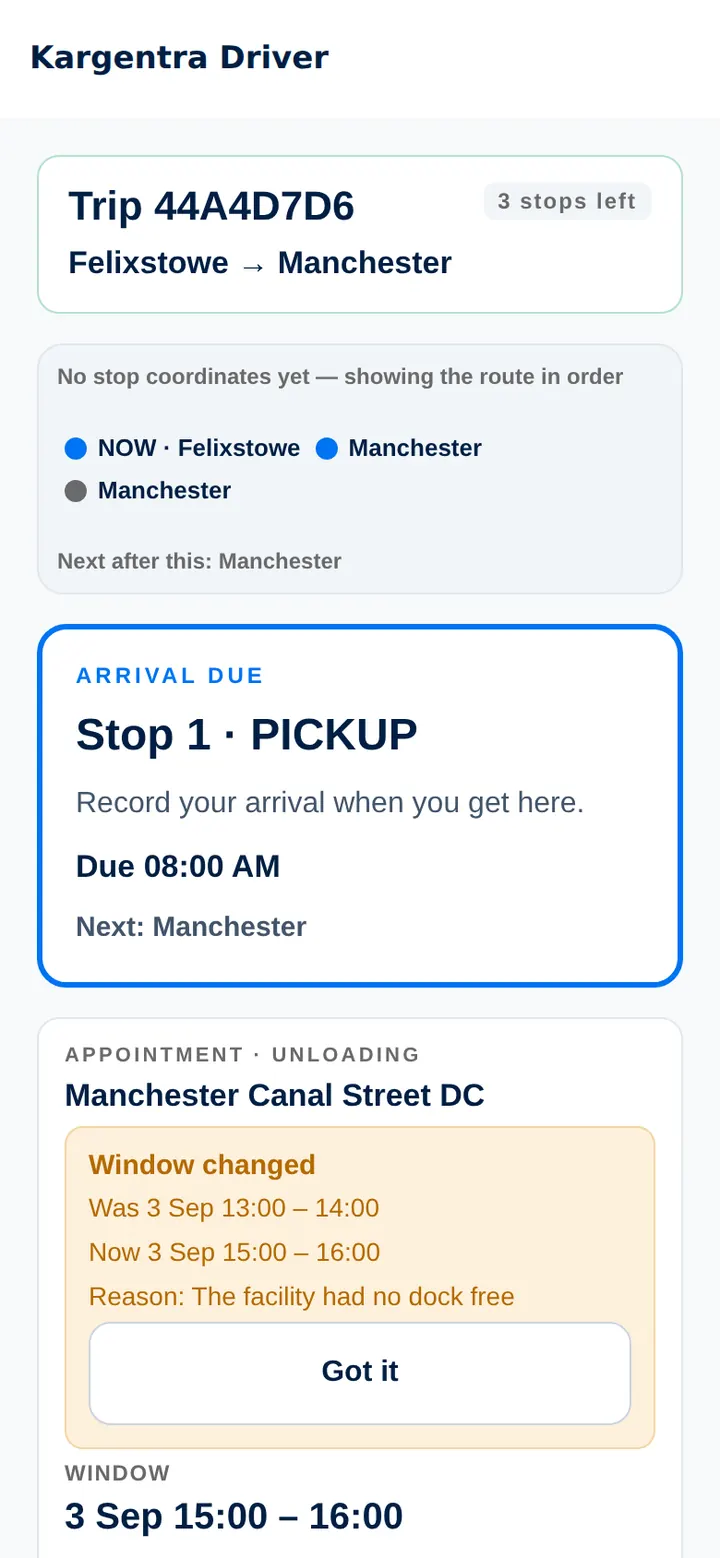
The driver works the stop list with or without signal. Arrival, the delivery attempt and the proof of delivery are separate events; the signature and photos queue on the device and sync to TRIP-4410 when the network returns.
- 08Freight Finance · Delivery-to-finance close
Billing ready, then invoiced
Evidence complete starts the commercial check: the rate, the accessorials and the agreement. Only when the work is billing ready does Finance issue the invoice, from facts already on the record and without typing an amount.
TRIP-4410 · Billing readinessINV-24-0412- Evidence completePOD accepted by operations
- Rate confirmedCustomer agreement v3 applied
- Accessorials reviewedDetention evidenced, approved
- Billing readyHanded to Finance, read-only
Exceptions become owned cases, not phone calls
Background checks look for delivery risk, silent tracking, hours-of-service shortfalls, route deviation, missing POD and partial delivery. Each one opens a case on the record with an owner, the evidence and a next step.
- 01
Detect
Deterministic checks compare the plan with what is observed and label every position by its source and freshness.
- 02
Explain
Ask Kargentra summarises the case with citations: which stop, which window, which source went quiet.
- 03
Recover
A supervisor replaces the driver or vehicle, re-tenders or reschedules. A recorded attempt is never treated as the fix.
- 04
Verify
The case closes only when the record shows the recovery held, such as a new ETA inside the committed window.

Planned, observed and authoritative are kept apart
Live Execution shows each stop’s planned window beside what was actually observed. Every position carries its source and freshness, and a position on its own never changes a trip’s status: an arrival is recorded as an event, with a person or a device behind it.
- Driver device, labelled with freshness and quality
- Vehicle telematics, labelled with freshness and quality
- ELD connector, labelled with freshness and quality
Ask Kargentra on a dispatch record: a cited answer, then a proposal that waits for approval.
AI that shows its work. People who sign it off.
Ask Kargentra is on every authenticated screen. It answers from the records you are allowed to see, cites each fact and drafts the next step as a proposal. A person with the right permission approves it, or nothing happens.
01Reads only permitted context
Answers use the records, fields and documents your role can already open. Internal notes never reach an external party or an AI summary.
02Cites every fact
Each statement links to the record field it came from, with its source and how fresh it is.
03Proposes, never executes
A re-sequence, a re-tender or a customer update is drafted as a proposal. There is no automatic external send.
04A named person approves
Each proposal names the role that must approve it, and is applied through the same governed action a person would use.
05Every invocation is recorded
Questions, answers, proposals and approvals are on the audit trail, and each tenant controls whether and where AI runs.
Each role gets its own workspace on the same record
Kargentra is not one screen with permissions bolted on. Each role works in an application built for its job, and a control a person cannot use names the permission it needs instead of quietly disappearing.
Operations · Transportation
Dispatcher
Works the transport day from the command queue to release, live execution and recovery.
- Release trips once readiness checks pass
- Watch execution against planned windows and act on ETA risk
- Recover exceptions with an owner and a verified outcome

Warehouse handheld
Warehouse lead
Runs the floor from a phone or handheld, with every decision that needs a lead in one queue.
- Clear receiving discrepancies against the PO and the ASN
- Release holds and quarantines with a recorded reason
- Stage outbound work and confirm Warehouse Ready

Operations · Freight Finance
Finance
Closes delivered work to invoice from facts already on the record, with no re-rating and no typed amounts.
- Check billing readiness: rate, accessorials and evidence
- Audit carrier bills against expected cost and resolve variances
- Issue invoices, and correct them only by credit note or supplemental invoice
- Evidence completePOD accepted by operations
- Rate confirmedCustomer agreement v3 applied
- Accessorials reviewedDetention evidenced, approved
- Billing readyHanded to Finance, read-only
Rebuilt from the billing readiness screen. Demonstration data.
Carrier Portal
Carrier
Answers quotes and tenders, staffs booked loads and files evidence, all in one portal.
- Answer quote requests and tenders from one inbox
- Nominate driver, tractor and trailer for booked loads
- File delivery evidence and raise disputes on the record

Customer Portal
Customer
Orders, follows deliveries and reviews invoices against the same record the shipper works from.
- Place orders and see the committed delivery date
- Track shipments with the position the shipper chooses to share
- Review invoices and dispute a line with evidence

Driver App
Driver
Runs the day’s stops on a phone that keeps working when the signal does not.
- Run the stop list online or offline
- Record arrival, delivery attempts and proof of delivery
- Report a problem with guided help

Tenant Administration
Administrator
Shapes how the tenant runs, with every change previewed before it takes effect.
- Choose who owns each order-to-delivery stage
- Publish operating profiles after an effective preview
- Govern roles, permissions and onboarding readiness

Carriers, customers, suppliers and drivers on the same record
Partners work in their own portals and apps, not in your inbox. Each sees only the records and fields shared with them, through sharing the owner can revoke at any time, with evidence of what was shared and when.
Carrier Portal
Scoped accessQuote, accept, nominate and file evidence in one place. The portal tells the carrier plainly that accepting a tender accepts the amount, and that accepted is not yet booked.
Tender inbox and quotesDriver, tractor and trailer nominationExplore Carrier PortalCustomer Portal
Scoped accessCustomers order, see the committed delivery date, track deliveries and dispute an invoice line, on a desktop or a phone.
Committed dates, not guessesInvoice line disputes with evidenceExplore Customer PortalSupplier Portal
Scoped accessPO ordered, ASN declared and WMS received appear side by side. Suppliers answer discrepancies on the record, and the warehouse owns the resolution.
ASNs and dock appointment requestsPerformance from recorded receiptsExplore Supplier PortalDriver App
Scoped accessOffline-first stops and proof of delivery, enrolled to the device and the driver’s identity. It also runs on its own for fleets that dispatch from another TMS.
Offline queue and Sync CenterSignature, photos and per-unit outcomesExplore Driver App


Start with TMS or WMS. Grow into the full operating system.
Each of the nine order-to-delivery stages can run in Kargentra, in a connected external system, in an external system updated by hand, or not at all. One availability decision drives what the API permits, what the effective preview shows and what appears in navigation, so the three can never disagree.
- Transport
TMS only
Plan, source, dispatch, track and close transport while orders and stock stay in your ERP and existing WMS. Orders arrive by EDI X12 204, REST API or connector.
Transport planning to delivery completion in Kargentra
- Warehouse
WMS only
Run receiving, inventory, picking, packing and shipping in Kargentra, with orders from your ERP or OMS and transport handed to the system you already use.
Warehouse fulfilment in Kargentra, the rest connected
- Operating system
Full connected
Order, warehouse, yard, transport, portals, driver app and finance on one record, from order intake to billing readiness.
All nine stages on one record
Who runs each stage is a setting, not a project
The Process Composer sets an owner for every stage, from order intake to billing readiness. A stage owned by an external system is never marked complete inside Kargentra, and the effective preview shows exactly what each role will see before a change is published.
- Kargentra
- External, connected
- External, updated by hand
- Not applicable
Connect what you already run
Kargentra works beside your ERP, an existing OMS, WMS or TMS, and your partners’ systems. Connector Hub shows every exchange with its health and failures, and a failed message can be replayed without creating a duplicate.
EDI X12 204
Load tenders kept as evidence with control numbers and a hash; an exact duplicate is never applied twice.
REST APIs
Contract-first OpenAPI, and every operation carries the permission it needs.
Signed webhooks
Inbound and outbound, with signatures verified and deliveries deduplicated.
Event streams
AsyncAPI-described events for status, milestones and exceptions.
ERP connectors
Orders and master data in, status and confirmations back out.
Maps and telematics
Road routing proposals, vehicle positions and ELD duty status, each labelled by source.
Isolation, scoped sharing and evidence you can verify
Security sits in the data model rather than at the edge. Tenants are isolated by row-level security beneath every API check, and every access decision follows the same five-step chain.
The authorisation chain
- Entitlementis distinct from
- Permissionis distinct from
- Record scopeis distinct from
- Workflow stateis distinct from
- UI visibility
Owning a product is not having permission, and having permission is not having access to every record. Each step is checked on its own, so a gap in one is never covered by another.
Tenant isolation
Forced row-level security in PostgreSQL sits beneath every controller check, so a query cannot read another tenant’s rows.
Scoped, revocable sharing
Owners share named records with a partner for a stated scope, see evidence of what was shared and revoke it, effective from the next request.
Hash-chained audit
Access changes and governed actions are recorded with hashes the owner can verify against the stored evidence.
Sealed credentials
Connector secrets use per-credential envelope encryption bound to the tenant and connection, with a visible rotation fingerprint.

Arranged around how your operation works
The same platform and the same record, set up for the work you actually do, whether you ship your own goods, run warehouses for clients, operate trucks or broker freight.
- SolutionShippers & ManufacturersOrders, outbound warehouses, carrier sourcing and freight cost control on one record, from plant to customer.Learn more
- SolutionThird-Party Logistics (3PL)Multi-client warehouses and transport with client ownership on every unit, service charging and client portals.Learn more
- SolutionCarriers & FleetsTenders, fleet readiness, hours-aware dispatch and offline proof of delivery for asset-based operators.Learn more
- SolutionDistribution & RetailSupplier ASNs, dock appointments, replenishment and returns, with delivery promises customers can rely on.Learn more
- SolutionFreight BrokersQuote to margin, carrier sourcing and tender recovery, with sell price and margin kept as separate facts.Learn more
- OverviewCompare every solutionSee side by side which modules each type of operation starts with, and how they connect on the same record.Learn more
Take the tour, or watch the film
Both are open to everyone, with no form to fill in first.
- Product tour
Order to invoice in eight chapters
Click through real screens and animated scenes at your own pace, from the first order to the issued invoice, with a working session offered at the end of each chapter.
Take the tour 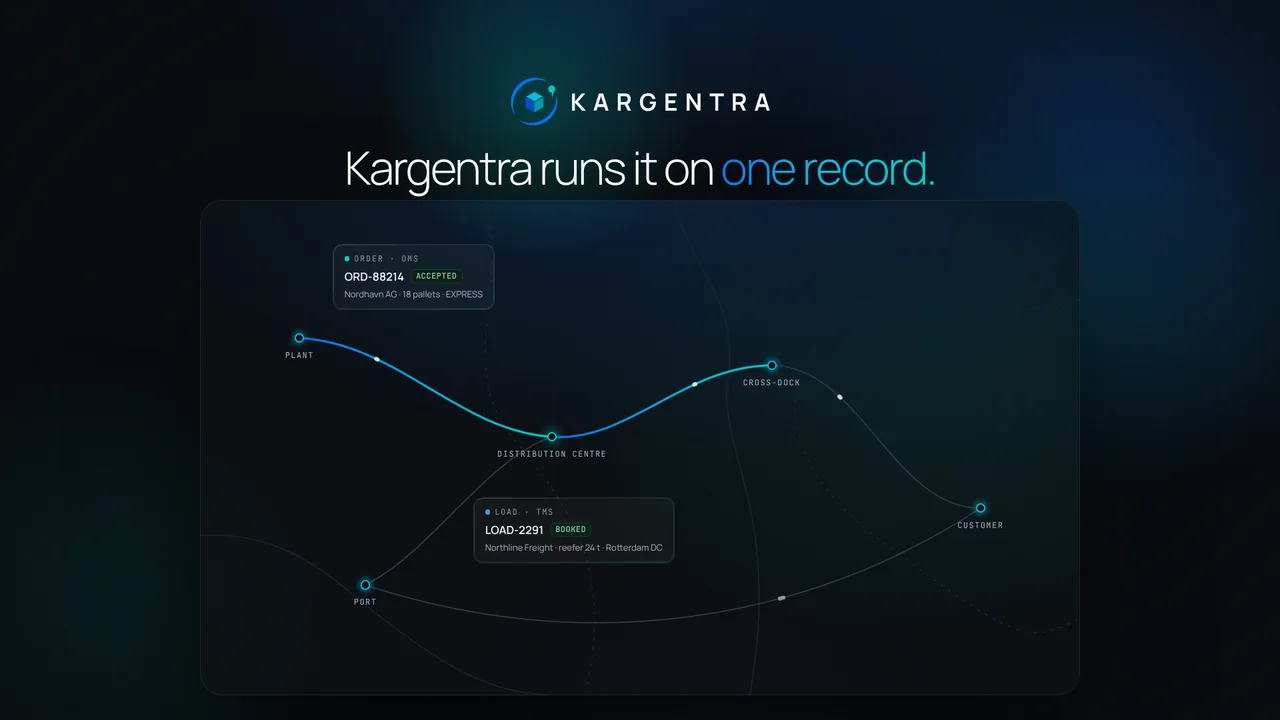 The Kargentra film
The whole operation in motion
One order from intake through planning, the warehouse, the road, proof of delivery and the invoice, told in the product’s own screens.
Watch the film
Guides for evaluating logistics software
Plain-language explanations of how order, warehouse and transport systems fit together, written with the same precision as the product.
- Guide · 8 min read
What is a transportation management system (TMS)?
What a TMS does, from planning and tendering to tracking, freight audit and billing, and how to judge one.
Read the guide - Guide · 8 min read
OMS vs WMS vs TMS: how the three systems fit together
Where order, warehouse and transport management start and stop, and what breaks at the hand-offs.
Read the guide - Guide · 8 min read
AI in logistics operations: assist, propose, approve
How to use AI in operations without handing it control: context, citations, proposals and approval.
Read the guide
Questions buyers ask first
What is Kargentra?
Kargentra is logistics management software built as one operating system. Order management, transportation, warehouse and yard management, a control tower, carrier, customer and supplier portals, a driver app, freight finance and governed AI all work on one operational record, so an order and its shipments, loads, trips, delivery evidence and invoice stay linked from intake to billing.
Can I use OMS, TMS and WMS together or separately?
Both. Kargentra runs as TMS-only, WMS-only or the full connected operating system from one tenant. Each of the nine order-to-delivery stages can be owned by Kargentra, by a connected external system, by an external system updated by hand, or marked not applicable, and one availability decision keeps the API, the effective preview and the navigation in agreement as you add modules.
How does Kargentra use AI without acting on its own?
Ask Kargentra reads only the records your role can open, cites every fact it uses and drafts the next step as a proposal. A person with the right permission approves it, and it is applied through the same governed action a person would use. There is no automatic external send, every invocation is recorded, and each tenant controls where AI runs.
Does Kargentra replace my ERP?
No. Kargentra works beside your ERP. Orders and master data arrive through ERP connectors, REST APIs, signed webhooks or EDI X12 204, and status flows back the same way. Kargentra owns the execution record from order acceptance to billing readiness, and invoices can be issued in Kargentra or by your accounting system, with Kargentra recording the confirmation.
How is our data kept separate from other customers?
Every tenant is isolated by forced row-level security in PostgreSQL, beneath the permission check on every API operation. Access follows one chain: entitlement, permission, record scope, workflow state and UI visibility. Sharing with a partner is scoped to named records, can be revoked at any time, and is recorded as evidence the owner can verify.
Who builds Kargentra?
Kargentra is a product developed by Ditstek Innovations Private Limited, incorporated in 2017. Every module, portal and app runs on one shared platform and one data model, which is why order, warehouse, transport, partner and finance work all read and write the same operational record rather than synchronising copies.
Bring a real lane or exception. We will walk it through Kargentra.
A working session on your orders, sites and hand-offs, from order to invoice on one record, with the people who build the product.