A no-code logistics workflow builder that changes what runs
Administration is Kargentra’s no-code logistics workflow builder, where you decide how your operation works: which of nine order-to-delivery stages Kargentra runs and which stay with systems you already own, which templates, forms and policies apply, who can do what, and how the workspace looks. Every change is previewed for a named person and role first, and the API enforces the same decision the navigation shows.
What changes for your operation
Coexist instead of re-platform
Keep the WMS or TMS you already run. Kargentra takes the stages you hand it and never marks an external stage as done on its own.
The preview is the product
Effective Preview, navigation and the API read one availability decision, so no menu item appears that fails on click and no screen hides a permission the API would still grant.
Go-live from facts, not a checklist
Readiness is computed across 14 dimensions from the system’s own state, and each blocker has an owner, a link to fix it and evidence.
Access an auditor can follow
Every permission traces to a versioned role and to the API contract that requires it, and every change lands in the audit history.
What Admin does
No-code process, configuration, onboarding, roles and branding
Process Composer
Choose who runs each of nine canonical stages, from order intake to billing readiness: Kargentra, an external system with governed data exchange, an external system updated by hand, or not applicable.
- Order intake, acceptance, warehouse fulfilment, transport planning, carrier sourcing
- Dispatch release, delivery execution, delivery completion, billing readiness
- Draft, compare against the live route, activate a new version
- An external stage refuses local writes, so two systems never both own it
Configuration Studio and templates
Platform and tenant templates bundle custom fields, forms, workflows, operating policies, experience, AI defaults, integrations and the process route. Apply them atomically and keep your own overrides when a template is upgraded.
- Per-item preview: Will be added, Will get a new version, Already matches, Your change is kept
- Needs setup by you and Cannot be applied stated before anything changes
- Save the current configuration as a reusable template
Effective Preview
Pick a person and a role and see exactly what they get: products, modules, route, forms, policies, integrations, AI, Context Layer and the screens offered, with the reason for each.
- Each blocker links to the place to fix it
- The same decision the API and navigation use
- Unknown facts render explained and inert, never as a working link
Tenant-composed operations
Run TMS on its own, WMS on its own or the full connected platform from one tenant. One availability decision across subscription, process stage and module activation drives what users see and what the API allows.
- Not in subscription, purchased but not switched on, run outside Kargentra and not in route are distinct states
- Template-driven order forms agree with server validation
- Direct API calls that bypass the screen are refused
Onboarding readiness
Go-live readiness is derived from live facts across 14 dimensions, from tenant identity and package to process route, connector chain, initial data, AI configuration and people.
- Headline: Ready to go live, or Blocked: N things must be fixed first
- Area chips: Ready, Blocked, Needs attention, Not needed
- Each blocker has an owner, a deep link and evidence
Data & Integrations
The one-time initial import is kept separate from ongoing integration. Activation projects take source data through profiling, mapping, ownership, validation and reconciliation to Ready for Pilot.
- Dataset catalogue: Supported, Governed but not yet loadable, Not supported
- Per-connection steps from sealed credential to first successful exchange
- Replay without duplicate effect
People, roles and permissions
A people directory, a versioned role catalogue and a My Access explainer show which role grants what, in which part of the organisation, and why.
- Person, role, can act in and status in one directory
- Warnings when access is not explained by any role, or survives removing one
- Entitlement, permission and record scope enforced separately
Products, packages and AI control
Your admin sees the package you bought, the products in it and where each is switched on. AI is governed per capability and autonomy mode, inside a ceiling you can narrow but never widen.
- Purchased modules and included platform capability shown separately
- AI modes from Off to Insight only to Draft, a person confirms
- Every AI invocation is recorded as evidence
Workspace theme and languages
Brand the operations workspace, the customer portal and the driver app with a governed design-token theme that your administrator selects for the tenant.
- Contrast and tap-size guardrails hold for every theme
- Tenant default language, including right-to-left scripts
- No arbitrary CSS or scripts in a tenant theme
See the effective policy before anyone works under it
Operating profiles hold the transportation policy that applies to a tenant and each customer, with the version in force and its history. Templates apply the same way: every item is previewed as added, upgraded, already matching, kept as your override or needing your setup, and nothing changes until the whole set applies atomically.
- Change History filtered by templates, route, custom fields, forms, workflows and policies
- Overrides survive a template upgrade
- Policy changes are versioned and prospective
- The effective result is shown for a chosen person and role

Initial import and ongoing integration, kept apart on purpose
Moving off spreadsheets or a legacy system is a project with an end: import, profile, map, decide ownership, validate, reconcile and reach Ready for Pilot. Live connections are a different thing with their own chain: sealed credential, connection tested, discovery run, mapping approved, connection switched on and records exchanged. Kargentra shows both separately and tells you plainly which datasets it can load.
- Activation tabs from Sources to Reconciliation and History
- Ownership decided per dataset before Ready for Pilot
- Rejected and duplicate records cleared before Ready for Pilot
- Connection health feeds onboarding readiness directly
Go-live readiness computed from 14 live dimensions
Nobody ticks a box to say the tenant is ready. Kargentra derives it: whether a package is assigned, products are active, an organisation and locations exist, an administrator is active, the route is valid, every external stage has a bound, tested and mapped connection, initial data has reconciled, and people other than administrators can run the work.
- Blocking and warning severity on every finding
- Each blocker names the area and links to it
- AI configuration is optional and flagged, never required
- Readiness changes the moment the underlying fact changes

From a blank tenant to a governed go-live
- 01
Package assigned
A platform administrator assigns a published package and sets the first tenant administrator. The tenant cannot entitle itself.
- 02
Template applied
Start from a platform template for your operation type and preview every field, form, workflow and policy it adds before applying it.
- 03
Route composed
In the Process Composer, decide which of the nine stages run in Kargentra, run externally with governed exchange, are updated by hand or do not apply.
- 04
Systems connected
Bind each external stage to a connection, seal its credential, test, discover and approve a mapping version.
- 05
Data loaded
Run the initial import through profiling, mapping, validation and reconciliation to Ready for Pilot.
- 06
People and roles
Invite people, assign versioned roles and check the result with My Access and Effective Preview.
- 07
Readiness proven
Onboarding readiness reads Ready to go live only when all 14 dimensions are satisfied by real data.
Inside Administration & Configuration
Captured from the running Kargentra application. Data shown is demonstration data.
- admin.kargentra.com
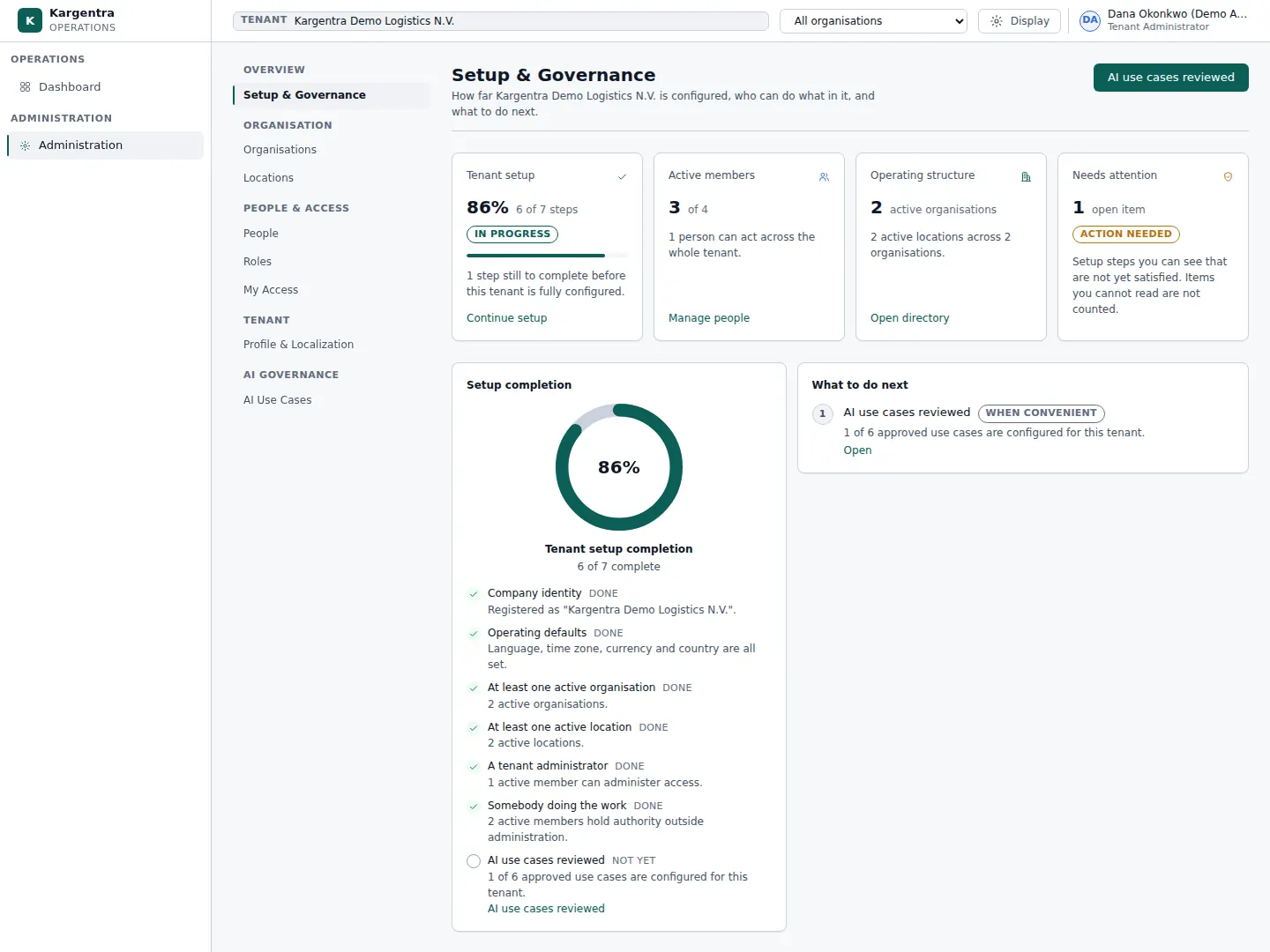
Administration · Setup & Governance - admin.kargentra.com/roles
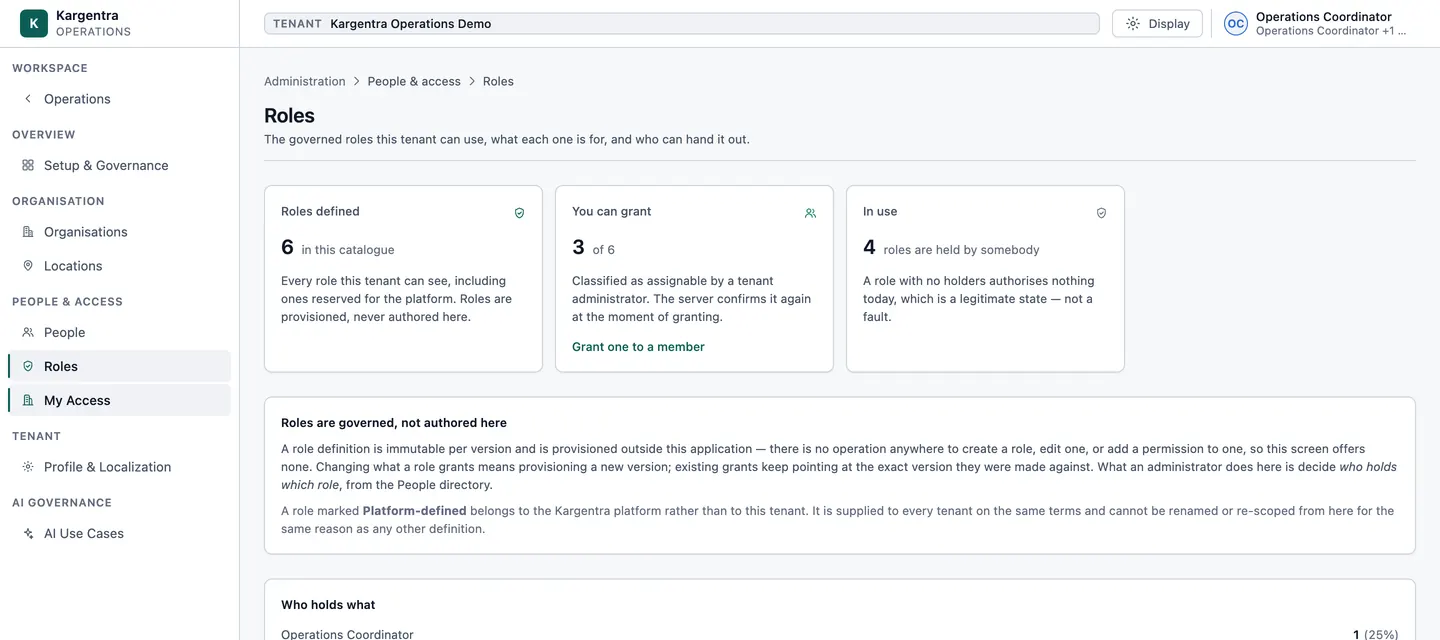
Administration · governed roles and permissions


Governed AI inside Admin
Ask Kargentra reads the record you are looking at, cites every fact it uses and proposes the next step. Nothing changes until a person with the right permission approves it.
- Why can this dispatcher not see Carrier sourcing?
- What blocks go-live right now?
- What would this template change?
The Dispatcher role at the Riverside DC site grants dispatch release but not the carrier sourcing permission, and Carrier sourcing is set to External, connected in route version 4, so the screen is not offered to anyone. Go-live is blocked by two dimensions: the external carrier system has no approved mapping version, and import project ACT-07 has not reached Ready for Pilot.
- Role · Dispatcher v3
- Process route · version 4 · Carrier sourcing
- Onboarding readiness · Mapping approval
- Activation project ACT-07
Proposal · requires approval
Open the mapping draft for the carrier connection and request approval of version 2.
Approver: Tenant administrator or Integration engineer with mapping approval permission. Applied only through the governed action, and recorded in the audit trail.
Exceptions and edge cases Admin handles
Real operations are mostly exceptions. These are handled as first-class states with an owner, evidence and a next step, not as notes in a spreadsheet.
- A stage marked as run externally refuses local writes with an ownership conflict, so the external system stays the only owner.
- A template item that conflicts with a tenant override keeps the override and says so, instead of overwriting it silently.
- An external stage with no bound connection blocks go-live with the stage named and a link to bind it.
- A dataset Kargentra cannot load yet is listed as Governed but not yet loadable, rather than failing during import.
- Access that survives removing a role is flagged in the explainer, so least privilege can be proven.
- A navigation fact that cannot be resolved renders as explained and inert, never as a working link that fails.
- Ready for Pilot is refused while reconciliation is missing, mismatched or stale.
Who uses Admin
Tenant administrator
Composes the process route, applies templates, manages people and roles, and checks every change in Effective Preview before it takes effect.
Implementation consultant
Runs activation projects from source data to Ready for Pilot and saves a working configuration as a template for the next site.
Integration engineer
Binds external stages to connections, seals credentials, approves mapping versions and watches the connector chain in readiness.
Security officer
Reviews role definitions, the access explainer and the audit history of every access and configuration change.
Brand owner
Selects the governed workspace theme and the tenant’s languages, including right-to-left scripts.
Platform administrator
Creates tenants, assigns packages and moves tenants through set-up, active, suspended and closed, without access to tenant business data.
Administration & Configuration at a glance
A scannable reference for evaluation teams and RFPs.
| Process Composer |
|
|---|---|
| Configuration Studio |
|
| Onboarding readiness (14 dimensions) |
|
| Tenant-composed operations |
|
| Access and identity |
|
| Experience and branding |
|
| Integrations |
|
Connected to the rest of Kargentra
Every module reads and writes the same record, so a hand-off is a state change rather than a re-keyed file.
- Order ManagementOrder intake follows the configured order fields and the active process route, and new orders take the route version in force.Explore OMS
- Transportation ManagementOperating profiles set transport policy per tenant and customer, and transport planning can be handed to an external TMS stage.Explore TMS
- Warehouse ManagementWarehouse fulfilment can run natively or externally, and one stage owner governs native inbound, receipt, inventory, outbound and handoff writes.Explore WMS
- Ask KargentraTenant AI control decides which AI capabilities are on and at what autonomy, inside the package ceiling.Explore Ask Kargentra
- Driver AppThe driver app takes the tenant’s selected theme and the roles and device enrolment governed here.Explore Driver
- Supplier PortalVersioned supplier templates set field visibility and requiredness for each supplier community.Explore Supplier
Admin: frequently asked questions
Can I change logistics workflows without code?
Yes. In the Process Composer a tenant administrator chooses who runs each of nine order-to-delivery stages, saves a draft, compares it with the live route and activates a new version that new orders follow. Configuration Studio applies fields, forms, workflows and policies from templates. These changes alter what the API permits and what users see, not only the menus.
How are roles and permissions managed?
Roles are versioned entries in a role catalogue, and every API operation names the permission it requires. Administrators assign roles to people with a scope for where they can act. The My Access explainer shows each person what they can do and why, and warns when access is not explained by any role or would survive removing one.
Can we brand the portals with our own theme?
Yes, through a governed theme. A tenant administrator selects a governed design-token theme, which sets colours, typography and shape, and the operations workspace, the customer portal and the driver app apply it. Contrast and tap-size guardrails are checked before a theme goes live, the driver app follows it in light and dark, and tenants set a default language, including right-to-left scripts.
How is a new tenant onboarded?
A platform administrator assigns a published package and the first tenant administrator. The tenant then applies a template, composes its process route, connects any external systems and runs its initial data import to Ready for Pilot. Onboarding readiness tracks 14 dimensions from live data and reads Ready to go live only when every blocker is cleared.
Can we keep our existing WMS or TMS?
Yes. Any stage can be marked as run by an external system, connected through a governed data exchange or updated by hand. Kargentra then refuses local writes to that stage, records what the external system reports as observations, and never marks the external step as complete on its own. You can run TMS only, WMS only or the full platform.
What is Effective Preview?
Effective Preview shows, for a chosen person and role, exactly which products, modules, process route, forms, policies, integrations, AI capabilities and screens they will get, and why. It reads the same availability decision the API and navigation enforce, so what an administrator previews is what the person sees and what the API allows.
Further reading
- Guide · 9 min readOMS vs WMS vs TMS: what each system doesOrder, warehouse and transportation management compared: what each system owns, where they hand off and how to choose the right mix.
- Guide · 9 min readAI in logistics operations: assist, propose, approveWhere AI helps logistics teams today, what data it needs, and the guardrails that keep advice from turning into unapproved action.
- Guide · 10 min readWhat is a transportation management system (TMS)?What a TMS does, how it works from transport demand to freight audit and billing, who uses one and how to evaluate it without being sold a map.
Take the Admin datasheet with you
Capabilities, workflow, capability reference and the questions buyers ask, on two pages.
PDF · 2 pages · 333 KB
See Kargentra run your operation
A working session on your lanes, your sites and your hand-offs: order to invoice, on one record.