Logistics software security, isolation and evidence you can verify
Kargentra treats logistics software security as something the system proves: “who could see this, who changed it, and can you prove it?” is answered by the product itself. Tenant data is isolated by the database, access is decided in separate layers, sensitive actions leave hash-verifiable evidence, and Ask Kargentra reads only what the person asking is allowed to see.
What changes for your operation
Isolation enforced by the database
Tenant tables run under forced row-level security beneath application checks, so another tenant’s record reads as not found even if a query is wrong.
Access you can explain
Entitlement, permission, record scope, workflow state and screen visibility are checked separately, and every permission traces to a role and an API contract.
Evidence, not assertions
Actions are written to a hash-chained audit record with the actor, their membership and a correlation id, and integrity can be checked in the product.
AI that proposes, people who approve
Ask Kargentra reads permitted context only, cites its sources and proposes. A named role approves, every invocation is recorded and nothing is sent externally on its own.
What Trust & Security does
Tenant isolation, layered access, audit evidence and governed AI
Tenant isolation with row-level security
Every tenant-owned table runs under forced row-level security for a non-owner runtime role that must carry a tenant context. It is the last line beneath controller authorisation, not the only one.
- Another tenant’s record returns a non-disclosing not found
- New tables ship with row-level security forced from the start
- Isolation tests run in every connected release
Layered authorisation
Entitlement is not permission, and permission is not record scope. Each layer is enforced on its own: what the tenant bought, what the role allows, which records the person may act on, whether the transition is lawful, and what the screen shows.
- One availability decision drives the API, preview and navigation
- Calls that bypass the screen are refused by the API
- Unknown facts render inert, never as a working link
Governed roles and My Access
Every API operation names the permission it requires, and only a versioned role can grant it. Membership has a governed lifecycle, and My Access lets each person check what they can do and why.
- Warnings when access is unexplained or survives removing a role
- Platform roles are never tenant memberships
- Platform staff have no access to tenant business data
Hash-verified audit evidence
Business and administrative actions are written to a tenant-scoped audit record where each entry carries the hash of the one before it, with actor, membership and correlation id.
- SHA-256 record hash chained to the previous hash
- Document access records authorisation, never a claimed download
- Configuration changes browsable in Change History
Scoped, revocable shipment sharing
A shipment’s owner grants a named colleague a read-only share with a scope, a purpose and an optional end date. The recipient sees only the granted facts, and revocation takes effect on the next request.
- Scopes: shipment status and cargo summary
- Purposes: operational coordination, customer visibility, claims review
- Access can end automatically within 365 days
- Use as AI context only when both the share and workspace allow it
Sealed, replaceable credentials
Each integration credential is encrypted with its own AES-256-GCM data key, wrapped by a key-encryption key and bound to the tenant and connection, so a copied row cannot be decrypted elsewhere.
- Values are never shown again after storing
- Rotation proven by a keyed fingerprint
- Named refusals when the key is missing or malformed
Privacy-first diagnostics
The request log carries metadata from a closed allowlist, never request or response values, URLs, messages or stack traces. Tenant administrators troubleshoot by correlation id, and every lookup re-checks their authorisation.
- No debug-body switch for anyone, platform staff included
- Errors classified so a refusal never looks like an outage
- Cross-tenant aggregates suppress small groups, and event drilldown is purpose-recorded and audited
AI governance
Ask Kargentra reads only context the person asking may see, cites every fact it uses and proposes the next step. A named role approves through the governed action, and every invocation is recorded.
- Per-capability modes: Off, Insight only, or Draft that a person confirms
- A package ceiling the tenant can narrow but never widen
- No automatic external send; money, commitments and liability stay with people
Identity and single sign-on
Named people sign in through one standards-based OIDC realm across operations, administration, customer, supplier, carrier, warehouse handheld and driver apps, each carrying their own token.
- Strict single-audience token verification
- Sealed session cookies and brute-force protection
- Machine clients for integrations; enrolled, revocable driver phones
Every access change, with who, when, before and after
When someone changes another person’s access, the audit trail records the actor, their membership, the time and the values before and after. Because each record carries the hash of the previous one, a removed or edited entry breaks the chain and shows as a mismatch, so the history is evidence rather than a log someone could quietly tidy.
- Actor and membership attributed on every record
- Before and after values for access changes
- Correlation id links the record to the request
- Integrity checked in the product, not only by engineers

An answer with citations, and a proposal that waits for a person
Ask Kargentra answers from the record the person is looking at and the context they are permitted to read, and every fact in the answer is cited. When it suggests an action, the suggestion is a proposal with a named approver. Only the approver can apply it, through the same governed action and permission check a person would use without AI.
- Reads permitted context only; shares feed AI only when allowed
- Every invocation recorded as evidence
- Sensitive topics such as price, claims and liability go to a person
- Works with AI switched off, using deterministic answers
Roles you can read like a policy
Each role lists the permissions it grants, and each permission is the same one the API contract requires for an operation. Roles are versioned, so a change is a new version with a history. Administrators assign roles with a scope for where a person can act, and the access explainer flags anything that does not add up.
- Versioned role catalogue
- Permissions bound to API operations in the contract
- Scope for where a person can act
- Explainer warnings for unexplained or surviving access

How every request is authorised and recorded
- 01
Identity verified
The request carries a token for a named person or machine client, verified against a single expected audience.
- 02
Tenant context bound
The person’s chosen workspace binds the database session to one tenant, and row-level security is forced from there.
- 03
Entitlement checked
The product and module must be in the subscription, switched on and owned by Kargentra in the process route.
- 04
Permission checked
The person’s role must grant the permission the API contract names for this operation.
- 05
Record scope checked
The person must be able to act on this organisation, site or customer’s record, or hold an active share.
- 06
Transition checked
The change must be lawful from the record’s current workflow state, or it is refused with a reason.
- 07
Evidence written
The action lands in the hash-chained audit record with actor, membership and correlation id.
Inside Trust & Security
Captured from the running Kargentra application. Data shown is demonstration data.
- admin.kargentra.com
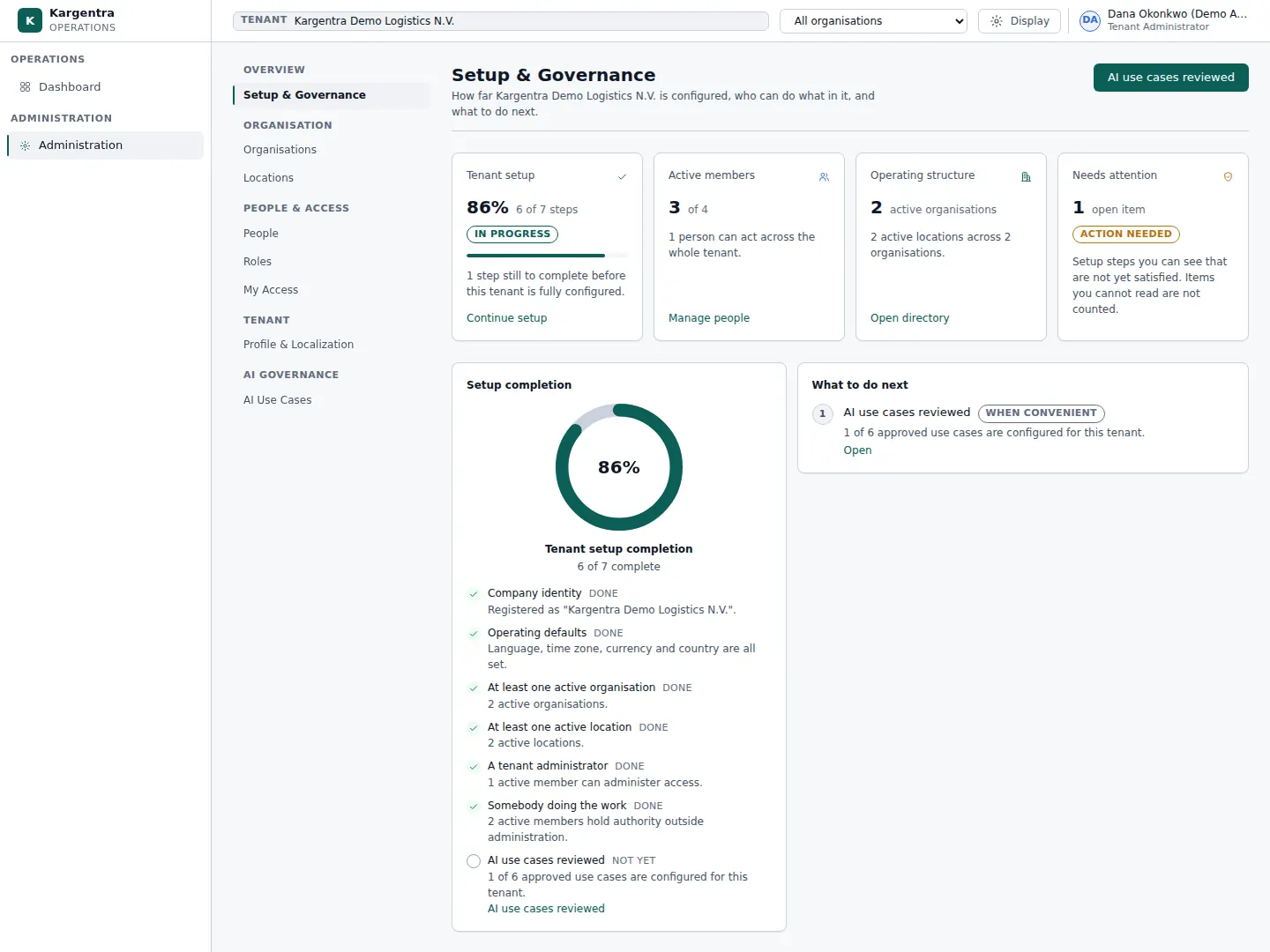
Administration · Setup & Governance - admin.kargentra.com/people
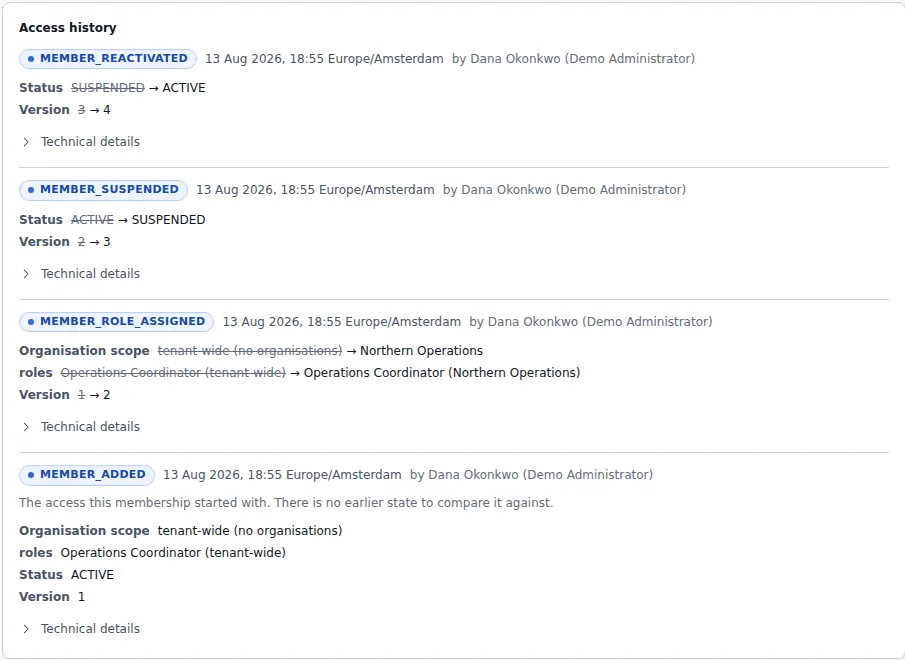
Administration · access change audit trail

Governed AI inside Trust & Security
Ask Kargentra reads the record you are looking at, cites every fact it uses and proposes the next step. Nothing changes until a person with the right permission approves it.
- Who can see shipment SH-61207?
- Why was this access refused?
- Has the sharing evidence been altered?
Shipment SH-61207 has one active share: a warehouse supervisor at the Riverside site holds the Shipment status scope for operational coordination, ending on 31 October. A second share was revoked on 7 October, and a read attempt by that recipient on 8 October was refused and recorded. All 14 evidence records match their recorded hash.
- Shipment SH-61207 · sharing
- Share grant · active · ends 31 Oct
- Evidence · refusal 8 Oct
- Integrity check · 14 of 14 match
Proposal · requires approval
Revoke the remaining share now, because the coordination purpose ended when the shipment was delivered.
Approver: Shipment owner. Applied only through the governed action, and recorded in the audit trail.
Exceptions and edge cases Trust & Security handles
Real operations are mostly exceptions. These are handled as first-class states with an owner, evidence and a next step, not as notes in a spreadsheet.
- A request for another tenant’s record returns not found, without confirming that the record exists.
- A share revoked while the recipient is reading ends on their next request, and the refusal is recorded.
- An expired share is replaced atomically, and a revoke sent twice at once takes effect only once.
- An evidence history that no longer matches its recorded hashes is flagged as a hash mismatch.
- A credential copied to another tenant or connection fails to decrypt, because the ciphertext is bound to both.
- A missing or malformed key-encryption key produces a named refusal rather than a fallback to plain text.
- Access that would survive removing a role is flagged, so least privilege can be demonstrated.
- AI asked about a record the person cannot read has no access to that record’s facts.
Who uses Trust & Security
Security officer
Reviews role definitions, credential handling, identity settings and the evidence behind every sensitive action.
Compliance officer or auditor
Reads the audit trail, checks evidence integrity and follows who accessed which documents and shares.
Tenant administrator
Assigns versioned roles with scope, governs AI per capability and troubleshoots by correlation id without seeing payloads.
Procurement and risk reviewer
Evaluates isolation, access control, audit, sharing and AI governance as described controls rather than badges.
Operations coordinator
Owns shipments, grants scoped shares to colleagues for a purpose and revokes them when the purpose ends.
Trust & Security at a glance
A scannable reference for evaluation teams and RFPs.
| Tenant isolation |
|
|---|---|
| Access control and identity |
|
| Audit and evidence |
|
| Scoped sharing |
|
| Credentials and diagnostics |
|
| AI governance |
|
| Integrations |
|
Connected to the rest of Kargentra
Every module reads and writes the same record, so a hand-off is a state change rather than a re-keyed file.
- Administration & ConfigurationPeople, roles, Effective Preview and Change History are where the access rules on this page are configured and reviewed.Explore Admin
- Ask KargentraEvery AI answer is cited, every proposal waits for a named approver and every invocation is recorded.Explore Ask Kargentra
- Transportation ManagementShipment owners grant scoped, revocable shares, and the recipient sees only the granted facts.Explore TMS
- Customer PortalCustomers see only their own account, and exact vehicle position is off until you enable it per account.Explore Customer
- Driver AppEach phone is enrolled with a signing key, signs its requests and can be revoked when lost.Explore Driver
- Collaboration CenterInternal notes stay internal, and an inbound external reply attaches only with a trusted machine identity.Explore Collaboration
Trust & Security: frequently asked questions
How is tenant data isolated?
Every tenant-owned table runs under forced row-level security in the database, for a runtime role that must carry a tenant context, beneath the application’s own authorisation checks. A request for another tenant’s record returns not found without confirming it exists. New tables ship with row-level security forced, and isolation tests run in every connected release.
What is recorded in the audit trail?
Business and administrative actions are recorded with the actor, their membership, the time and a correlation id that links back to the request. Each record carries the hash of the previous one, so an altered or removed entry shows as a mismatch. Access changes keep before and after values, and document access is recorded when it is authorised.
How does scoped shipment sharing work?
The shipment’s owner grants a named colleague a read-only share with a scope, such as shipment status or cargo summary, a purpose and an optional end date. The recipient sees only those facts. Revocation takes effect on the next request, and every grant, access, refusal and revocation is written to an evidence history whose integrity can be checked.
How is AI governed?
Ask Kargentra reads only the context the person asking is allowed to see, cites every fact it uses and proposes rather than acts. A named role approves any proposal through the normal governed action. Tenant administrators switch AI on per capability and choose its mode within the package ceiling, every invocation is recorded, and nothing is sent externally automatically.
Can Kargentra staff see our business data?
Platform administrators create tenants, assign packages and manage tenant lifecycle, but platform roles are never tenant memberships and cannot act inside your operation. Diagnostics are designed around metadata: the request log excludes request and response values, and there is no switch that reveals payloads to anyone, platform staff included.
How are integration credentials protected?
Each credential is encrypted with its own AES-256-GCM data key, which is wrapped by a key-encryption key. The ciphertext is bound to your tenant and the specific connection, so a copied record cannot be decrypted elsewhere. Values are never displayed after storing, and a keyed fingerprint proves a rotation happened without revealing the secret.
How do people sign in across the portals?
Everyone signs in through one standards-based OIDC identity realm, whether they use operations, administration, the customer, supplier or carrier portal, the warehouse handheld or the driver app. Tokens are verified for a single audience, sessions are kept in sealed cookies, and integrations use separate machine clients. Driver phones are also enrolled and can be revoked.
Further reading
- Guide · 9 min readAI in logistics operations: assist, propose, approveWhere AI helps logistics teams today, what data it needs, and the guardrails that keep advice from turning into unapproved action.
- Guide · 9 min readWhat is a logistics control tower?What a logistics control tower does, how it differs from a visibility platform, the data it needs and the KPIs that survive scrutiny.
- Guide · 9 min readOMS vs WMS vs TMS: what each system doesOrder, warehouse and transportation management compared: what each system owns, where they hand off and how to choose the right mix.
Take the Trust & Security datasheet with you
Capabilities, workflow, capability reference and the questions buyers ask, on two pages.
PDF · 2 pages · 341 KB
See Kargentra run your operation
A working session on your lanes, your sites and your hand-offs: order to invoice, on one record.