A carrier portal for tenders, quotes, bookings and qualification
Carriers sign in to a task-first carrier portal that shows what needs an answer before it lapses: quote requests, tenders, bookings, nominations, evidence and disputes. Behind it, your network team sees every carrier’s qualification, capacity, terms and recorded performance on one page, and your own fleet is checked for eligibility before anything is dispatched.
What changes for your operation
No tender lapses unseen
Carriers see work grouped by the question it asks, with deadlines close to lapsing at the top, and your team sees the same pipeline from its side.
Awards you can audit
Every award records the exact quote version, the alternatives compared and the reason given, and losing quotes are kept rather than overwritten.
Margin before commitment
Brokers price a customer quote against carrier buy options and see expected margin before anything is offered or booked.
Fleet problems found before dispatch
Driver, tractor and trailer combinations are checked for eligibility up front, with the reason a combination is blocked stated plainly.
What Carrier does
Tenders, quotes, bookings, carrier qualification and fleet readiness
“What needs you” carrier home
A carrier’s work is grouped into bands: awaiting your answer, about to lapse, booked and upcoming, evidence needs attention and recently resolved, each with a reason chip.
- One navigation for phone, tablet and laptop, with 44px touch targets
- Multi-account context for carriers serving several shippers
- Unreadable rows are stated, never hidden as zero
Quote requests and versioned quotes
Carriers price the movements they are invited to quote on, with an amount, currency, validity and a note to the shipper. They can revise or withdraw and always see where each quote stands.
- Open, Replaced by a revision, Withdrawn, Selected, Not selected, Expired
- “You were selected” leads straight to the tender issued on the quote
- A carrier never sees a competitor’s quote
Tender response, booking and nomination
A carrier accepts or declines a tender against frozen commercial terms, sees its booking position and facility windows, nominates drivers, vehicles and trailers, and files delivery evidence.
- “Accepting this tender accepts this amount”, with the rate source shown
- Not booked, Booking requested, Booking confirmed, Booking closed
- Delivery evidence as PDF, JPEG or PNG, shown as filed or awaiting the shipper
Carrier 360 and qualification
One page per carrier covers relationship, qualification, capability, capacity, commercial terms, performance and current work. The qualification verdict lists blocking reasons, warnings and unresolved facts.
- Response rate, acceptance rate, typical time to answer, bookings confirmed
- Performance built from recorded outcomes, not self-reported figures
- Insurance and qualification checked again at dispatch readiness
Tender waterfall and routing guides
Tenders expire on time, and a per-lane routing guide offers the next eligible carrier under a not-to-exceed cap and an attempt limit. A carrier that declined or let a tender lapse is never re-offered the same load.
- A hold names its cause: guide exhausted, cap exceeded, attempts exhausted, no qualified carrier
- Queue chips: Awaiting an answer, Lapsing within a day, Lapsed unanswered, Sent back
- Recovery is rule-based, switched on per tenant
Agreements and Bill of Lading versions
Carrier agreements are versioned with effective windows and linked contract evidence. Each shipment’s Bill of Lading shows when it has gone stale, and acknowledgements are bound to a version.
- In force now or Not in force, at a glance
- “Freight changed after the latest Bill of Lading” warning
- Shipper, carrier and driver acknowledgements per version
Self-view: capacity, qualifications, relationship
Carriers declare indicative capacity by lane and window, see every qualification requirement held against them, and see the same performance figures the shipper sees.
- Offered, accepted, declined and lapsed counts
- Declared capacity is indicative and kept as history
- Transport modes, equipment classes, lanes and coverage regions
Brokerage quote-to-margin
The commercial desk builds a customer sell quote against carrier buy options and sees expected gross margin. After commercial approval the quote is offered, and the customer accepts or declines the exact price in the customer portal.
- Draft, Offered, Expired, Accepted, Declined, Withdrawn, Superseded
- A change after an offer creates a successor version
- Quote-time expected buy kept separate from the frozen carrier buy
Private-fleet readiness and Driver 360
Dispatchers evaluate driver, tractor and trailer combinations for a movement and see why each is Eligible, Blocked or Cannot confirm. Driver 360 shows qualifications, current and next work, delivery attempts and proof submitted.
- “Evaluate combinations” commits nothing
- Assignment needs driver acknowledgement; reassignment needs a reason
- Hours of service checked from duty records, including ELD facts
Everything a carrier needs to answer a tender, on one screen
The tender shows what is being asked to move, the answer-by deadline, the commercial terms that accepting will commit to and their source. Accepting is a commitment to that amount, not a booking: booking confirmation, facility windows and nominated resources follow as separate states that both sides can see.
- Decline requires a reason, so lapses and refusals are distinguishable
- Flat-rate and unit-rate terms shown with their source
- “When the facilities expect you” lists appointment windows
- Accepted is not booked, and booked is not dispatched

See the margin before you commit to the customer
A broker builds a sell quote for a customer, compares carrier buy options by mode and expected buy, and sees expected margin on each. Commercial approval comes before the offer, and every change after the offer creates a new version, so a later re-tender cannot quietly rewrite what the customer accepted.
- Customer, state, sell, margin and validity in one queue
- Customers see only the sell price, never buy or margin
- Accepted quotes become recorded sell terms
- A quote is not a booking, and acceptance does not form a shipment by itself
Explainable fleet eligibility before dispatch, not after
For your own fleet, the dispatcher compares eligible driver, tractor and trailer combinations for a movement. Each one states why it is eligible or blocked: hours, qualifications, availability holds or missing data. Nothing is committed by evaluating, and an assignment is confirmed only when the driver acknowledges it.
- Needs resource assignment, Ready to assign, Awaiting driver, Driver reported unable
- Up to eight feasible combinations shortlisted, feasible first
- A plan is never offered as executable when hours cannot be confirmed
- Reassignment history kept with its reason

From quote request to delivered and evidenced
- 01
Quote requested
Operations invites up to three carriers to quote on a movement. Each carrier sees only its own request.
- 02
Quotes compared
The planner compares quotes on qualification, service fit, track record and rate-card baseline, with a warning when currencies differ.
- 03
Award and tender
Awarding one exact quote version, with a reason, issues the tender on those terms in the same step.
- 04
Tender answered
The carrier accepts or declines in the portal. A decline or lapse moves the routing guide to the next eligible carrier.
- 05
Booked and staffed
Booking is confirmed against facility windows, and the carrier nominates driver, vehicle and trailer.
- 06
Evidence filed
The carrier files delivery evidence. It reaches the customer only after your Operations team accepts it.
- 07
Bill and dispute
The carrier bill is audited against the tender, and any disagreement runs as a structured dispute in the portal.
Inside Carrier Network & Portal
Captured from the running Kargentra application. Data shown is demonstration data.
- carrier.kargentra.com
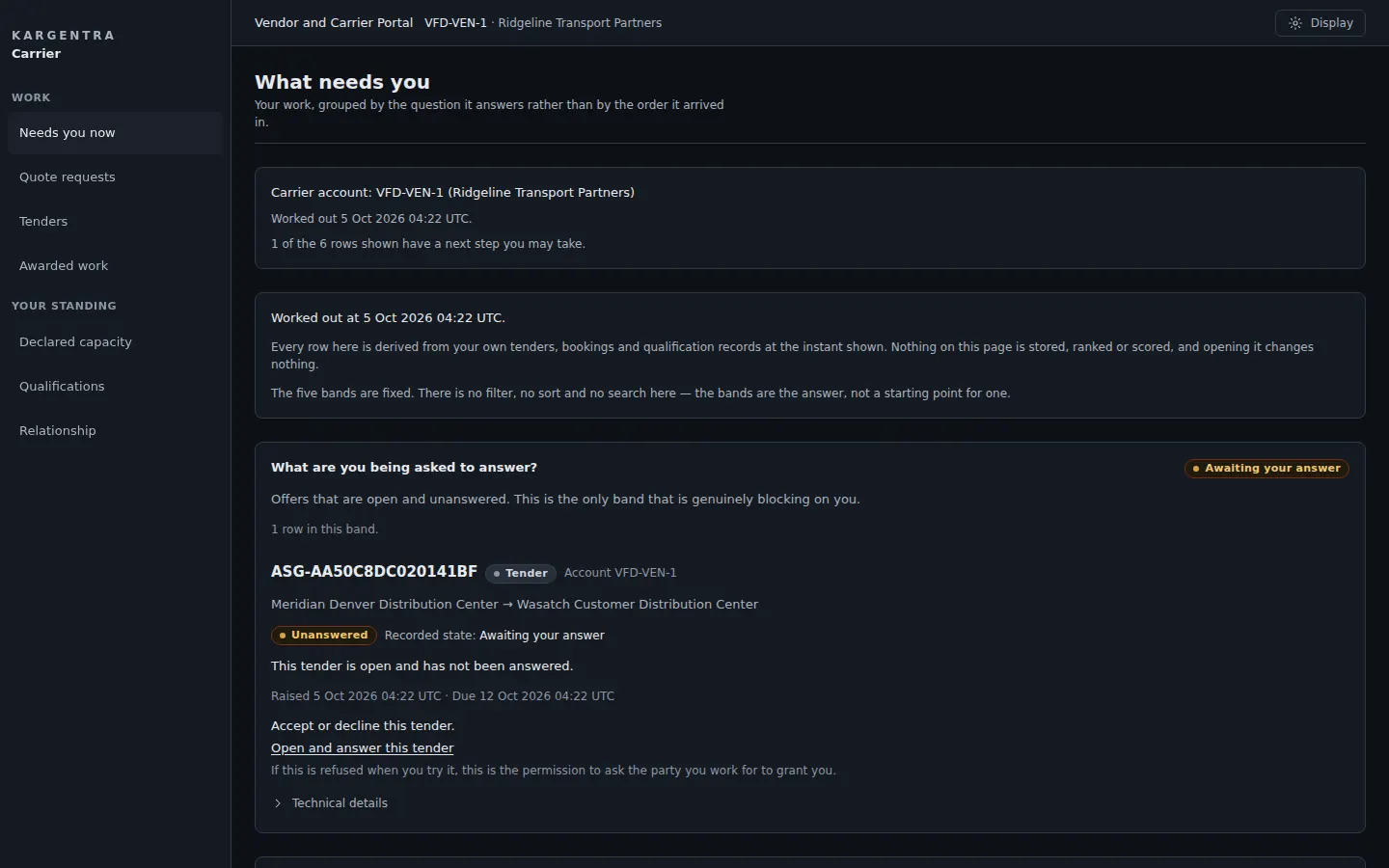
Carrier portal · what needs you now, in dark mode - carrier.kargentra.com/quotes
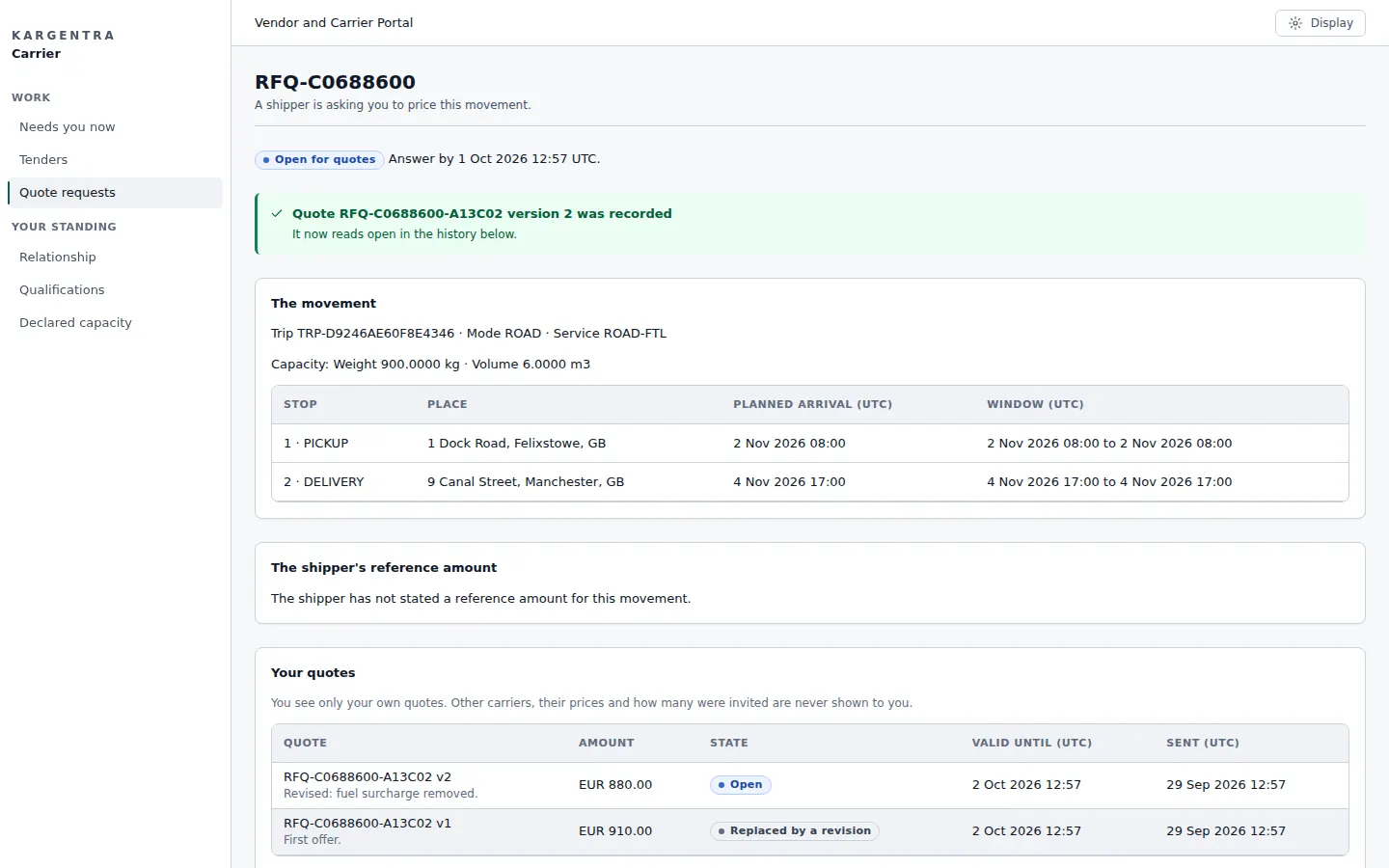
Carrier portal · quote and revise a request - app.kargentra.com/carriers
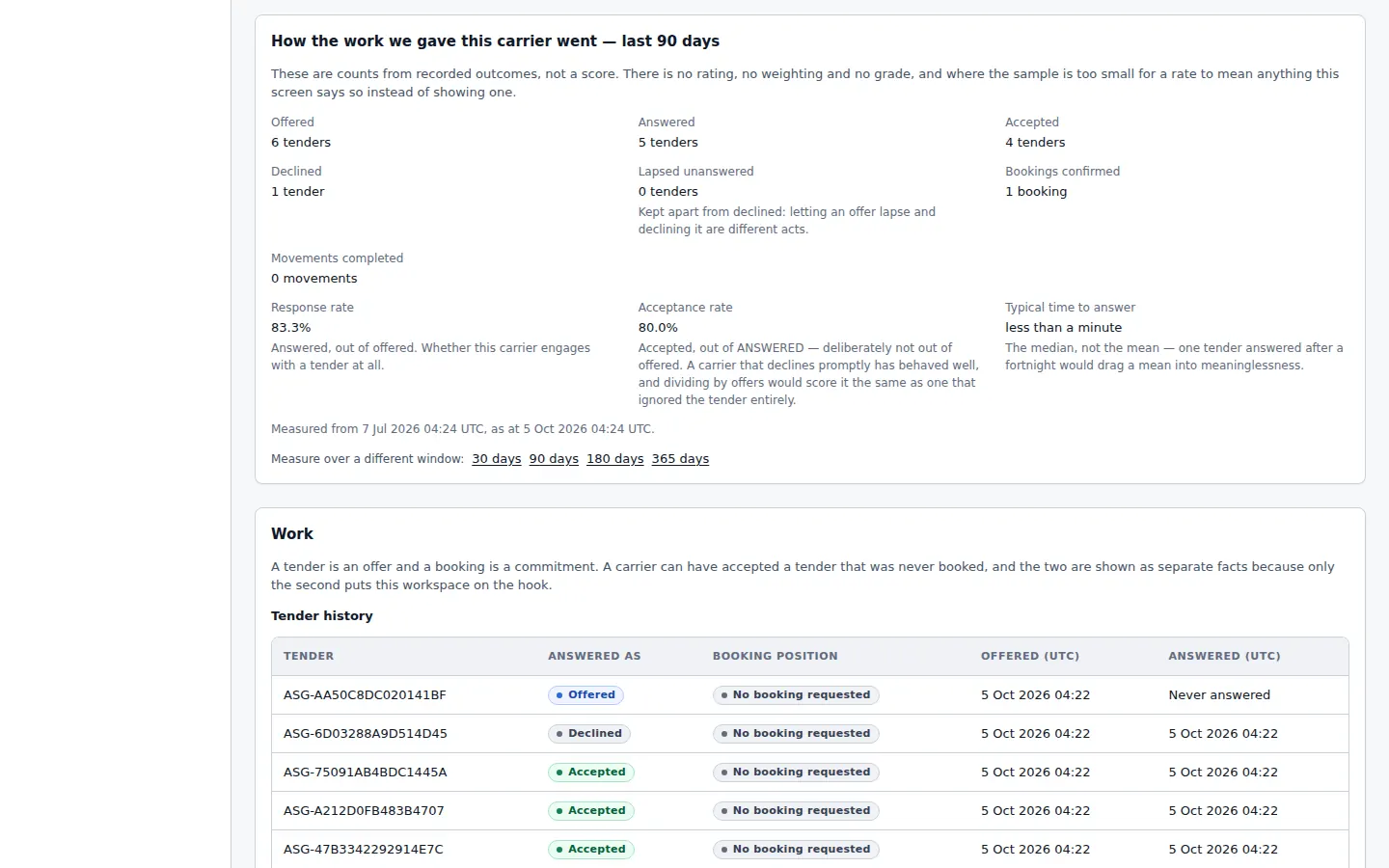
Carrier 360 · performance from recorded outcomes - carrier.kargentra.com/awarded
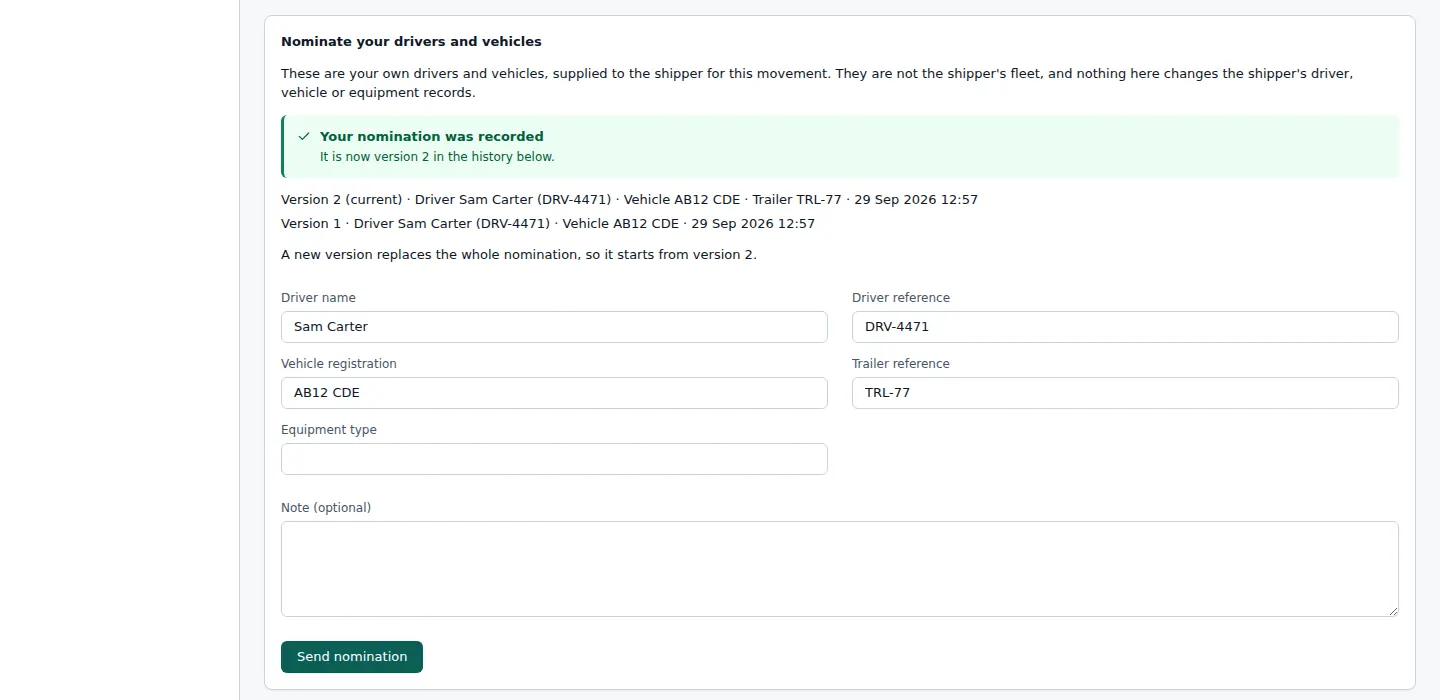
Carrier portal · nominate driver, tractor and trailer


Governed AI inside Carrier
Ask Kargentra reads the record you are looking at, cites every fact it uses and proposes the next step. Nothing changes until a person with the right permission approves it.
- Why can this carrier not be used?
- Which tenders lapse today?
- Summarise this carrier’s performance
Fernway Haulage is blocked for lane MAN–BRS because its goods-in-transit qualification expired on 2 October and no replacement is recorded. Two of its tenders lapsed unanswered this week. Over the last 90 days it accepted 41 of 48 offers, and its typical time to answer is 3 hours. Two other qualified carriers on the lane have open declared capacity this week.
- Carrier 360 · Fernway Haulage · Qualification
- Tender queue · Lapsed unanswered
- Carrier 360 · Performance · last 90 days
- Declared capacity · lane MAN–BRS
Proposal · requires approval
Request an updated qualification from Fernway Haulage and offer the next load on the lane to the second carrier in the routing guide.
Approver: Carrier network manager. Applied only through the governed action, and recorded in the audit trail.
Exceptions and edge cases Carrier handles
Real operations are mostly exceptions. These are handled as first-class states with an owner, evidence and a next step, not as notes in a spreadsheet.
- A carrier that rejected, let a tender lapse or cancelled is never re-offered the same load by the routing guide.
- When every eligible carrier is exhausted or the cap is exceeded, the load holds with the cause named instead of retrying quietly.
- Quotes in different currencies are flagged rather than compared as if they were equal.
- Freight that changes after the Bill of Lading was issued marks the Bill of Lading stale, with who acknowledged which version.
- A carrier whose insurance has expired since tender is caught again at dispatch readiness.
- A driver who reports unable triggers reassignment with a mandatory reason, and the history is kept.
- When no duty record exists or duty data is stale, the plan is marked not hours-confirmed and is not offered as executable.
- A customer quote changed after it was offered becomes a successor version, so the accepted price is never rewritten.
Who uses Carrier
Carrier dispatcher
Answers tenders before they lapse, confirms bookings, nominates drivers and vehicles, and files delivery evidence.
Carrier pricing and sales
Prices quote requests, revises or withdraws quotes, and follows which were selected and why.
Carrier network manager
Works the Carrier 360 pages and the network Action Center: lapsed tenders, blocked carriers and qualifications about to expire.
Transport planner
Invites quotes, compares them, awards with a reason and lets the routing guide recover declined tenders.
Freight broker
Builds customer sell quotes against carrier buy options, gets commercial approval and offers an exact price.
Fleet dispatcher
Evaluates private-fleet combinations, assigns with driver acknowledgement and reassigns with a recorded reason.
Carrier Network & Portal at a glance
A scannable reference for evaluation teams and RFPs.
| Carrier portal |
|
|---|---|
| Carrier network |
|
| Sourcing and tendering |
|
| Brokerage |
|
| Private fleet |
|
| Integrations |
|
Connected to the rest of Kargentra
Every module reads and writes the same record, so a hand-off is a state change rather than a re-keyed file.
- Transportation ManagementCarrier Network & Portal comes with Kargentra TMS: sourcing, tendering and dispatch readiness run in TMS, and the portal is the carrier’s side of the same tender record.Explore TMS
- Freight Finance & BillingAwarded terms become the expected buy for freight audit, and carrier disputes run on the shared dispute lifecycle.Explore Finance
- Driver AppNominated and assigned drivers receive their work on the driver app, where proof of delivery is captured.Explore Driver
- Customer PortalCustomers accept or decline brokered quotes at the exact price offered, and see accepted carrier evidence.Explore Customer
- Collaboration CenterConversations sit on the tender, booking or dispute itself, shared with the carrier and kept with the record.Explore Collaboration
- Control Tower & Live TrackingLapsing tenders and blocked carriers surface in the Control Tower action centre beside other work that needs a person.Explore Control Tower
Carrier: frequently asked questions
What is a carrier portal?
A carrier portal is where a transport company receives and answers work from a shipper or broker without email or phone calls. In Kargentra, carriers see quote requests, tenders, bookings, nominations, evidence and disputes grouped by what needs an answer, on phone, tablet or laptop. Each action changes the same record your operations team works from, so both sides see one truth.
How are carriers qualified?
Each carrier has a Carrier 360 page with its relationship, qualification requirements, capability, capacity, commercial terms and recorded performance. The qualification verdict lists blocking reasons, warnings and unresolved facts, and the network Action Center flags qualifications about to expire. Qualification is checked again at dispatch readiness, so a lapse after tender is still caught before the load is released.
Can carriers accept tenders in the portal or by integration?
Both. Carriers can accept or decline in the portal, where accepting commits to the frozen amount shown, or answer through the governed partner gateway from their own systems. Either way the answer lands on the same tender record, and a decline or lapse lets the routing guide offer the load to the next eligible carrier under your cap and attempt limit.
Can brokers see the margin before they offer a quote?
The commercial desk builds a customer sell quote against carrier buy options and sees expected gross margin before the offer. After commercial approval, the customer accepts the exact price in the customer portal. Once the load moves, the shipment’s commercial position records sell, expected buy, actual buy, accessorials and gross margin as separate facts, so margin is evidence rather than a month-end estimate.
Can carriers see how they are measured?
Yes. In its self-view a carrier sees the same performance figures the shipper sees, built from recorded outcomes rather than self-reported scores: offers accepted, declined and lapsed, response rate, typical time to answer and bookings confirmed. It also sees every qualification requirement held against it with its expiry, and declares indicative capacity by lane and window, kept as history rather than overwritten.
What does a carrier need to start using the portal?
A named login for each person, issued by the shipper or broker through single sign-on. There is no software to install and no EDI project to start. The portal works in a browser on phone, tablet or laptop, and a carrier serving several shippers can switch between accounts while seeing only its own requests, quotes and tenders.
Further reading
- Guide · 10 min readWhat is a transportation management system (TMS)?What a TMS does, how it works from transport demand to freight audit and billing, who uses one and how to evaluate it without being sold a map.
- Guide · 9 min readFreight audit and billing readiness, explainedThe freight audit process step by step, why delivery evidence decides billing readiness, common invoice errors and how disputes are resolved.
- Guide · 9 min readWhat is a logistics control tower?What a logistics control tower does, how it differs from a visibility platform, the data it needs and the KPIs that survive scrutiny.
Take the Carrier datasheet with you
Capabilities, workflow, capability reference and the questions buyers ask, on two pages.
PDF · 2 pages · 367 KB
See Kargentra run your operation
A working session on your lanes, your sites and your hand-offs: order to invoice, on one record.